
Smart Size chart for WooCommerce
Custom Size Charts
Product & Category Assignment
Responsive Design
14 Days Money Back Guarantee
99% Customer Satisfaction Rating
Support
- Enjoy 12 months of updates and dedicated support starting from your purchase date. Renewal is optional and can be cancelled anytime.
- Prices displayed on this site are in United States Dollars (USD).
- Trusted by 5000+ Websites
Rating
45 Reviews
1.0
Plugin Version
2000+
Downloads
April 17, 2026
Last Updated
HOW IT WORKS?
Smart size chart for WooCommerce Help Customers Choose the Right Size Every Time
Smart Size Chart for WooCommerce allows store owners to create professional size charts and display them on product pages. Improve the shopping experience, reduce size-related returns, and increase customer confidence before purchase.
Design detailed size charts tailored to your products and brand requirements.
Display different size charts based on products, categories, or attributes.
Fully responsive size charts that work perfectly across all devices.
Trusted by clients from 50+ Countries
Try with Confidence

100% Money-Back Guarantee
Our 30-day No-Risk Money Back Policy assures 100% money back.

99% Satisfaction Rating
We make every effort to make sure our customers are happy.

Average 5 star rating
Our plugins are highly regarded in WordPress forums and review platforms.
How Does The Plugin Work?
See How ‘Smart size chart for WooCommerce ‘ plugin function.
Admin page
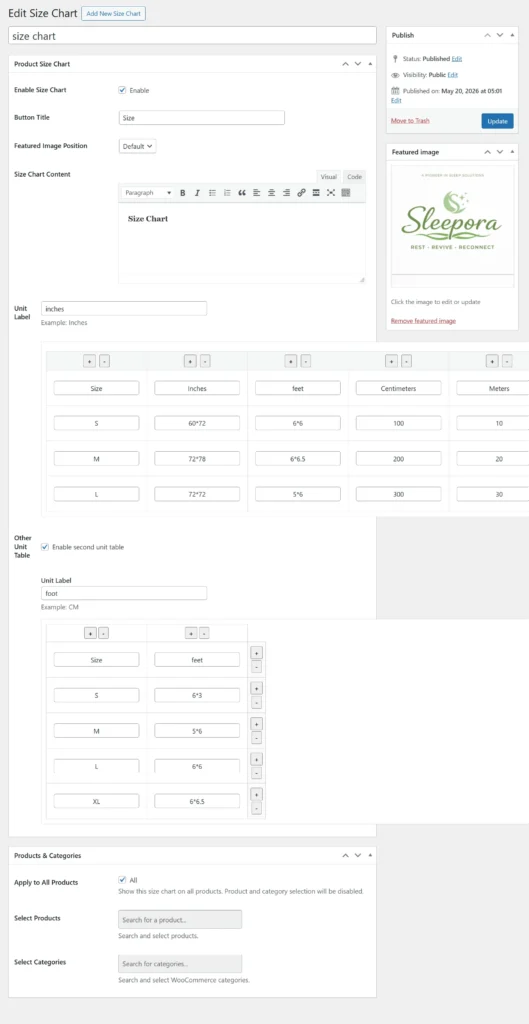
Size Chart Builder
Create and manage unlimited size charts directly from your WordPress dashboard with an intuitive drag-and-drop style interface. Add custom rows and columns, define multiple measurement units, and include detailed size information for your products. The built-in editor allows you to add descriptions, images, and helpful sizing instructions. You can create charts for apparel, footwear, furniture, mattresses, and more. Support for multiple unit tables makes it easy to serve international customers. Each chart can be customized independently to match specific product requirements. The flexible structure ensures accurate size information across your store. This helps customers make confident purchasing decisions and reduces size-related returns.
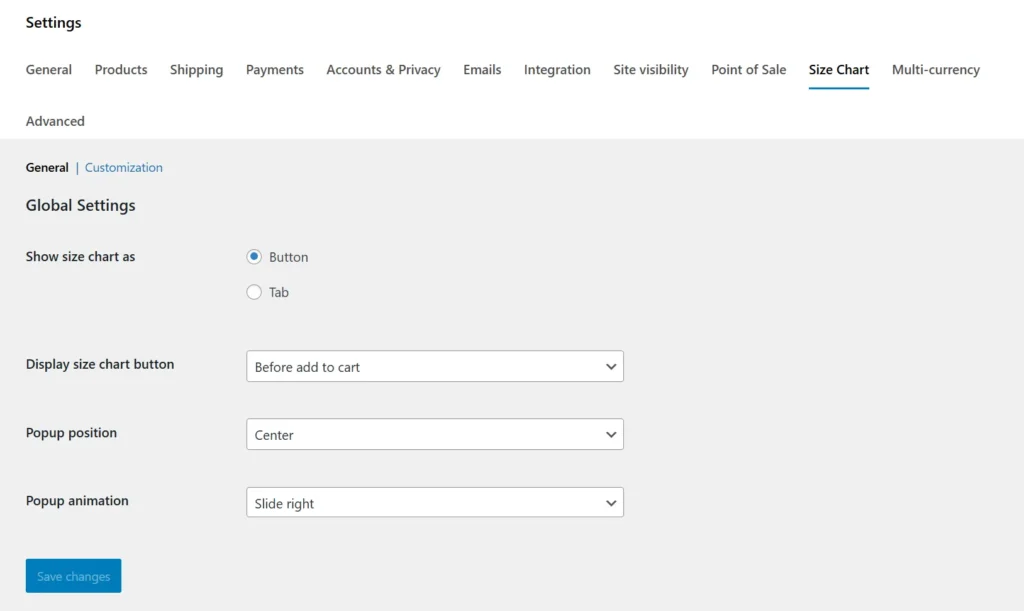
Global Size Chart Settings
Configure how size charts are displayed across your WooCommerce store from a centralized settings panel. Choose whether the size chart appears as a button, popup, or product tab for a seamless shopping experience. Control the display position to ensure maximum visibility on product pages. Customize popup placement and animation effects to match your website’s design. These settings apply globally, saving time when managing large product catalogs. The simple configuration options require no coding knowledge. Store owners can quickly optimize the customer experience with just a few clicks. This flexibility ensures size charts integrate perfectly with any WooCommerce theme.
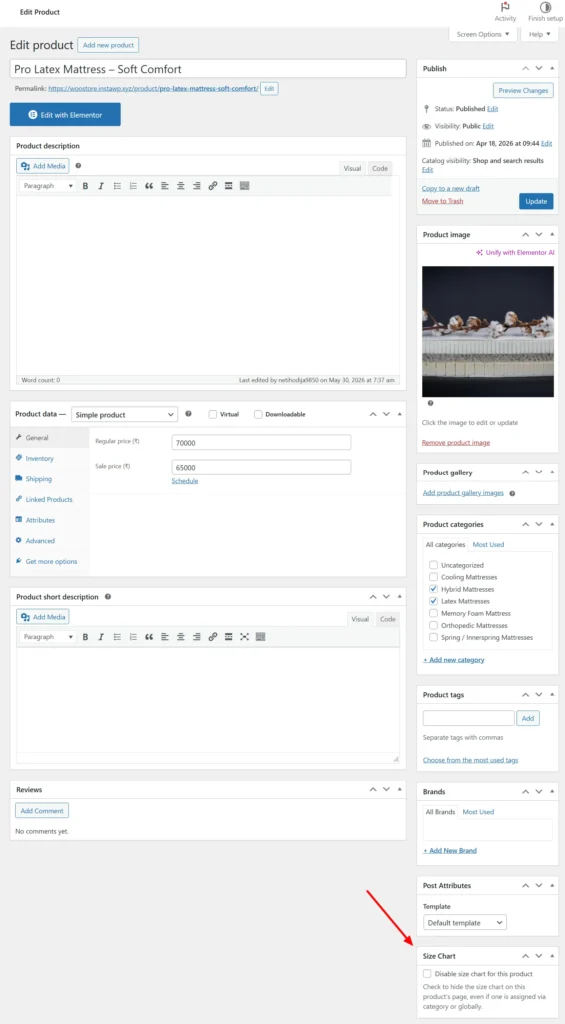
Product-Level Control
Manage size chart visibility for individual products directly from the WooCommerce product editor. Enable or disable size charts on specific products without affecting global settings. This gives store owners complete control over where size charts appear. Products that do not require sizing information can easily exclude the size chart feature. The product-level override works alongside category and global assignments for maximum flexibility. This is especially useful for stores with mixed product types. The integration is seamless and fits naturally into the WooCommerce product management workflow. It allows merchants to create a personalized sizing experience for every product.
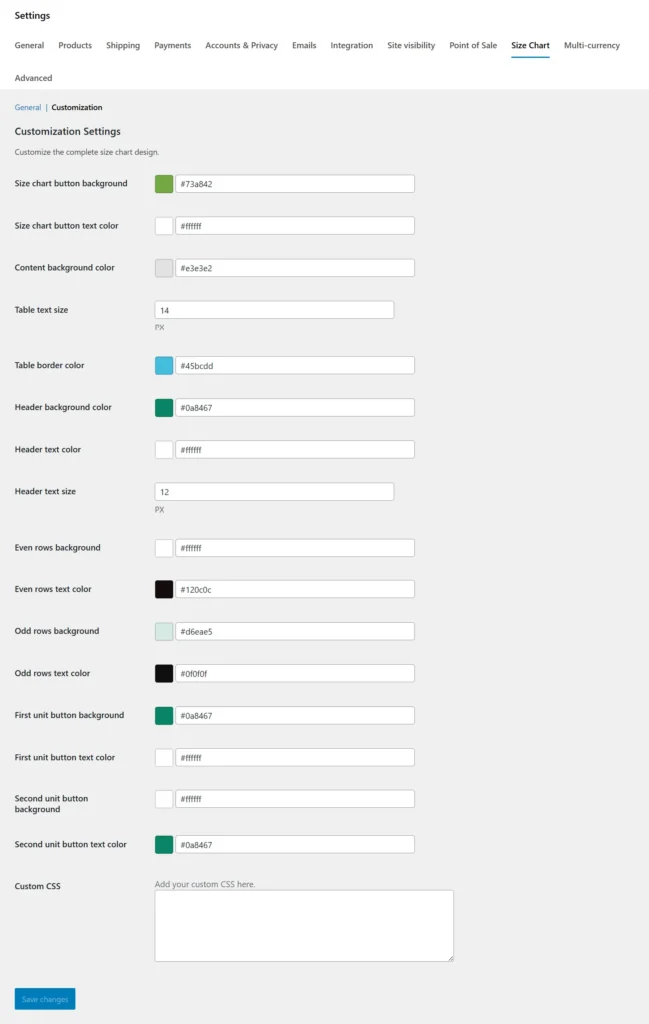
Design & Customization Setting
Customize every aspect of your size chart’s appearance to match your brand identity. Adjust button colors, text colors, table styling, borders, headers, row backgrounds, and typography directly from the settings page. Create a consistent design experience that blends perfectly with your WooCommerce store. Separate styling options for alternating rows improve readability and user experience. Support for custom CSS provides unlimited design flexibility for advanced users. Live customization options eliminate the need for manual code edits. The responsive design ensures charts look great on desktop, tablet, and mobile devices. With complete control over styling, you can create professional and visually appealing size charts that build customer confidence.
Frontend
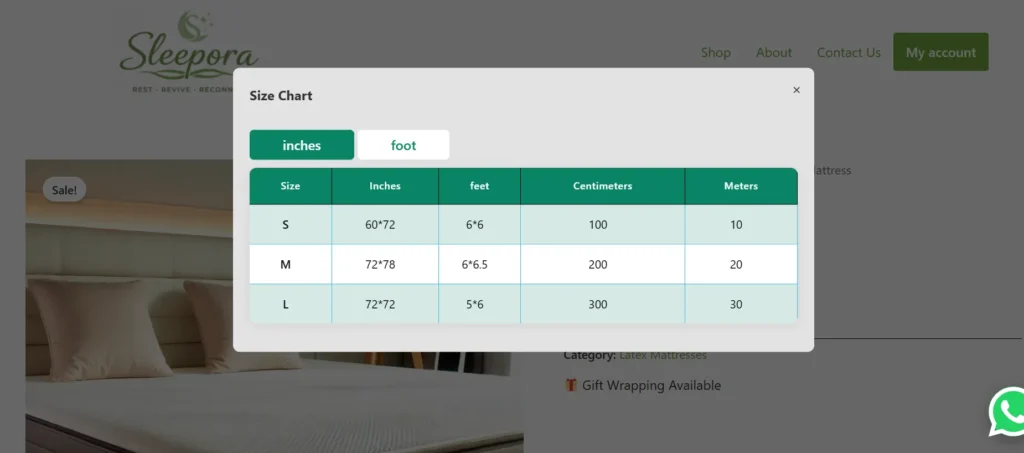
Size Chart Popup Button Display
Display size charts in an attractive popup window that opens when customers click the Size Chart button on the product page. This approach keeps the product page clean while giving shoppers instant access to detailed sizing information. The popup supports multiple measurement units and allows customers to switch between unit tables with a single click. Responsive design ensures a smooth viewing experience across desktop, tablet, and mobile devices. Store owners can customize popup position, animations, colors, and styling to match their brand. The overlay design helps customers focus on sizing details without navigating away from the product. By making size information easily accessible at the point of purchase, the plugin improves the shopping experience and reduces sizing uncertainty. This helps customers choose the correct size confidently and increases overall sales conversions.
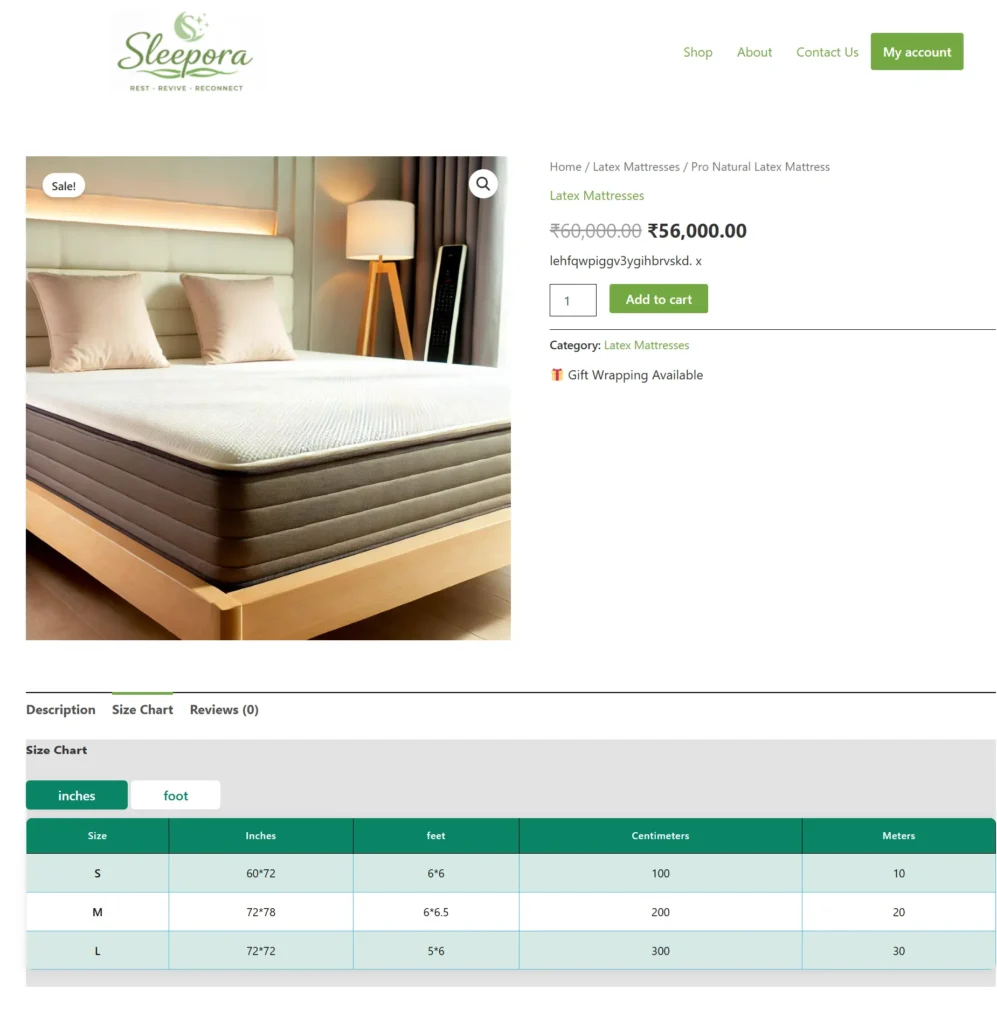
Size Chart Tab Display
Display size charts directly within a dedicated tab on the WooCommerce product page for a seamless shopping experience. Customers can access detailed sizing information without leaving the product page or opening additional windows. The tab supports multiple measurement units such as inches, feet, centimeters, and meters, making it ideal for international customers. Size information is presented in a clean, organized table that is easy to read on both desktop and mobile devices. Store owners can assign different size charts to products or categories as needed. The tab integrates naturally with WooCommerce product tabs and matches your store’s design. By providing size information exactly where customers need it, the plugin helps reduce confusion and improve purchase confidence. This results in fewer size-related returns and higher conversion rates.
Help customers find the perfect fit with professional size charts designed for WooCommerce stores.
Frequently Asked Questions
See the list below for our most frequently asked questions about our plugins.
If this doesn’t satisfy your requirement, please reach out to support team.
Q: What is Smart Size Chart for WooCommerce?
A: Smart Size Chart for WooCommerce allows you to create and display customizable size charts on your product pages.
Q: Can I assign different size charts to different products?
A: Yes. You can assign unique size charts to specific products, categories, or product groups.
Q: Is the size chart mobile-friendly?
A: Yes. All size charts are fully responsive and optimized for mobile, tablet, and desktop devices.
Q: Can I create multiple size charts?
A: Yes. You can create and manage unlimited size charts from the admin dashboard.
Q: Does it support product categories?
A: Yes. Size charts can be automatically assigned to product categories.
Q: Can I customize chart content?
A: Yes. You can add custom measurements, rows, columns, text, images, and styling options.
Q: Does it work with any WooCommerce theme?
A: Yes. The plugin is designed to work with most modern WooCommerce-compatible themes.
Q: How does a size chart help increase sales?
A: Size charts help customers choose the correct size, reducing uncertainty, improving confidence, lowering return rates, and increasing conversions.
Q: Can I display size charts as a popup or tab on product pages?
Yes. Smart Size Chart for WooCommerce allows you to display size charts in a user-friendly popup or product tab, making them easily accessible without disrupting the shopping experience.
Q: Can I add measurement units such as inches and centimeters?
A: Yes. You can create size charts using your preferred measurement units, including inches, centimeters, feet, or any custom unit that suits your products.