

Smart size chart for WooCommerce
Overview
Smart Size Chart for WooCommerce enables store owners to create and display detailed size charts for products, helping customers make informed purchasing decisions. The plugin supports customizable measurement tables, images, and sizing instructions that can be assigned to specific products, categories, tags, or attributes. With flexible display options such as popups, tabs, and inline layouts, customers can easily access sizing information directly from product pages. By reducing size-related uncertainty, the plugin improves customer confidence, decreases product returns, and enhances the overall shopping experience.
Key Features
- Key Features
- Create unlimited custom size charts for different products and categories.
- Assign size charts to products, categories, tags, or attributes.
- Display size charts as popups, tabs, or inline sections on product pages.
- Create detailed measurement tables with custom rows and columns.
- Add images, size guides, and sizing instructions to charts.
- Product-specific and category-based size chart support.
- Fully responsive design for desktop, tablet, and mobile devices.
- Customizable chart appearance, colors, buttons, and layouts.
- Shortcode support for displaying size charts anywhere on the website.
- Easy-to-use admin interface with no coding required.
- Improves customer confidence by providing accurate sizing information.
- Helps reduce size-related returns and increase conversion rates.
Installation
- Download the extension from your WooCommerce dashboard.
- Go to Plugins > Add New > Upload and select the ZIP file you just downloaded.
- Click Install Now, and then Activate.
How It Works ?
- The plugin allows store owners to create detailed size charts with measurements, images, and sizing instructions for different products and categories.
- Size charts can be assigned to specific products, categories, tags, or attributes, ensuring customers see the most relevant sizing information.
- Customers can access the size chart directly from the product page through a popup, tab, or inline display before making a purchase.
- By providing accurate sizing information, the plugin reduces size-related confusion, minimizes returns, and improves customer confidence.
Backend Settings
(Add size chart) :
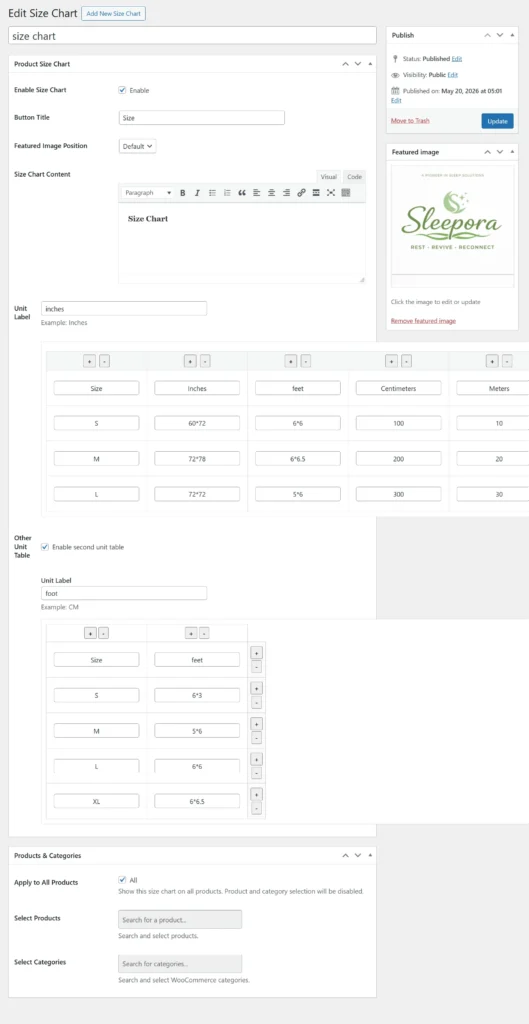
The plugin makes it easy to create and add custom size charts for any product or product category in your WooCommerce store. Store owners can define measurements, sizing details, images, and instructions using a simple admin interface. Multiple size charts can be created and managed from a centralized dashboard for different product types. This ensures customers always have access to accurate sizing information before making a purchase.
Size Chart Settings:
General:
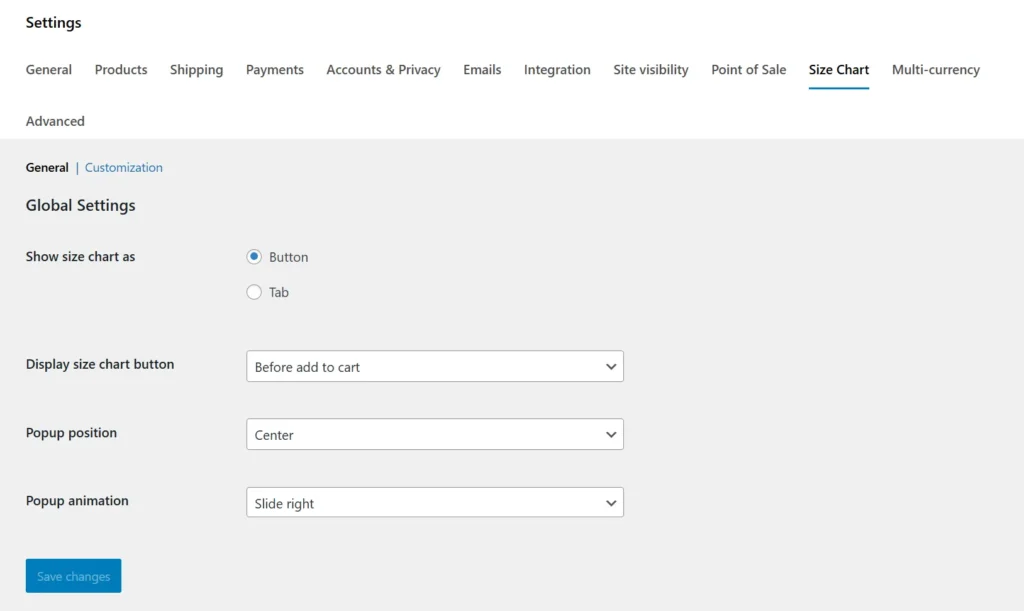
General Settings
The General Settings section allows store owners to configure how size charts are created, managed, and displayed throughout the WooCommerce store. Users can enable or disable size charts, choose display positions, and control visibility for specific products or categories. The settings interface is simple and user-friendly, making configuration quick and effortless. These options help ensure customers always have access to relevant sizing information while shopping.
Customization:
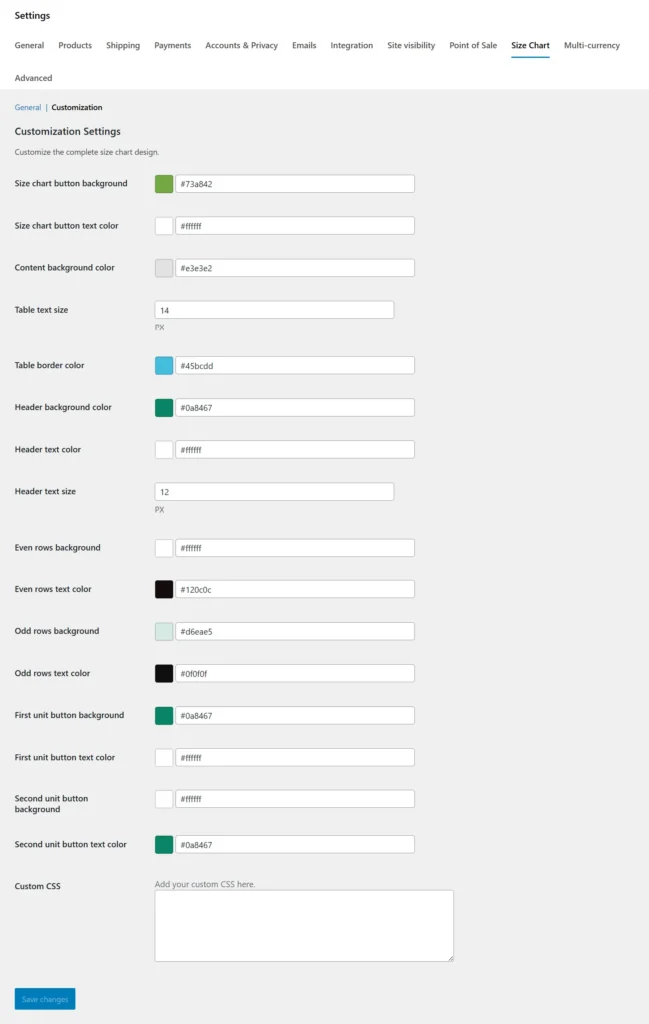
The plugin offers extensive customization options, allowing store owners to tailor size charts to match their brand and store design. You can customize chart layouts, colors, fonts, button text, and display styles without any coding knowledge. Images, measurement tables, and sizing instructions can be personalized to suit different product types. These customization features ensure a seamless and professional shopping experience for customers.
Pickup Hours:
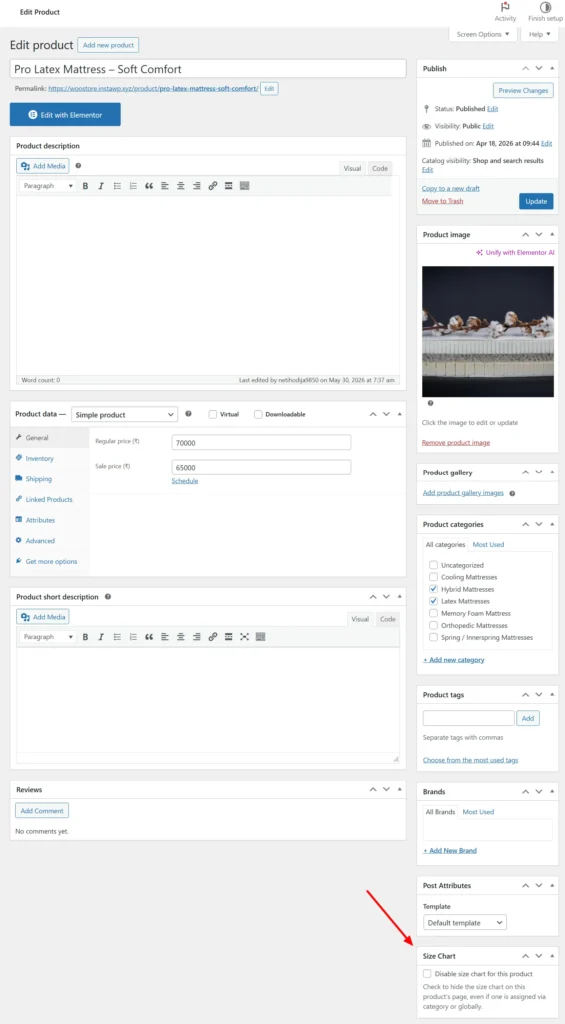
The plugin allows store owners to disable the size chart for individual products when sizing information is not required. This setting can be configured directly from the product edit page without affecting other products in the store. It provides greater flexibility in managing size chart visibility based on product requirements. By disabling unnecessary size charts, store owners can maintain a cleaner and more relevant shopping experience.
Frontend Workflow
Size chart Button:
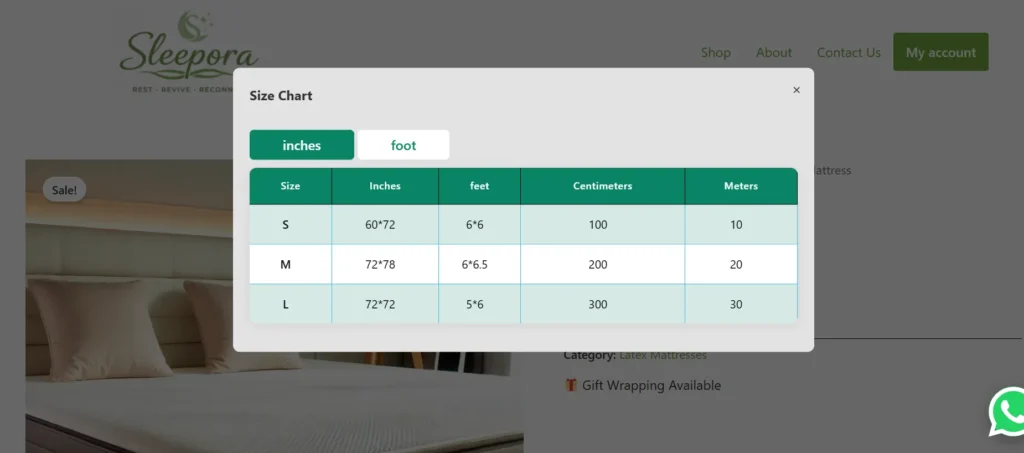
The plugin displays a dedicated Size Chart button on the product page, providing customers with quick access to sizing information before making a purchase. When clicked, the button opens the assigned size chart in a popup or modal window without leaving the current page. The button’s text, position, and appearance can be customized to match the store’s design. This feature improves accessibility to sizing details and helps customers choose the correct size with confidence.
Size chart Tab:
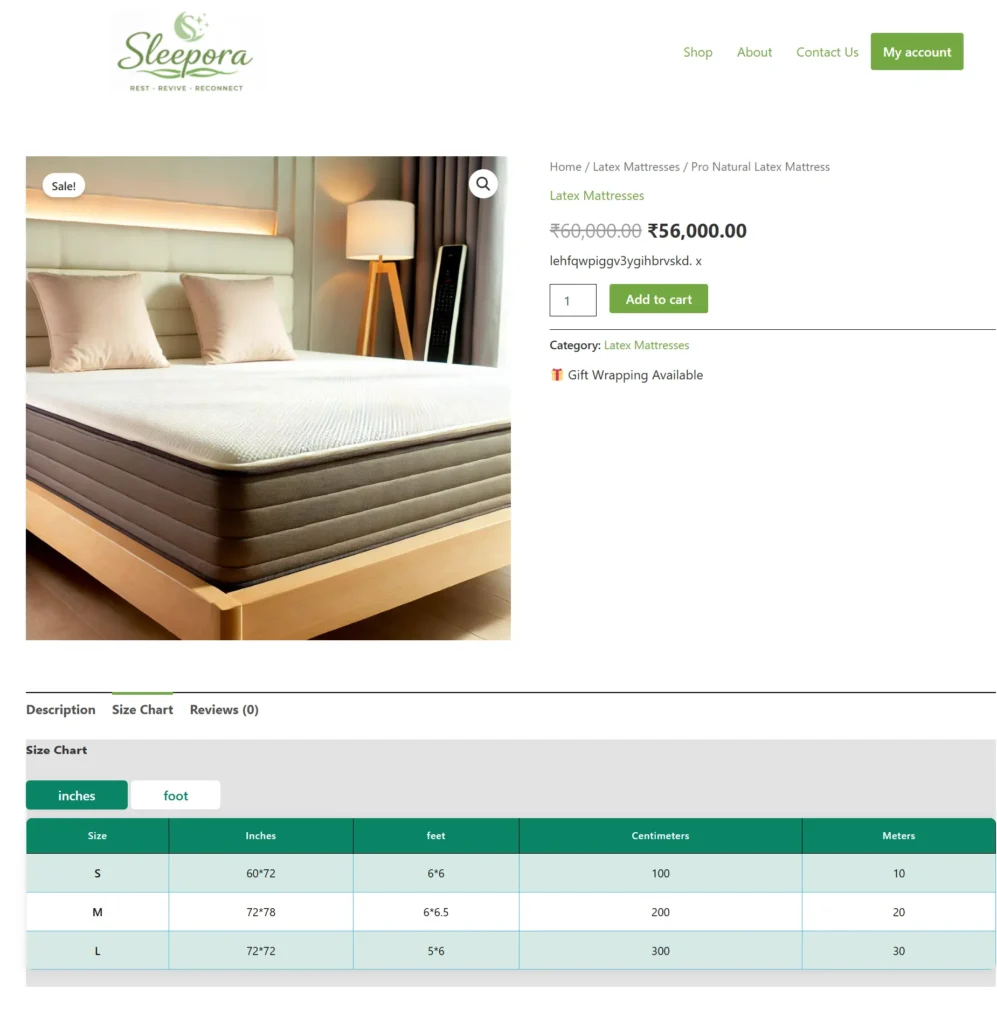
The plugin can display size charts within a dedicated tab on the product page, keeping sizing information organized and easily accessible. Customers can switch to the Size Chart tab to view measurements, size guides, and fitting instructions without leaving the product page. The tab integrates seamlessly with the WooCommerce product layout and supports responsive design across all devices. This feature enhances the shopping experience by providing clear sizing information in a structured and user-friendly format.
Frequently Asked Questions
See the list below for our most frequently asked questions about our plugins.
If this doesn’t satisfy your requirement, please reach out to support team.
Q: What is Smart Size Chart for WooCommerce?
A: Smart Size Chart for WooCommerce allows you to create and display customizable size charts on your product pages.
Q: Can I assign different size charts to different products?
A: Yes. You can assign unique size charts to specific products, categories, or product groups.
Q: Is the size chart mobile-friendly?
A: Yes. All size charts are fully responsive and optimized for mobile, tablet, and desktop devices.
Q: Can I create multiple size charts?
A: Yes. You can create and manage unlimited size charts from the admin dashboard.
Q: Does it support product categories?
A: Yes. Size charts can be automatically assigned to product categories.
Q: Can I customize chart content?
A: Yes. You can add custom measurements, rows, columns, text, images, and styling options.
Q: Does it work with any WooCommerce theme?
A: Yes. The plugin is designed to work with most modern WooCommerce-compatible themes.
Q: How does a size chart help increase sales?
A: Size charts help customers choose the correct size, reducing uncertainty, improving confidence, lowering return rates, and increasing conversions.
Q: Can I display size charts as a popup or tab on product pages?
Yes. Smart Size Chart for WooCommerce allows you to display size charts in a user-friendly popup or product tab, making them easily accessible without disrupting the shopping experience.
Q: Can I add measurement units such as inches and centimeters?
A: Yes. You can create size charts using your preferred measurement units, including inches, centimeters, feet, or any custom unit that suits your products.