
Waitlist for Woocommerce
Wishlist for WooCommerce lets customers join a waiting list for out-of-stock products and automatically receive email notifications when items are back in stock. Recover lost sales, improve customer satisfaction, and keep shoppers engaged with timely stock alerts.
Automatic Back in-Stock Alerts
Guest & Registered User Support
Product-Level Wishlist Controls
14 Days Money Back Guarantee
99% Customer Satisfaction Rating
Support
- Enjoy 12 months of updates and dedicated support starting from your purchase date. Renewal is optional and can be cancelled anytime.
- Prices displayed on this site are in United States Dollars (USD).
- Trusted by 5000+ Websites
Rating
55 Reviews
1.0.0
Plugin Version
2800+
Downloads
August 12, 2026
Last Updated
HOW IT WORKS?
Waitlist for WooCommerce
Wishlist for WooCommerce helps customers subscribe to out-of-stock products and receive automatic email notifications when they are back in stock. Recover lost sales, improve customer retention, and keep shoppers engaged with timely stock alerts.
Automatically notify customers via email as soon as an out-of-stock product is restocked. Keep interested shoppers informed and encourage them to return and complete their purchase.
Allow both guest visitors and registered customers to join product waiting lists effortlessly. No account is required, making it quick and convenient for every shopper.
Enable or disable wishlist functionality for individual products, set custom stock thresholds, manage subscribers, send notifications manually, and export waiting lists with complete administrative control.
Trusted by clients from 50+ Countries
Try with Confidence

100% Money-Back Guarantee
Our 30-day No-Risk Money Back Policy assures 100% money back.
99% Satisfaction Rating
We make every effort to make sure our customers are happy.

Average 5 star rating
Our plugins are highly regarded in WordPress forums and review platforms.
How Does The Plugin Work?
See How the Name Your Price for WooCommerce Plugin Works
Admin page
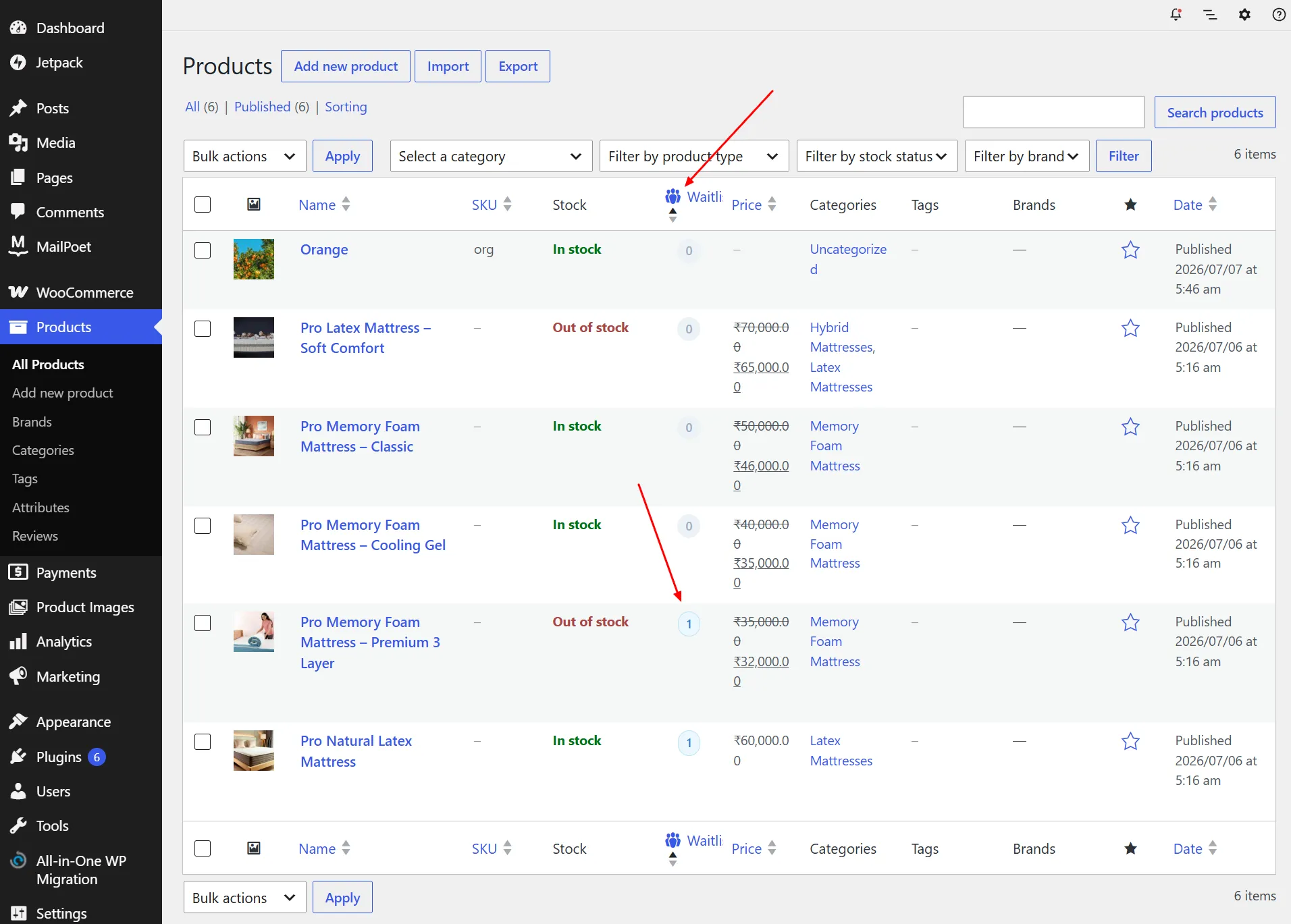
1.Products – Waitlist Overview :
The Waitlist column displays the number of subscribers for each product directly in the Products list.
Store owners can quickly identify out-of-stock products with active waitlist registrations.
This provides a convenient overview for monitoring customer demand across the catalog.
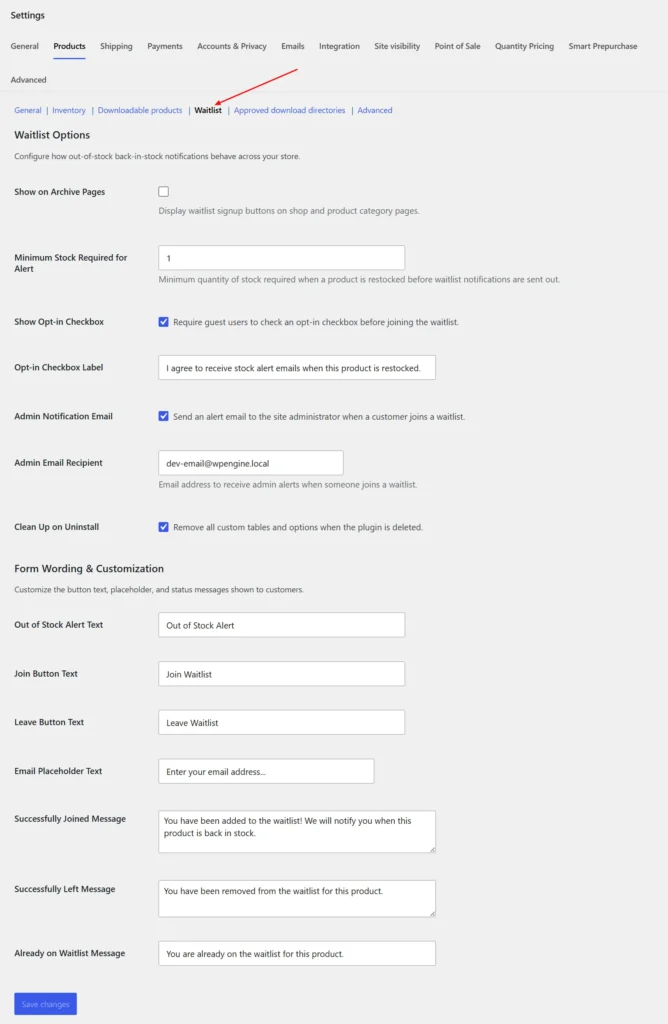
2.Global Waitlist Settings :
Configure all waitlist options from WooCommerce → Settings → Products → Waitlist.
Customize notifications, opt-in settings, stock alert rules, and frontend messages.
These settings allow you to tailor the waitlist experience for both customers and administrators.
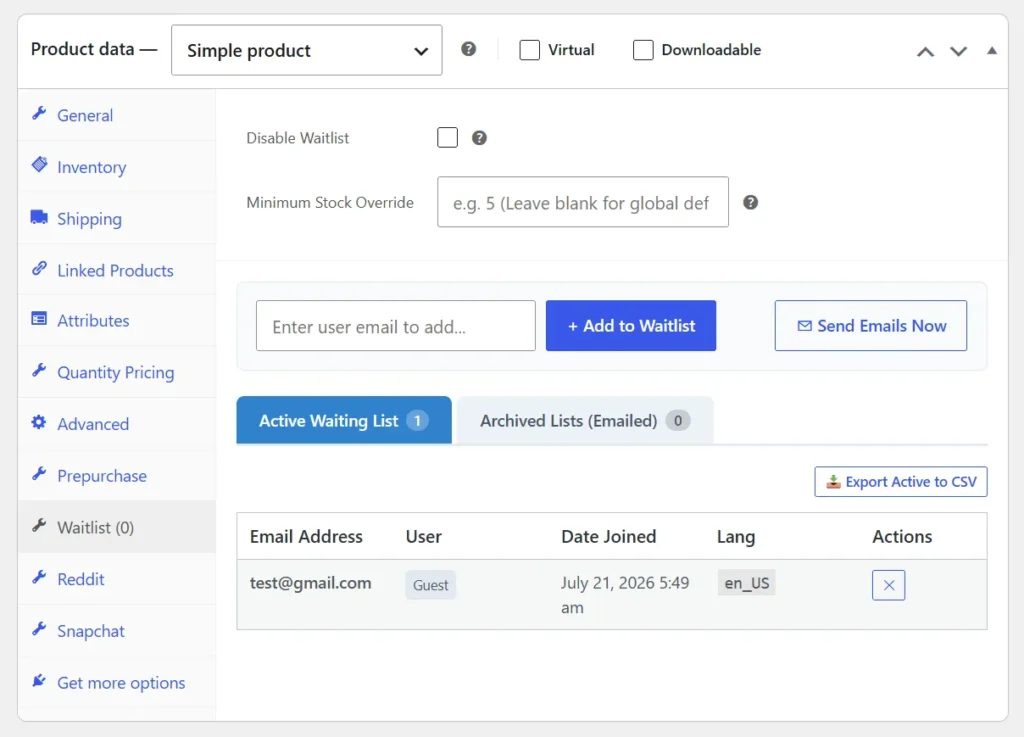
3.Product Waitlist Management :
Manage waitlist subscribers for individual products from the Product Data → Waitlist tab.
View active subscribers, manually add customers, and send restock emails with a single click.
You can also export the active waitlist and manage subscriber records directly from this page.
Frontend
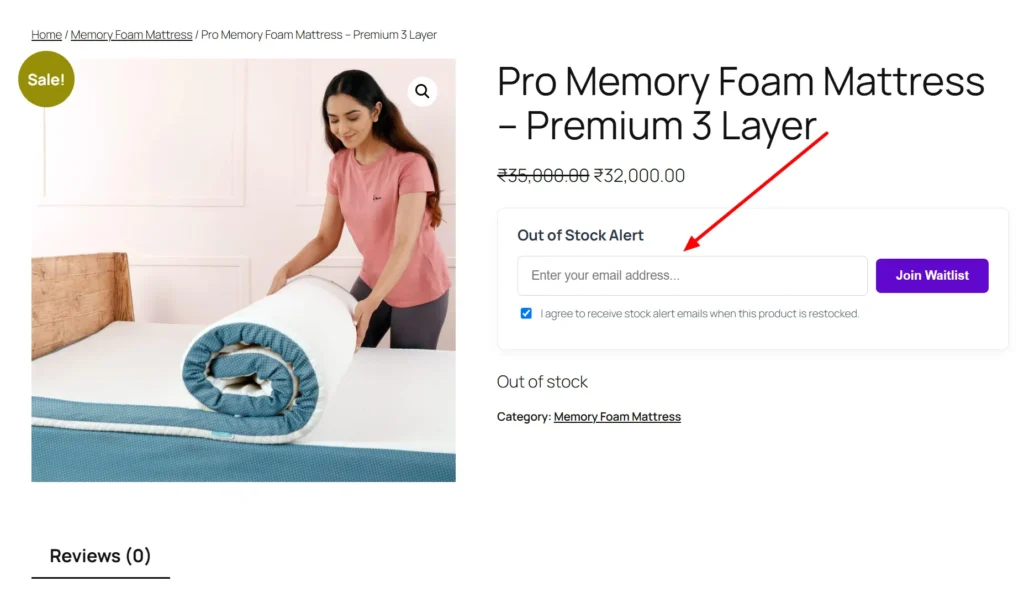
1.Product Page – Join Waitlist :
When a product is out of stock, customers can join the waitlist by entering their email address.
An optional opt-in checkbox allows customers to consent to receiving restock notifications.
Once subscribed, they will automatically receive an email when the product becomes available again.
This helps retain interested customers and increases the chances of recovering lost sales.
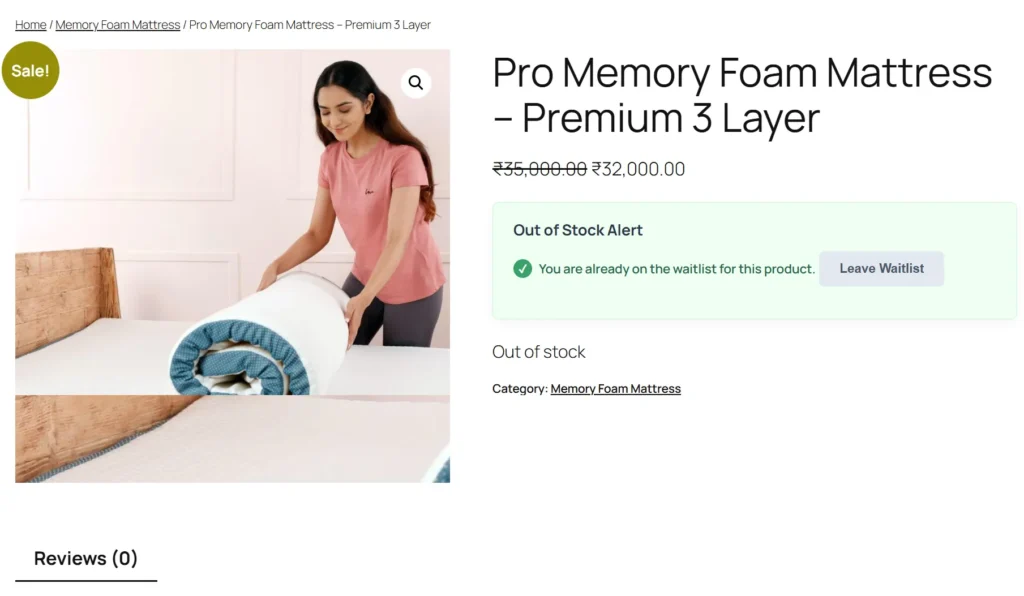
2.Product Page – Waitlist Confirmation :
Customers who have already joined the waitlist will see a confirmation message on the product page.
The interface clearly indicates their subscription status and confirms successful registration.
A Leave Waitlist button allows customers to unsubscribe at any time.
This provides a simple and transparent waitlist management experience.
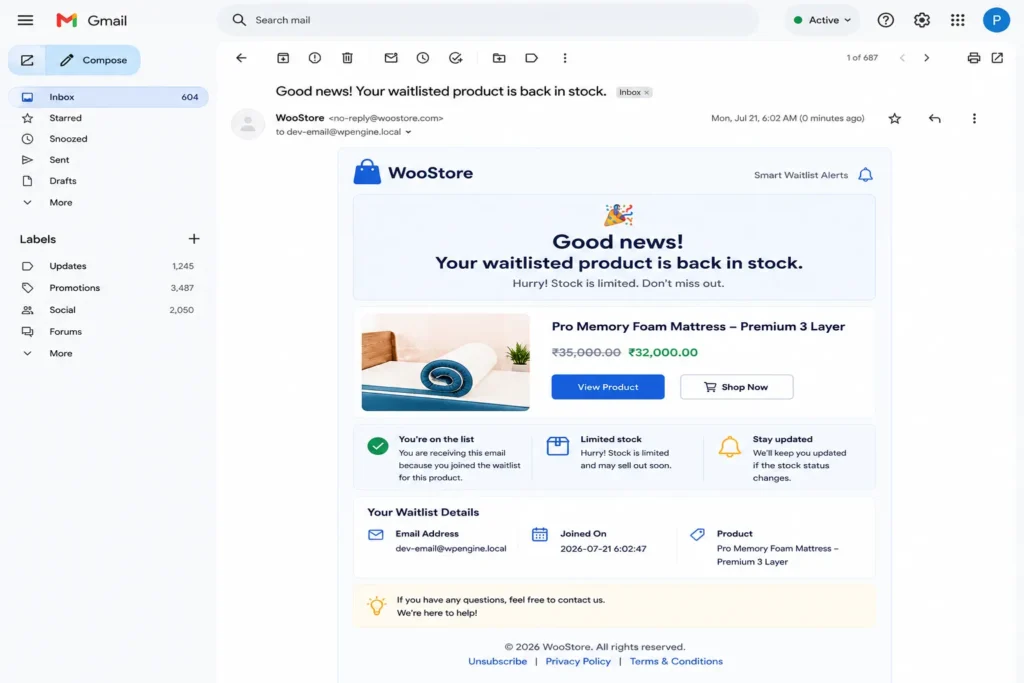
3.Email Notification – Back in Stock :
Customers automatically receive a professionally designed email when their waitlisted product is back in stock.
The email includes product details, updated pricing, and a direct link to view the product.
Waitlist information is displayed to confirm the customer’s subscription details.
This helps drive returning customers back to your store and recover potential sales.
Collect wishlist subscribers, send automatic stock alerts, and convert missed opportunities into successful sales.
Frequently Asked Questions
See the list below for our most frequently asked questions about our plugins.
If this doesn’t satisfy your requirement, please reach out to support team.
Q: What is Waitlist for WooCommerce?
A: Waitlist for WooCommerce allows customers to join a waiting list for out-of-stock products and automatically receive email notifications when those products are back in stock. It’s an effective way to recover lost sales and keep customers engaged.
Q: How does the back-in-stock notification work?
A: When a customer joins the wishlist for an out-of-stock product, the plugin monitors inventory. Once the product reaches the configured stock level, an email notification is automatically sent to all subscribed customers.
Q: Can guest users join the wishlist?
A: Yes. Both guest visitors and registered customers can subscribe to product waiting lists without any additional setup.
Q: Can I disable the wishlist for specific products?
A: Yes. You can enable or disable Waitlist functionality individually for each product directly from the WooCommerce product settings.
Q: Can I customize the button text and messages?
A: Absolutely. Customize the Join Waitlist button, Leave Wishlist button, email placeholder, success messages, and other customer-facing text directly from the plugin settings.
Q: Can I manually send stock notification emails?
A: Yes. Administrators can manually trigger notification emails for any product directly from the product edit page whenever needed.
Q: Can I export my waiting list?
A: Yes. The plugin allows you to export active Waitlist subscribers to a CSV file for reporting, marketing, or backup purposes.
Q: Does the plugin notify the store administrator?
A: Yes. Optional admin email notifications can be enabled whenever a customer joins a product Waitlist , helping you monitor customer demand.
Q: Will the plugin work with my WordPress theme?
A: Yes. Waitlist for WooCommerce is designed to work with most modern WordPress themes that follow WooCommerce development standards, ensuring seamless integration without affecting your store’s design.