
OTP Login for Woocommerce
Phone-number OTP login & registration for WooCommerce, powered by the MSG91 OTP API. Adds a phone OTP form above the standard WooCommerce login without replacing it.
Phone-number OTP login
Powered by the MSG91 OTP widget
Encrypted Auth Key storage
14 Days Money Back Guarantee
99% Customer Satisfaction Rating
Support
- Enjoy 12 months of updates and dedicated support starting from your purchase date. Renewal is optional and can be cancelled anytime.
- Prices displayed on this site are in United States Dollars (USD).
- Trusted by 5000+ Websites
Rating
46 Reviews
1.0.0
Plugin Version
1500+
Downloads
August 19, 2026
Last Updated
HOW IT WORKS?
Why Choose OTP Login for WooCommerce?
It adds a phone-number OTP login and registration flow to your WooCommerce My Account page using the MSG91 OTP API. Customers can sign in or register by verifying their phone number with a one-time code, while your standard username / password login keeps working exactly as before.
It adds a phone-number OTP login and registration flow to your WooCommerce My Account page using the MSG91 OTP API. Customers can sign in or register by verifying their phone number with a one-time code, while your standard username / password login keeps working exactly as before.
The plugin sends and verifies OTPs through MSG91’s OTP widget. You’ll need an MSG91 account with an OTP widget set up, then paste your Widget ID, Widget Token and Auth Key into the plugin’s settings.
The server-side Auth Key is stored encrypted in your database and is never sent to the browser. All MSG91 verification calls that use it happen on your server.
Trusted by clients from 50+ Countries
Try with Confidence

100% Money-Back Guarantee
Our 30-day No-Risk Money Back Policy assures 100% money back.

99% Satisfaction Rating
We make every effort to make sure our customers are happy.

Average 5 star rating
Our plugins are highly regarded in WordPress forums and review platforms.
How Does The Plugin Work?
See How the OTP Login for WooCommerce Plugin Works
Admin page
1. Settings Overview :
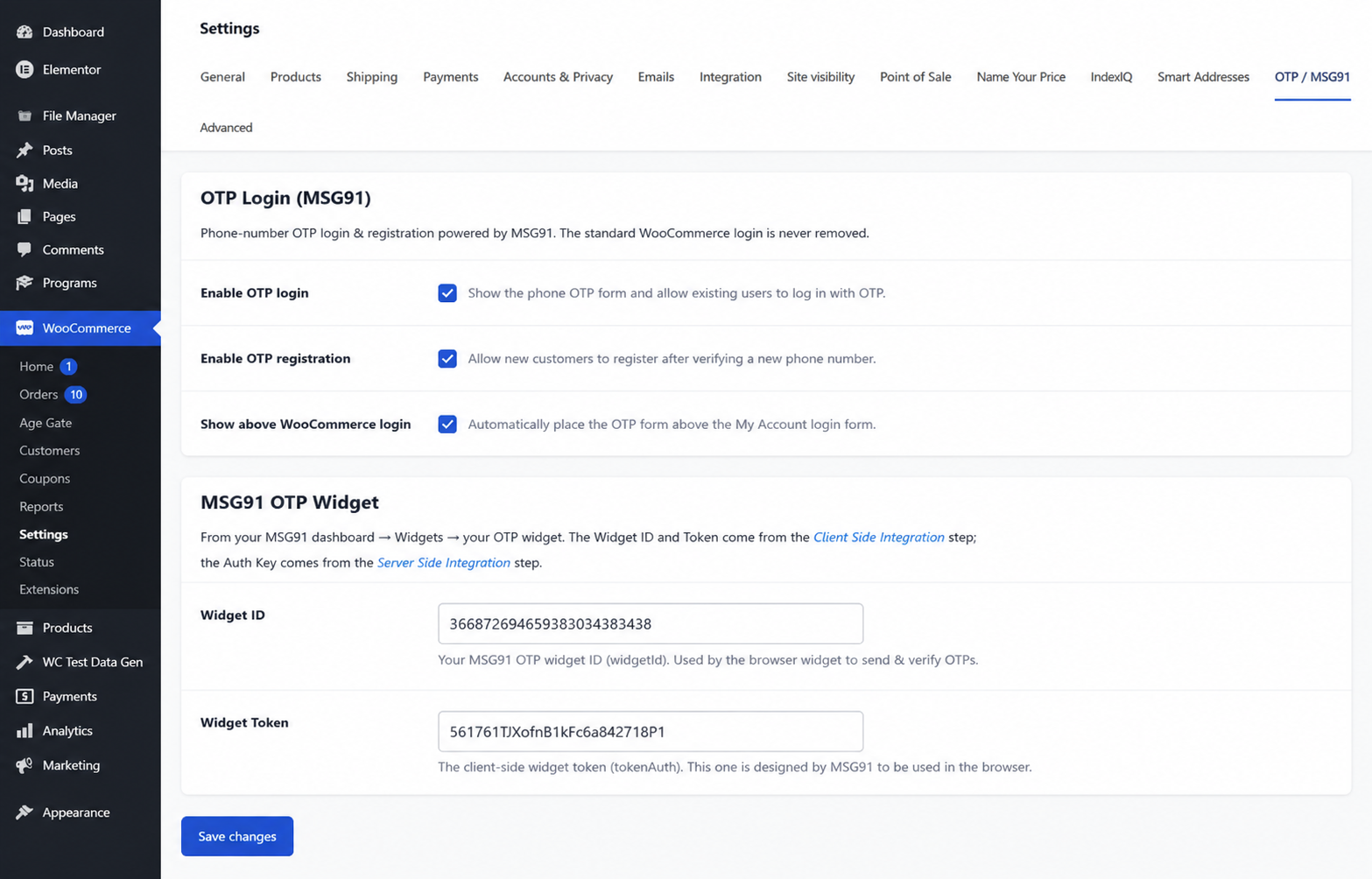
All configuration lives in one place. After activating the plugin, open WooCommerce › Settings › OTP / MSG91. The tab is organised into five clear groups — General, MSG91 OTP Widget, OTP Security, OTP Country, and Form Text — so you can set everything up top to bottom in a couple of minutes.
A status banner at the top of the tab tells you at a glance whether MSG91 is fully configured and OTP login is ready to use, or whether a credential is still missing.
2. Enable OTP Login & Registration :
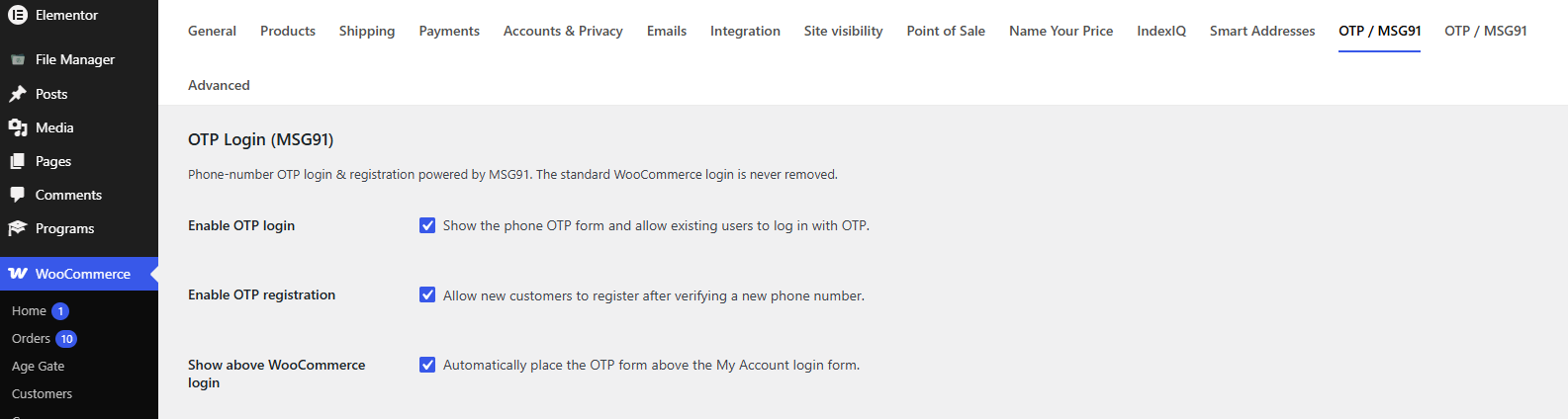
In the General group you decide how the OTP form behaves:
Enable OTP login shows the phone OTP form and lets existing users sign in with an OTP. Enable OTP registration lets new customers create an account after verifying a new phone number. Show above WooCommerce login automatically places the OTP form above the My Account login form, so you don’t need to edit any templates.
3. Connect MSG91 :
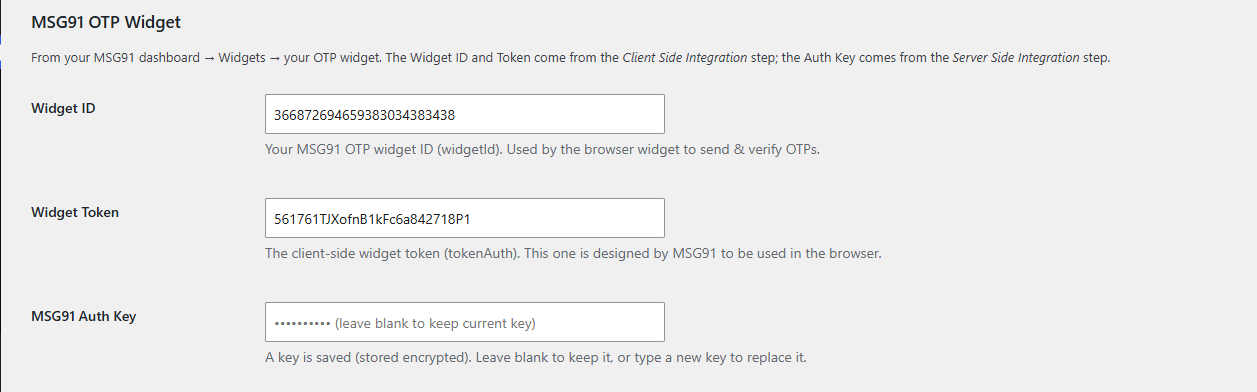
The MSG91 OTP Widget group is where you paste your credentials. All three come from your MSG91 dashboard, under Widgets › your OTP widget. An MSG91 account — sign up free at msg91.com and log in to your panel.
| Field | Where it comes from |
|---|---|
| Widget ID | The Client Side Integration step. Used by the browser widget to send & verify OTPs. |
| Widget Token | The client-side tokenAuth, also from the Client Side Integration step. Safe to use in the browser. |
| MSG91 Auth Key | The Server Side Integration step. Stored encrypted and never sent to the browser. |
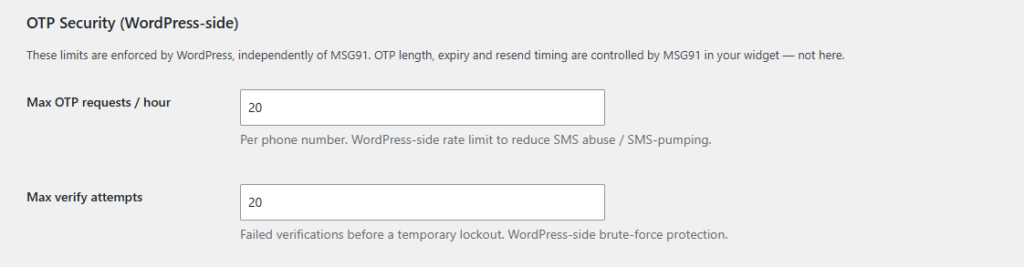
4. OTP Security (WordPress-side) :
These limits are enforced by WordPress, independently of MSG91, to reduce SMS abuse and brute-force attempts.
| Setting | What it does | Default |
|---|---|---|
| Max OTP requests / hour | Per phone number, to reduce SMS pumping. | 5 |
| Max verify attempts | Failed verifications before a temporary lockout. | 5 |
OTP length, expiry and resend timing are controlled by MSG91 inside your widget — not here.
Frontend
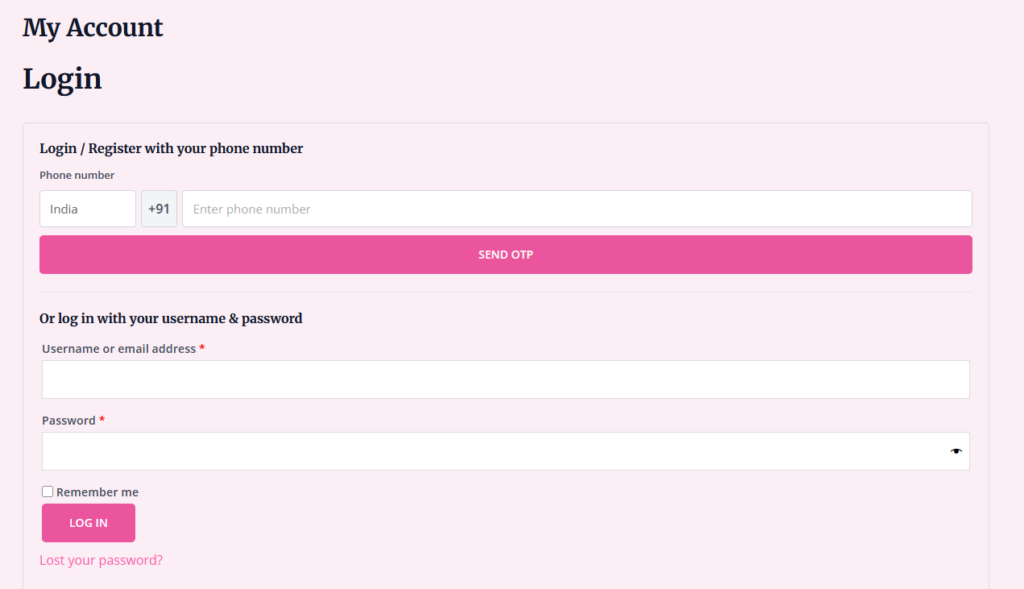
1.Displaying the OTP Form :
By default, with Show above WooCommerce login enabled, the OTP form appears automatically above the login form on the My Account page — no setup required. Visit that page while logged out to see it.
Quick Login for WooCommerce Users with Login OTP for woocommerce
Frequently Asked Questions
See the list below for our most frequently asked questions about our plugins.
If this doesn’t satisfy your requirement, please reach out to support team.
Q: What does OTP Verification for WooCommerce do?
A: It adds a phone-number OTP login and registration flow to your WooCommerce My Account page using the MSG91 OTP API. Customers can sign in or register by verifying their phone number with a one-time code, while your standard username / password login keeps working exactly as before.
Q: Do I need an MSG91 account?
A: Yes. The plugin sends and verifies OTPs through MSG91’s OTP widget. You’ll need an MSG91 account with an OTP widget set up, then paste your Widget ID, Widget Token and Auth Key into the plugin’s settings.
Q: Does it replace the default WooCommerce login?
A: No. The OTP form is added above the standard login form — the username / email and password login is never removed. Customers can use whichever method they prefer.
Q: Will it create duplicate accounts?
A: No. Phone numbers are normalized and matched against existing customers before anything is created. An existing customer is logged into their current account, and a new number is only registered once, after the email step.
Q: Is my MSG91 Auth Key stored securely?
A: Yes. The server-side Auth Key is stored encrypted in your database and is never sent to the browser. All MSG91 verification calls that use it happen on your server.
Q: Can I restrict OTP login to one country?
A: Yes. Turn on “Restrict OTP to one country” and choose the country. The frontend selector is locked to it and any other country is rejected on the server, so the restriction can’t be bypassed. Leave it off to accept international numbers.
Q: How does the plugin prevent OTP abuse?
A: It adds WordPress-side protection on top of MSG91: a per-phone hourly send limit, a short cooldown between requests, a per-IP guard, a verify-attempt lockout to stop brute-forcing, and nonce-protected AJAX endpoints. The final verification is always confirmed server-side.
Q: Does the plugin support WooCommerce HPOS?
A: Yes. The plugin declares compatibility with WooCommerce High-Performance Order Storage (custom order tables) and works with modern WordPress and WooCommerce versions.
Q: Is the plugin translation ready?
A: Yes. All user-facing text uses the xpcb-otp-verification-for-woocommerce text domain and the bundled /languages folder, so you can translate it with your preferred tools.
Q: What happens to my data if I uninstall?
A: Uninstalling removes the plugin’s options, its request-log table, and its temporary verification tokens. Your customer accounts and their stored phone numbers are left untouched.