
Shipping based on weight for Woocommerce
Create flexible shipping rates using cart weight, base shipping costs, weight steps, subtotal limits, and country-specific conditions to match your business needs.
Weight-Based Shipping Rates
Flexible Shipping Rules
Free Shipping Threshold
14 Days Money Back Guarantee
99% Customer Satisfaction Rating
Support
- Enjoy 12 months of updates and dedicated support starting from your purchase date. Renewal is optional and can be cancelled anytime.
- Prices displayed on this site are in United States Dollars (USD).
- Trusted by 5000+ Websites
Rating
46 Reviews
1.0.0
Plugin Version
1500+
Downloads
August 11, 2026
Last Updated
HOW IT WORKS?
Why Choose Shipping Based on Weight for WooCommerce?
Shipping Based on Weight for WooCommerce gives you complete control over your store’s shipping costs by calculating rates based on cart weight, order subtotal, shipping classes, and destination. Create flexible shipping rules, offer free shipping when conditions are met, and deliver a seamless checkout experience for your customers.
Calculate shipping charges automatically based on the total cart weight. Configure a base shipping cost, cost per unit weight, and weight step pricing to match your shipping strategy. Set minimum and maximum weight limits to ensure the correct shipping method is available for every order.
Create advanced shipping conditions using order subtotal, shipping classes, supported countries, and shipping zones. Restrict shipping methods when requirements are not met and display helpful messages to customers for a smoother checkout experience.
Encourage larger purchases by offering free shipping when customers reach a specified cart subtotal. Combine free shipping with weight and subtotal conditions to create powerful promotional shipping strategies while maintaining full control over shipping costs.
Trusted by clients from 50+ Countries
Try with Confidence

100% Money-Back Guarantee
Our 30-day No-Risk Money Back Policy assures 100% money back.

99% Satisfaction Rating
We make every effort to make sure our customers are happy.

Average 5 star rating
Our plugins are highly regarded in WordPress forums and review platforms.
How Does The Plugin Work?
See How the Name Your Price for WooCommerce Plugin Works
Admin page
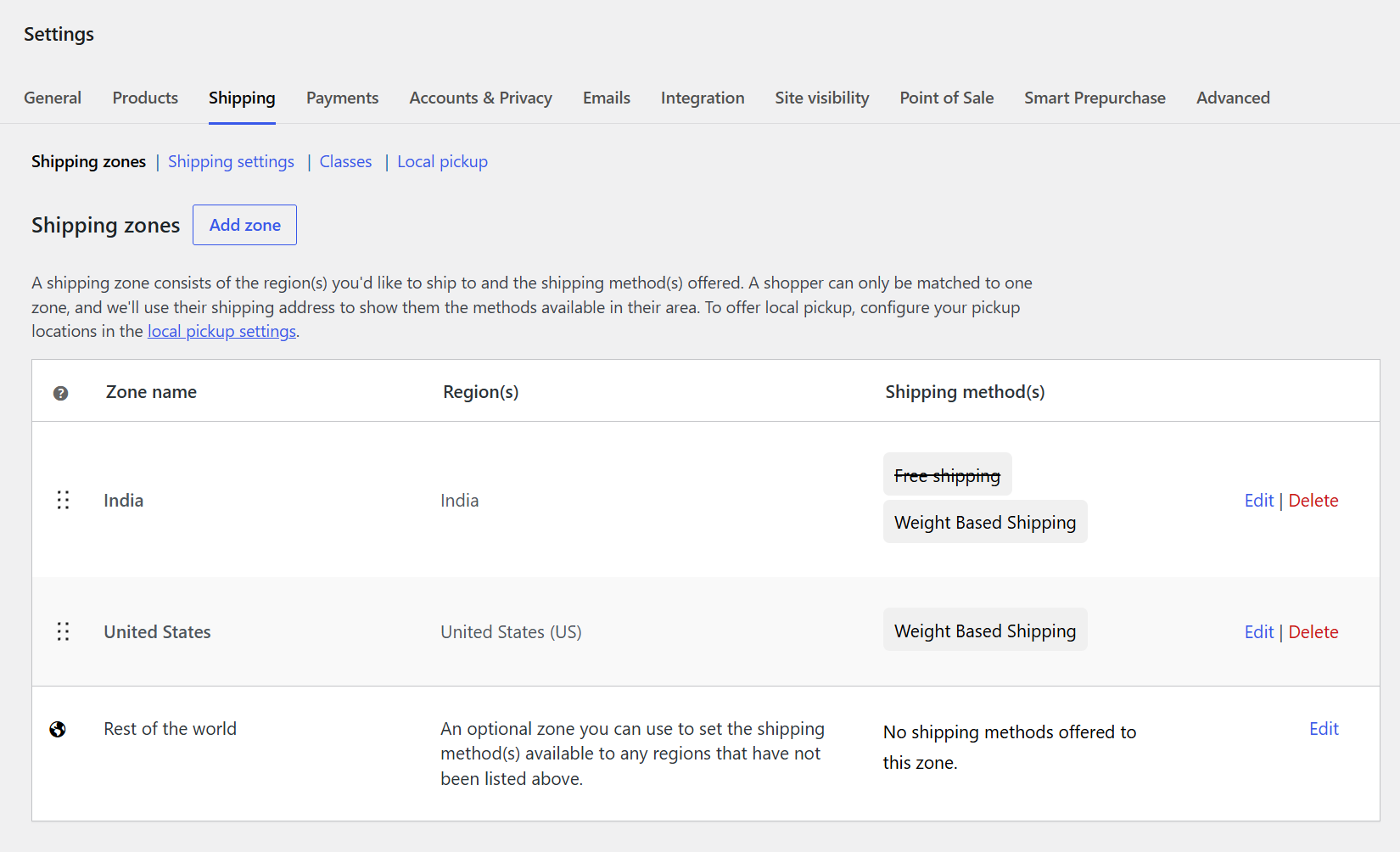
1. Shipping Zones :
Manage all your WooCommerce shipping zones from one centralized section.View the countries and regions assigned to each shipping zone. See which shipping methods are enabled for each zone. Configure Weight Based Shipping separately for different locations. Edit or delete zones whenever you need to update your shipping setup.
2. Create Shipping Zone :
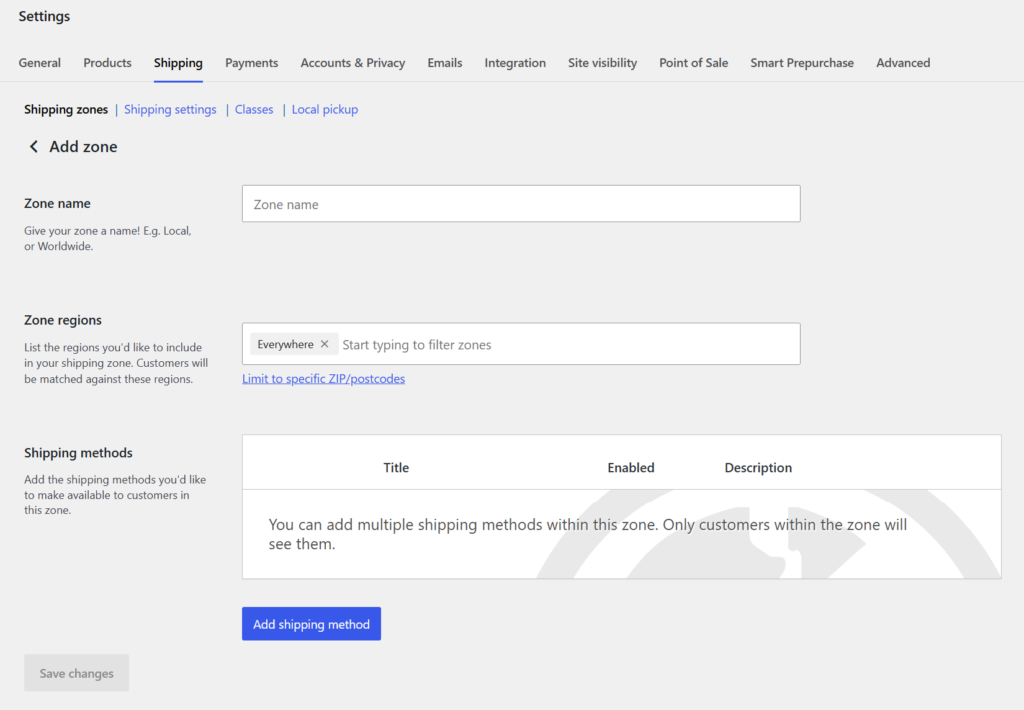
Create a dedicated shipping zone for your target customers.
Enter a zone name and select the countries or regions where you ship. You can also restrict the zone to specific ZIP or postcode ranges. Add Weight Based Shipping as one of the available shipping methods. Save the zone to make the configured shipping option available to customers.
3. Add Shipping Method :
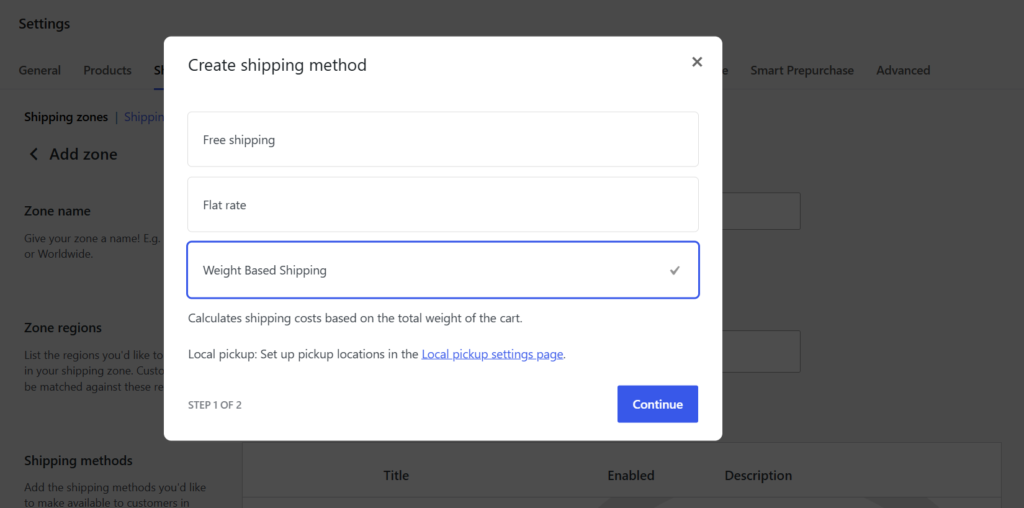
Select Weight Based Shipping from the available WooCommerce shipping methods.The method calculates shipping charges based on the total weight of the cart.Select it while configuring a shipping zone for your store.Click Continue to proceed with the shipping configuration.This makes it easy to add weight-based shipping to any WooCommerce zone.
4. Shipping Method Settings :
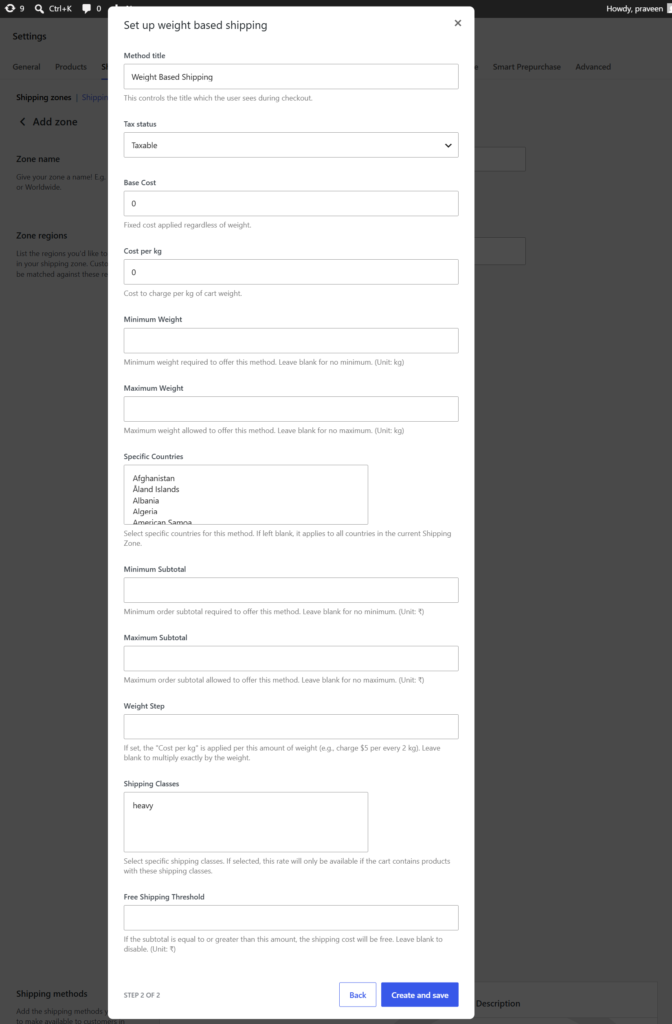
Configure the Weight Based Shipping method directly from your WooCommerce Shipping Zone.Enter a custom Method Title that customers will see during checkout.Choose whether the shipping charge should be Taxable or non-taxable.Set a Base Cost that will be applied to the shipment regardless of weight.Define the Cost per kg to calculate shipping based on the cart’s total weight.Set Minimum Weight and Maximum Weight limits for shipping eligibility.Restrict the shipping method to selected Countries when required.Configure Minimum and Maximum Subtotal limits for eligible orders.Use Weight Step to apply shipping charges at specific weight intervals.Set Shipping Classes and a Free Shipping Threshold to create flexible shipping rules.
Frontend
1.Frontend Checkout :
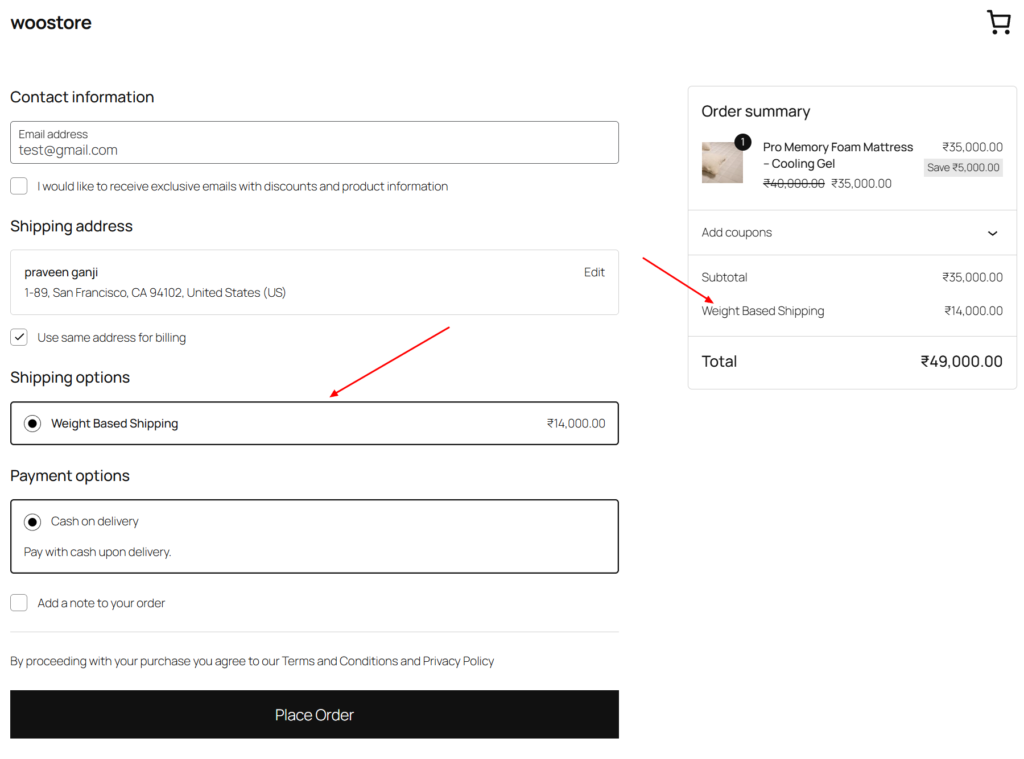
The Weight Based Shipping method is displayed on the checkout page.Customers can select the available shipping option for their order.The plugin automatically calculates the shipping charge based on the cart weight.The calculated shipping cost is clearly shown in the order summary. Customers can review the shipping charge before placing their order.
Boost Customer Engagement and Increase Conversions with a Spin-to-Win Coupon Wheel
Boost Customer Engagement and Increase Conversions with a Spin-to-Win Coupon Wheel
Frequently Asked Questions
See the list below for our most frequently asked questions about our plugins.
If this doesn’t satisfy your requirement, please reach out to support team.
Q: What is Shipping Based on Weight for WooCommerce?
A: Shipping Based on Weight for WooCommerce is a flexible shipping plugin that automatically calculates shipping charges based on the total cart weight. It also supports subtotal conditions, shipping classes, country restrictions, and free shipping thresholds.
Q: How is the shipping cost calculated?
A: The plugin calculates shipping costs using a configurable base shipping cost and a cost per unit of weight. You can also enable weight-step pricing to charge shipping in predefined weight intervals.
Q: Can I set minimum and maximum weight limits?
A: Yes. You can define minimum and maximum cart weight limits. If the customer’s cart falls outside the configured range, the shipping method will not be available.
Q: Can I offer free shipping?
A: Yes. You can specify a free shipping threshold based on the cart subtotal. Once the customer’s order reaches the configured amount, shipping charges can automatically become free.
Q: Can I restrict shipping by country or shipping class?
A: Absolutely. The plugin allows you to restrict shipping methods to specific countries and WooCommerce shipping classes, giving you complete control over when the shipping method is available.
Q: Does the plugin work with WooCommerce Shipping Zones?
A: Yes. The plugin integrates seamlessly with WooCommerce Shipping Zones, allowing you to configure different weight-based shipping methods for different locations.
Q: Is the plugin compatible with WooCommerce Cart & Checkout Blocks?
A: Yes. The plugin fully supports WooCommerce Cart & Checkout Blocks, ensuring a smooth checkout experience with modern WooCommerce stores.
Q: Do I need coding knowledge to use this plugin?
A: No. The plugin is designed with an intuitive settings interface, allowing you to configure advanced weight-based shipping rules without writing any code.