
Custom Price Text for WooCommerce
Add Custom Price Text
Show Offers & Labels
500+ Icons
14 Days Money Back Guarantee
99% Customer Satisfaction Rating
Support
- Enjoy 12 months of updates and dedicated support starting from your purchase date. Renewal is optional and can be cancelled anytime.
- Prices displayed on this site are in United States Dollars (USD).
- Trusted by 5000+ Websites
Rating
45 Reviews
1.0
Plugin Version
2000+
Downloads
April 17, 2026
Last Updated
HOW IT WORKS?
Custom Price Text for WooCommerce Plugin for Better Pricing Display
Delight customers and boost conversions with Custom Price Text for WooCommerce – highlight pricing, showcase offers.
Add custom text to your product prices and make them more informative, attractive, and engaging, helping your products stand out and drive more sales.
Display attractive offers and labels to highlight discounts, promotions, and special deals on your products.
500+ icons for flexible customization
Trusted by clients from 50+ Countries
Try with Confidence

100% Money-Back Guarantee
Our 30-day No-Risk Money Back Policy assures 100% money back.

99% Satisfaction Rating
We make every effort to make sure our customers are happy.

Average 5 star rating
Our plugins are highly regarded in WordPress forums and review platforms.
How Does The Plugin Work?
See How ‘Custom Price Text for WooCommerce ‘ plugin function.
Admin page
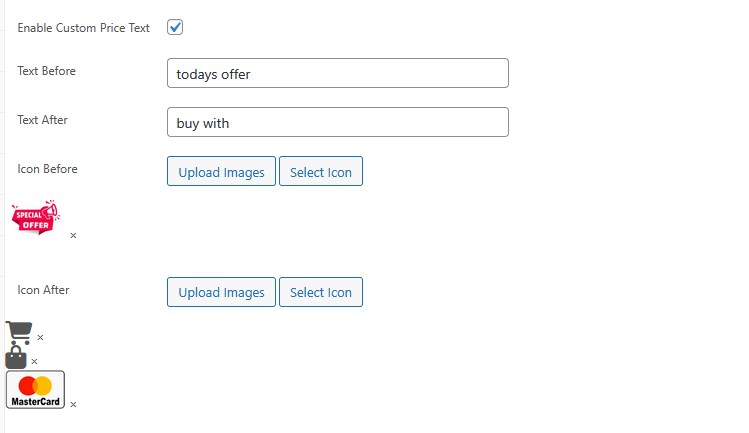
The Custom Price Text feature in WooCommerce is available on the Product Edit Page in the WordPress Admin Dashboard, where store admins can customize how product prices are displayed. Once inside a product, users will find options to enable the feature, add text before or after the price, and select icons or upload images. After enabling it, the entered text (like offers or call-to-actions) and selected icons are saved as product meta data. When the product is updated, this data is automatically applied on the frontend product page, where the price is displayed along with the custom text and icons. This allows store owners to highlight offers, add visual elements, and create a more engaging and informative pricing display, helping attract customer attention and improve conversions.

Frontend
The frontend display of the Custom Price Text feature enhances the default WooCommerce price by adding dynamic text and visual elements before and after the price. In this example, icons and images are displayed alongside the custom text “todays offer” before the discounted price, and “buy with” after it, creating a more engaging and informative price presentation. The original price is shown with a strike-through, while the current price is highlighted, maintaining WooCommerce’s standard pricing structure. Icons (Font Awesome) and uploaded images are seamlessly integrated, improving visual appeal and drawing customer attention to offers and call-to-actions. This results in a cleaner, more attractive product pricing layout that helps highlight promotions and encourages users to take action, ultimately improving the overall shopping experience and boosting conversions.
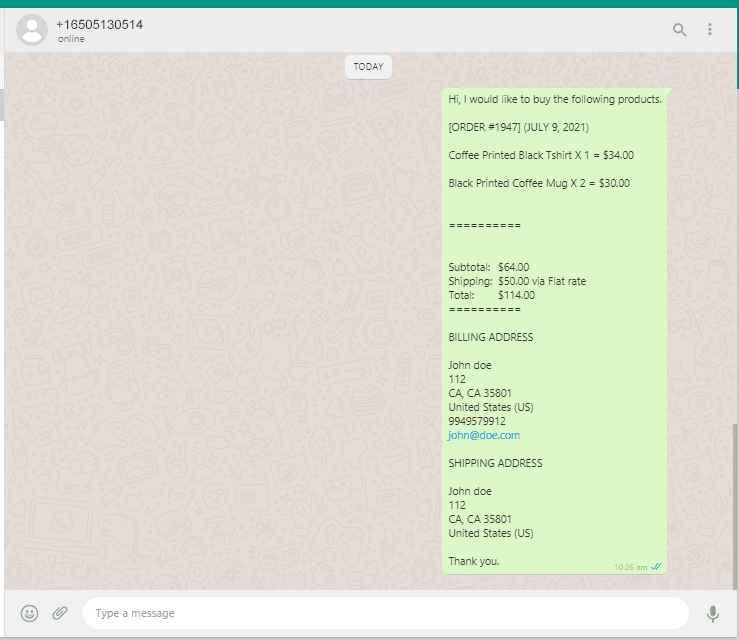
Finally, the order on WhatsApp for woocommerce
After the customer clicks on Checkout with WhatsApp / Buy on WhatsApp button, the client details and the card product data will be sent to store manager’s WhatsApp like the right side screenshot.
Upgrade your store’s pricing experience – add Custom Price Text and stand out today!
Frequently Asked Questions
See the list below for our most frequently asked questions about our plugins.
If this doesn’t satisfy your requirement, please reach out to support team.
Q: What is a Custom Price Text plugin for WooCommerce?
A: A Custom Price Text plugin for WooCommerce allows store owners to add custom messages before or after product prices to improve clarity and highlight offers.
Q: Can I add text before and after the product price in WooCommerce?
A: Yes, you can easily display text like “Starting from”, “Only”, or “Per item” before or after product prices.
Q: Can I replace the price with custom text like “Contact for Price”?
A: Yes, the plugin allows you to completely replace the product price with custom text such as “Contact for Price” or “Request a Quote”.
Q: Can I show custom price text for specific products or categories?
A: Yes, you can apply custom price text to selected products, categories, or groups for targeted messaging.
Q: Does the plugin support variable products?
A: Yes, it works with both simple and variable products, allowing flexible pricing display for all product types.
Q: Can I display icons or badges along with price text?
A: Yes, you can enhance price display by adding icons or badges to highlight offers, discounts, or important information.
Q: Can I customize the style of the price text?
A: Yes, you can change the color, font size, and style of the price text to match your store design.
Q: Where will the custom price text be displayed?
A: Custom price text can be shown on shop pages, product pages, or both, depending on your settings.
Q: How does custom price text help increase sales?
A: It improves product clarity, highlights promotions, and creates urgency, which can lead to higher conversions.
Q: Do I need coding skills to use this plugin?
A: No, the plugin is beginner-friendly and can be configured directly from the WooCommerce dashboard without coding.