
Countdown Timer for WooCommerce
Add urgency to your WooCommerce store with sales countdown timers on product and shop pages. Supports global campaigns, per-product timers, WooCommerce sale schedules and stock scarcity bars.
Smart Sale Countdown
Flexible Timer Management
Multiple Display Locations
14 Days Money Back Guarantee
99% Customer Satisfaction Rating
Support
- Enjoy 12 months of updates and dedicated support starting from your purchase date. Renewal is optional and can be cancelled anytime.
- Prices displayed on this site are in United States Dollars (USD).
- Trusted by 5000+ Websites
Rating
45 Reviews
1.1.1
Plugin Version
2000+
Downloads
July 13, 2026
Last Updated
HOW IT WORKS?
Countdown Timer for WooCommerce
Countdown Timer for WooCommerce is a powerful and easy-to-use plugin that helps create urgency and boost conversions by displaying attractive countdown timers for your WooCommerce products. Whether you’re running flash sales, seasonal promotions, limited-time offers, or product launches, this plugin gives you complete control over how and where countdown timers appear.
Automatically display “Sale Starts In” before a promotion begins and switch to “Sale Ends In” once the sale is live. Create urgency throughout the entire sales campaign without any manual intervention.
Configure countdown timers globally, by product category, or for individual products. The built-in priority system ensures product-specific settings override category and global timers for complete flexibility.
Show countdown timers exactly where they matter most—on single product pages, shop pages, category archives, or anywhere on your website using a simple shortcode. Increase visibility and encourage customers to act before time runs out.
Trusted by clients from 50+ Countries
Try with Confidence

100% Money-Back Guarantee
Our 30-day No-Risk Money Back Policy assures 100% money back.

99% Satisfaction Rating
We make every effort to make sure our customers are happy.

Average 5 star rating
Our plugins are highly regarded in WordPress forums and review platforms.
How Does The Plugin Work?
See How the Countdown Timer for WooCommerce Plugin Works
Admin page
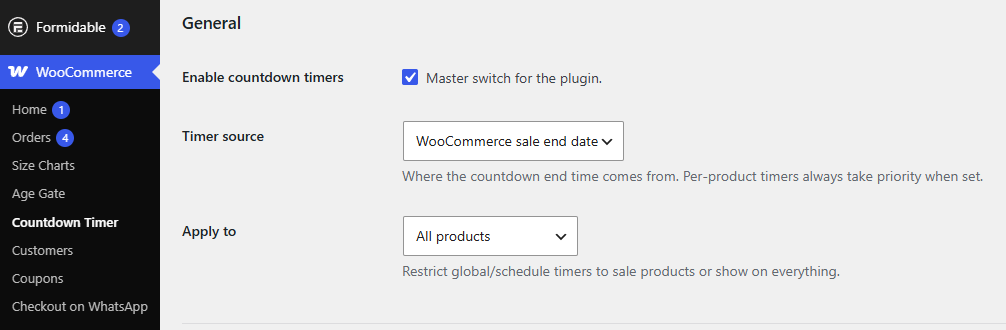
1.General Settings
The General Settings section is the central location for configuring the default behavior of the Countdown Timer for WooCommerce plugin. These settings allow you to control Enable & Disable the plugin and how countdown timers are displayed across your store without configuring each product individually.
2.Product Level Configuration
The Product Level Configuration allows you to customize countdown timer settings for individual WooCommerce products. This feature is ideal for creating unique promotional campaigns, flash sales, or limited-time offers that differ from your store’s global or category-level settings.
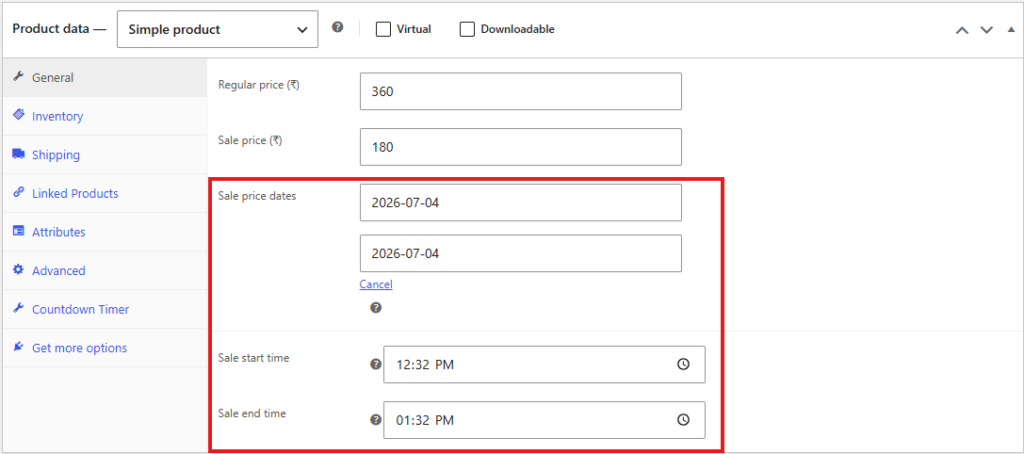
3.Override Global Settings in Product Level
The Override Global Settings option allows you to apply a custom countdown timer to an individual product instead of using the default global configuration. When enabled, you can define product-specific timer settings, such as custom start and end dates, without affecting other products in your store.
Product-level settings have the highest priority and will automatically override both category-level and global countdown configurations.
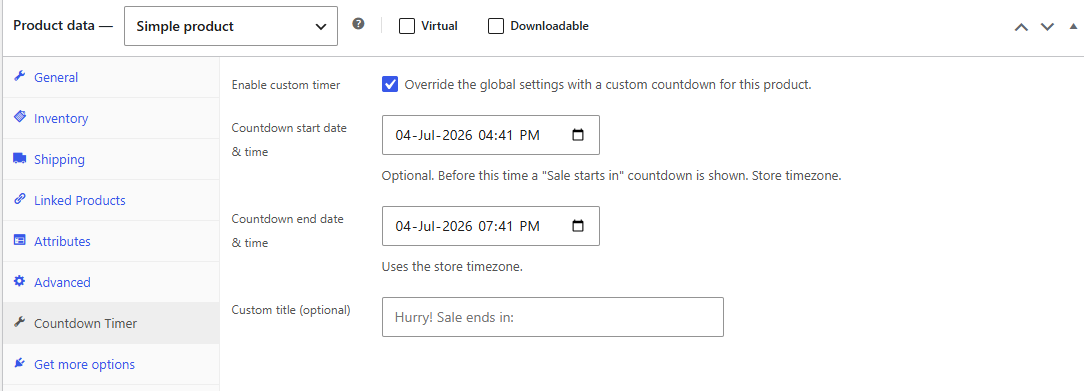
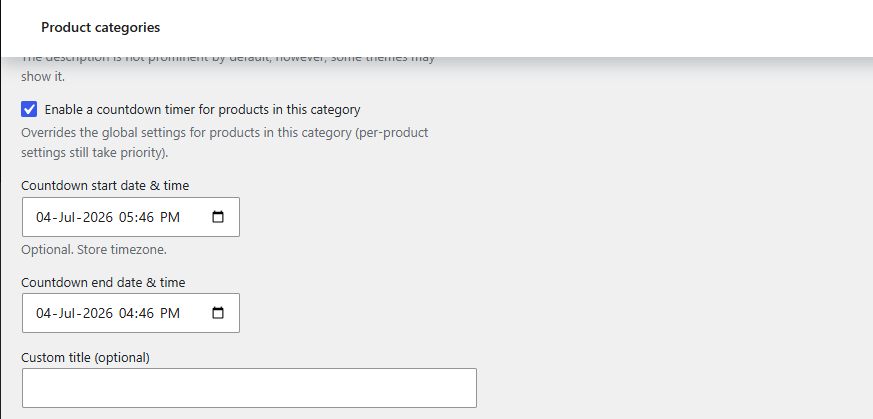
4.Override Global Settings in Category Level
The Override Global Settings option allows you to apply a custom countdown timer to an individual Category instead of using the default global configuration. When enabled, you can define Category-specific timer settings, such as custom start and end dates, without affecting other Other category & Products in your store.
Category-level settings have the Second-highest priority and will automatically override Global countdown configurations.
Frontend
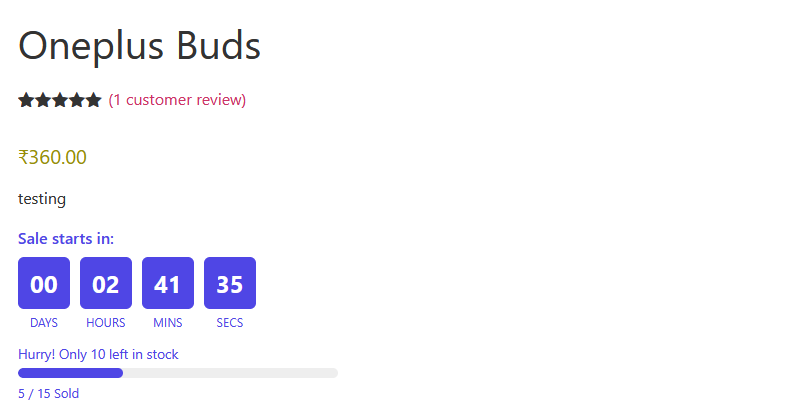
1.Product Level Countdown Timer
Customers will see a “Sale Starts In” countdown before the promotion begins, which automatically changes to a “Sale Ends In” countdown once the sale is active. This helps create urgency, encourages quicker purchasing decisions, and highlights time-limited offers directly on the product page.
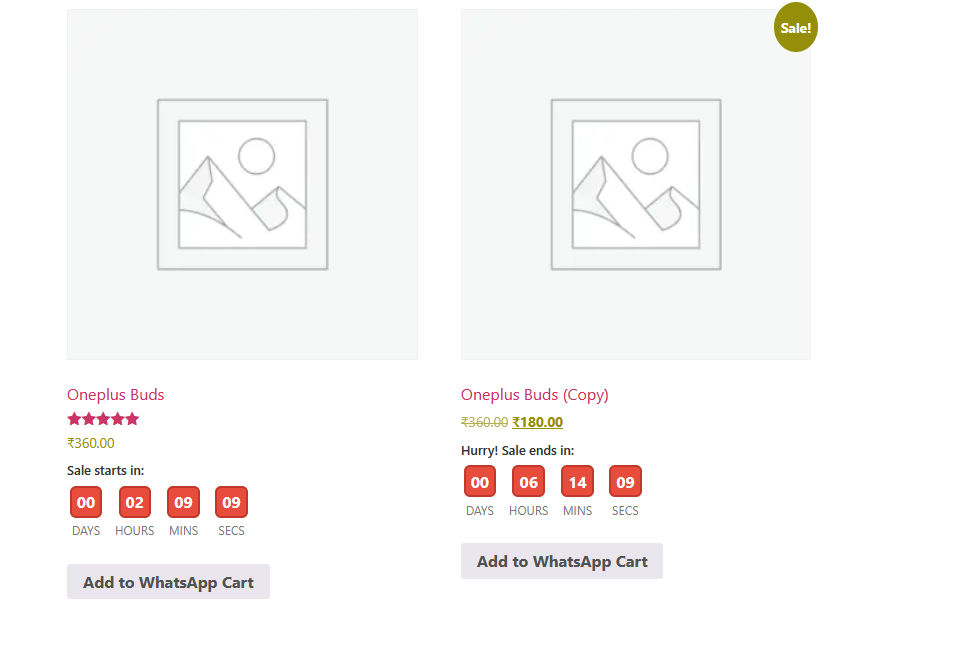
2.Archive & Category Level Countdown Timer
Customers will see a “Sale Starts In” countdown before the promotion begins, which automatically changes to a “Sale Ends In” countdown once the sale is active. This helps create urgency, encourages quicker purchasing decisions, and highlights time-limited offers directly on the product page.
Create urgency and boost conversions with customizable countdown timers designed specifically for WooCommerce stores.
Frequently Asked Questions
See the list below for our most frequently asked questions about our plugins.
If this doesn’t satisfy your requirement, please reach out to support team.
Q: How do I enable the countdown timer for my products?
A: After installing and activating the plugin, navigate to Woocommerce > Countdown Timer > General to configure the global countdown timer. You can also enable and customize countdown timers for individual products or product categories.
Q: Can I set different countdown timers for individual products?
A: Yes. The plugin allows you to configure a unique countdown timer for each product. Simply enable Product-Level Configuration and set custom start and end dates. Product-level settings always override category and global settings.
Q: Does the plugin support WooCommerce sale schedules?
A: Yes. The plugin integrates with WooCommerce Sale Price Dates and can automatically display countdowns based on your scheduled sale start and end dates.
Q: Can I display countdown timers on shop and category pages?
A: Yes. You can choose to display countdown timers on single product pages, shop pages, product category archives, and other WooCommerce listing pages from the plugin settings.
Q: Can I customize the appearance of the countdown timer?
A: Absolutely. You can customize the timer layout, colors, labels, borders, and countdown messages to match your store’s branding and design..
Q: What happens when the countdown expires?
A: You can configure the plugin to display an expiration message or automatically hide the countdown timer after the promotion ends, depending on your preferred settings.
Q: Does the plugin work with Elementor and other page builders?
A: Yes. The plugin includes shortcode support, allowing you to place countdown timers anywhere on your website, including Elementor, Gutenberg, widgets, and custom pages.
Q: Why isn't the countdown timer showing on my product?
A: Please verify that the countdown timer is enabled, the configured dates are valid, and the product meets the display conditions. If Product-Level Configuration is enabled, those settings will take priority over category and global settings.
Q: Does the countdown timer appear for out-of-stock products?
A: No. By default, the plugin does not display the countdown timer or stock scarcity bar for out-of-stock products, ensuring customers only see active promotions for available items.
Q: Is the plugin compatible with the latest versions of WooCommerce?
A: Yes. The plugin is designed to work with modern WooCommerce versions and supports High-Performance Order Storage (HPOS), making it suitable for current and future WooCommerce stores.