
Coupon Wheel for Woocommerce
Increase customer engagement, grow your email list, and boost WooCommerce sales using a beautiful Spin-to-Win Coupon Wheel. Reward visitors with exciting discounts, free shipping, or special offers while collecting valuable customer information for future marketing campaigns.
Interactive Spin-to-Win Wheel
Automatic Coupon Generation
Customer Lead Collection
14 Days Money Back Guarantee
99% Customer Satisfaction Rating
Support
- Enjoy 12 months of updates and dedicated support starting from your purchase date. Renewal is optional and can be cancelled anytime.
- Prices displayed on this site are in United States Dollars (USD).
- Trusted by 5000+ Websites
Rating
46 Reviews
1.0.1
Plugin Version
1500+
Downloads
August 6, 2026
Last Updated
HOW IT WORKS?
Why Choose Coupon Wheel for WooCommerce?
Coupon Wheel for WooCommerce helps you increase customer engagement, grow your email list, and boost sales by rewarding visitors with exciting discounts through an interactive spin-to-win experience. Customize every aspect of the wheel, automatically generate WooCommerce coupons, and turn more visitors into paying customers.
Capture your visitors’ attention with a fully customizable coupon wheel. Display attractive prizes, engaging animations, and branded designs that encourage customers to spin and claim exclusive offers before leaving your store.
Automatically create unique WooCommerce coupons based on the winning prize. Configure percentage discounts, fixed cart discounts, fixed product discounts, or free shipping offers, and instantly deliver coupons after every successful spin.
Collect valuable customer information such as email addresses, first name, last name, and phone numbers before allowing a spin. Prevent abuse with built-in anti-cheat protection, control display frequency, and manage where and when the coupon wheel appears across your WooCommerce store.
Trusted by clients from 50+ Countries
Try with Confidence

100% Money-Back Guarantee
Our 30-day No-Risk Money Back Policy assures 100% money back.

99% Satisfaction Rating
We make every effort to make sure our customers are happy.

Average 5 star rating
Our plugins are highly regarded in WordPress forums and review platforms.
How Does The Plugin Work?
See How the Name Your Price for WooCommerce Plugin Works
Admin page
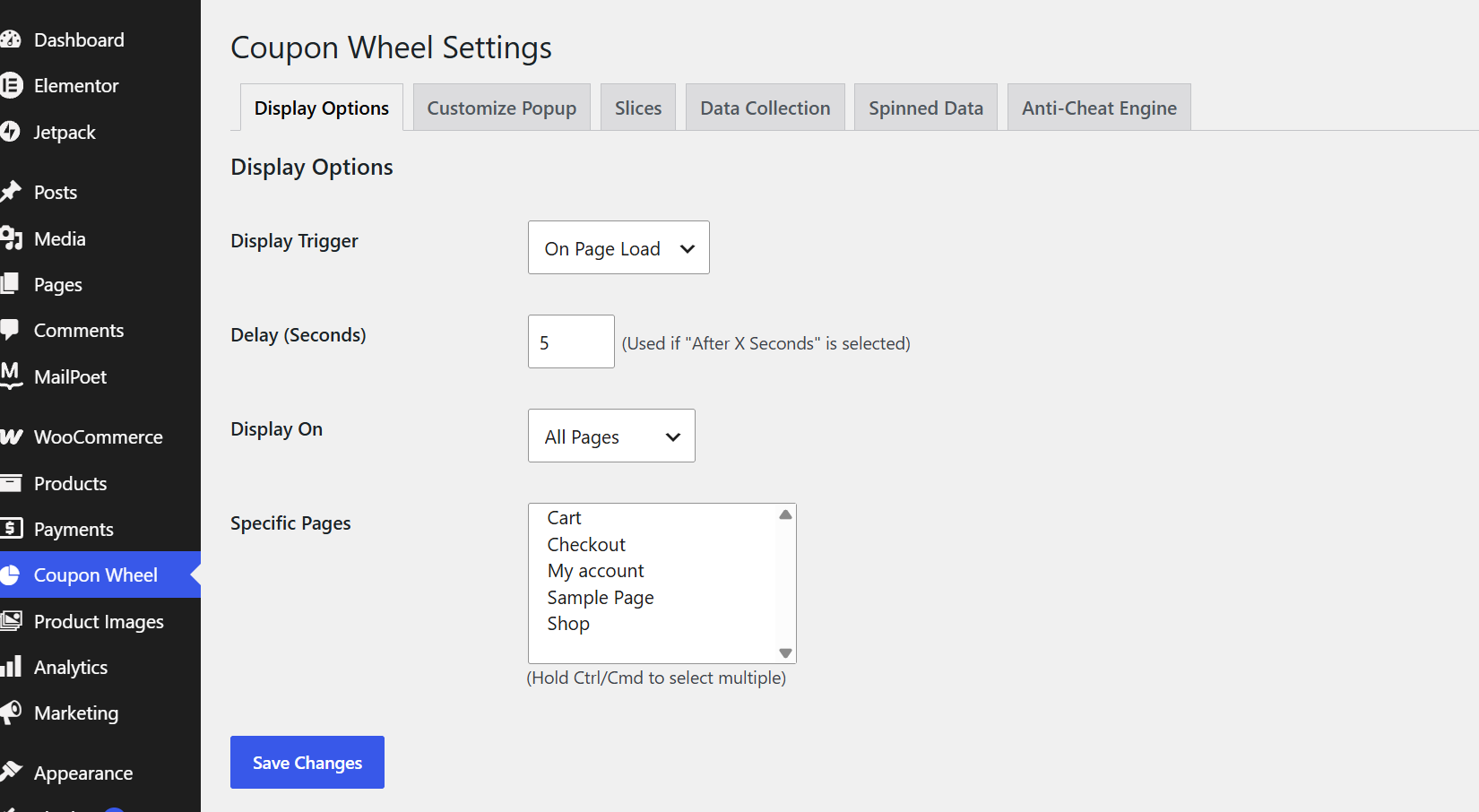
1. Display Options :
The Display Options tab lets you control when and where the coupon wheel appears on your WooCommerce store. Choose the popup trigger, set a custom delay, and display the wheel on all pages or selected pages. This helps you target customers at the right time for maximum engagement. Configure everything easily with just a few clicks.
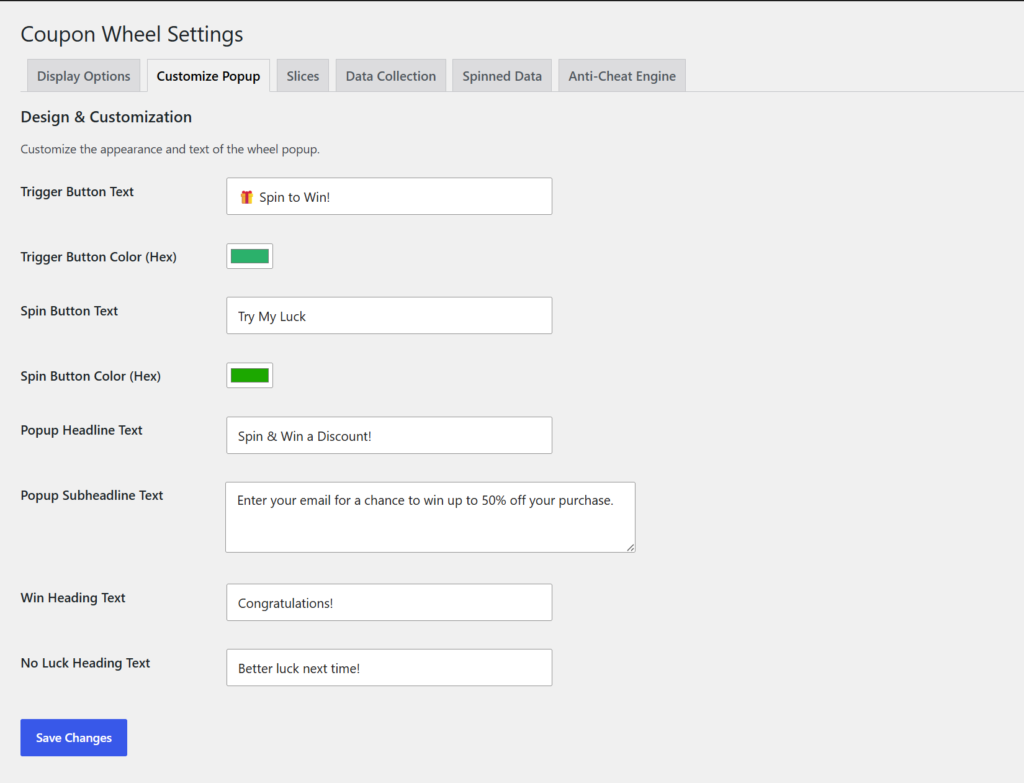
2. Customize Popup :
The Customize Popup tab allows you to personalize the coupon wheel’s appearance and messaging. Edit button text, popup titles, descriptions, colors, and success messages to match your brand. Create an attractive and consistent shopping experience for your visitors. No coding is required to customize the design.
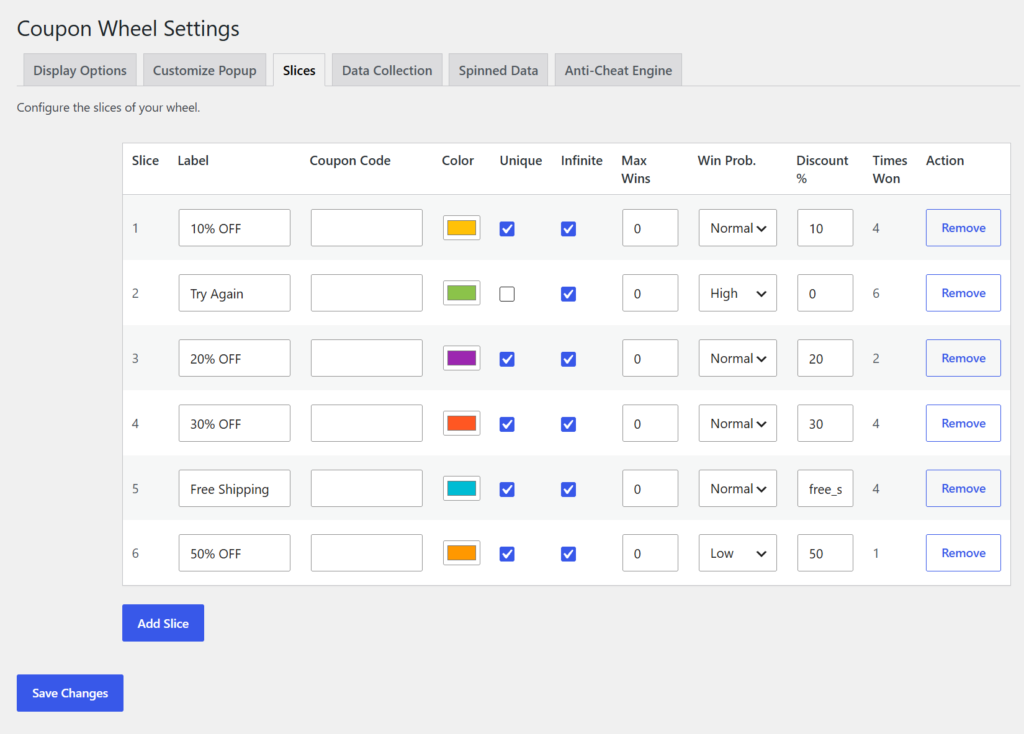
3. Slices :
The Slices tab is where you configure the rewards available on the coupon wheel. Add prize labels, coupon codes, colors, discount values, winning probabilities, and maximum win limits. Easily create, edit, or remove slices to design your promotional campaign. Every prize can be fully customized to suit your marketing goals.
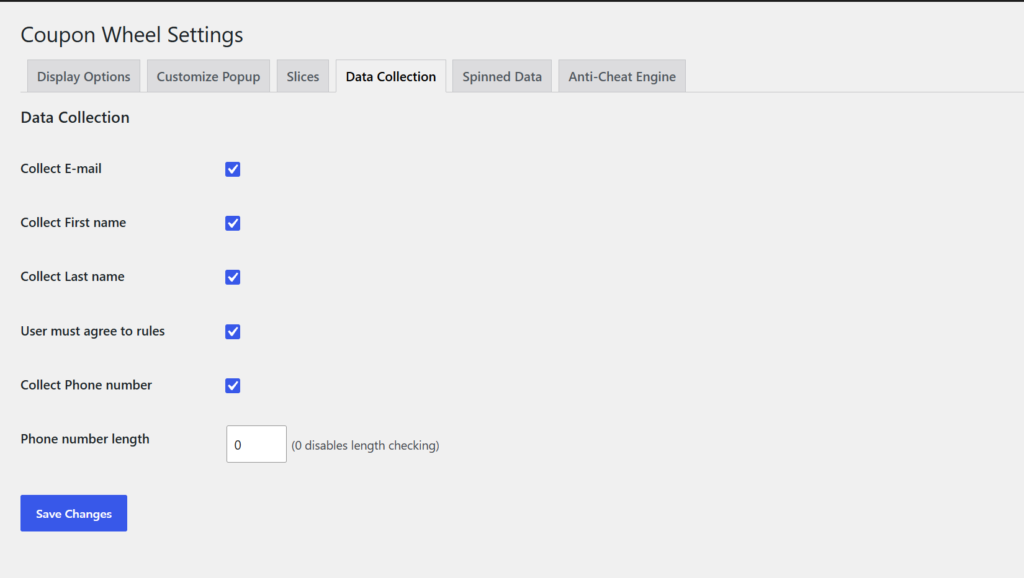
4. Data Collection :
The Data Collection tab lets you choose which customer details are collected before spinning the wheel. Enable fields like email, first name, last name, phone number, and terms acceptance. Build your customer database while generating more qualified leads. You can also configure phone number validation if needed.
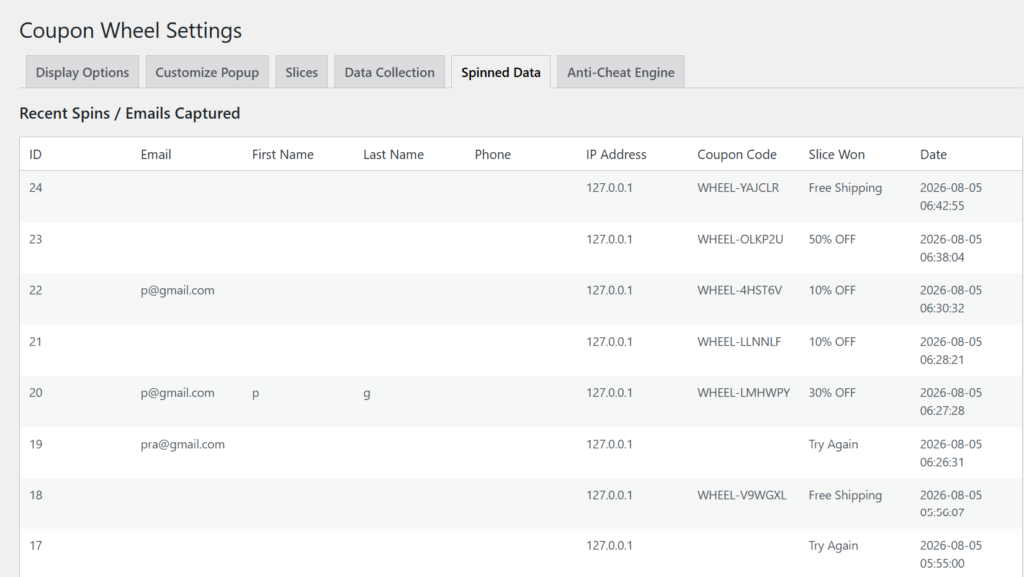
5. Spinned Data :
The Spinned Data tab provides a complete history of all customer spins. View captured customer information, generated coupon codes, prizes won, IP addresses, and spin timestamps. Easily monitor campaign performance and customer participation. All spin records are stored in one convenient location.
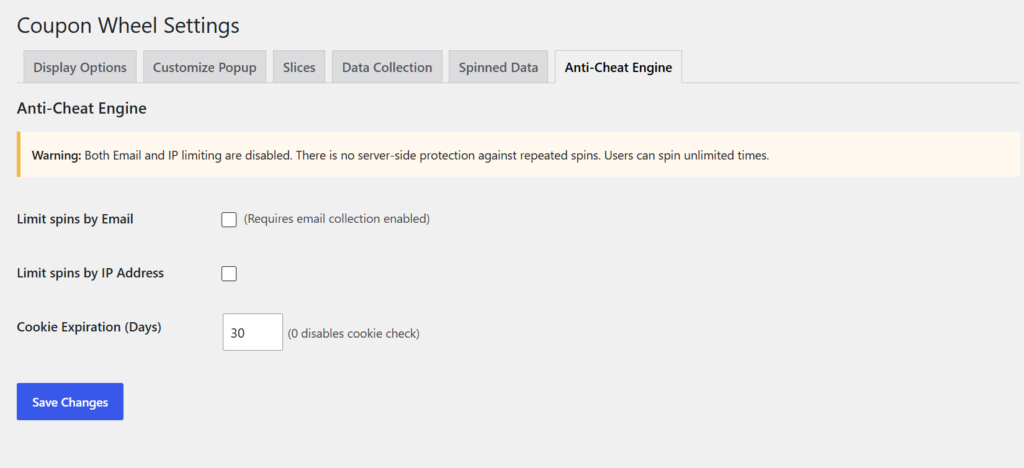
6. Anti-Cheat Engine :
The Anti-Cheat Engine protects your coupon campaigns from repeated or fraudulent spins. Restrict participation by customer email, IP address, and browser cookies to prevent abuse. Configure cookie expiration to control how often visitors can spin the wheel. These settings help ensure fair usage and secure promotions.
Frontend
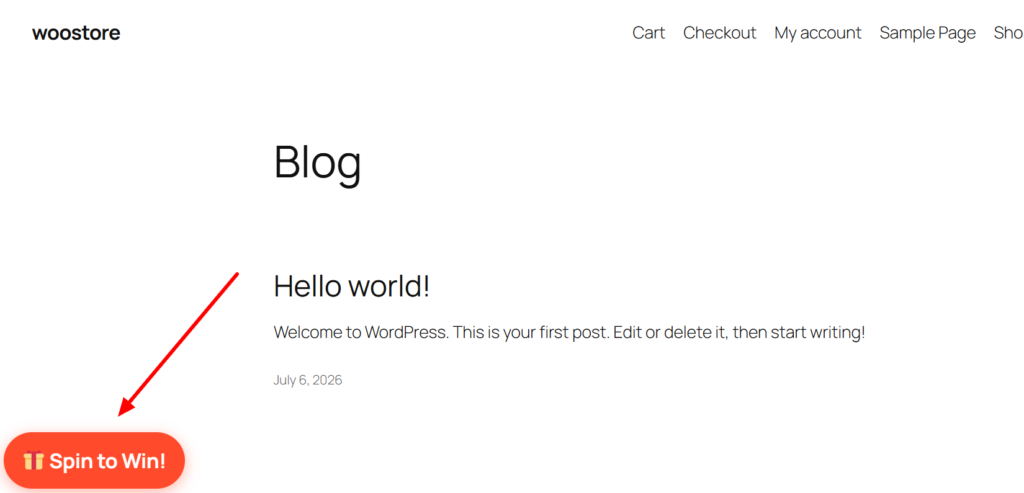
1. Spin to Win Button :
The Spin to Win button is displayed based on your configured display settings, encouraging visitors to interact with your store. A single click opens the coupon wheel popup, creating an engaging shopping experience. It’s a simple yet effective way to capture customer attention and increase participation.
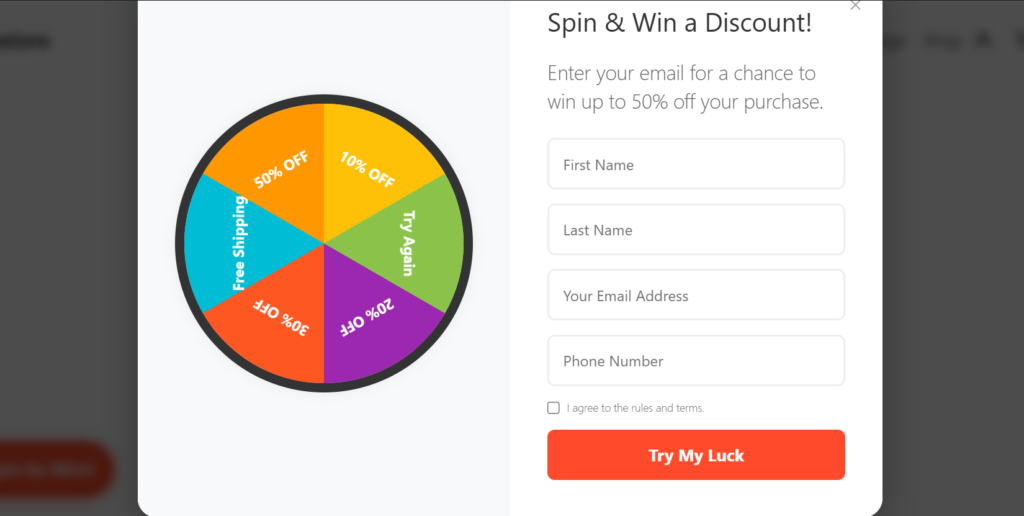
2. Customer Information Form :
Before spinning the wheel, customers enter their details, such as their name, email address, and phone number. You can also require users to accept your terms and conditions before participating. This helps you collect valuable customer information while building your email marketing list. The form is simple, responsive, and easy to complete.
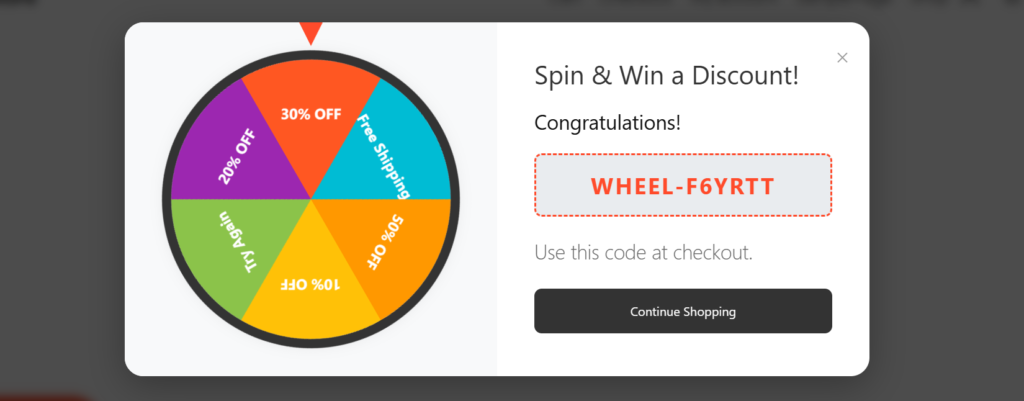
3. Spin & Win Experience :
The eligible quantity discount is automatically applied during checkout.The order summary clearly displays the applied Quantity Discount as a separate line item.Customers can verify their savings before completing the purchase.
The final order total is updated instantly after the bulk discount is applied.
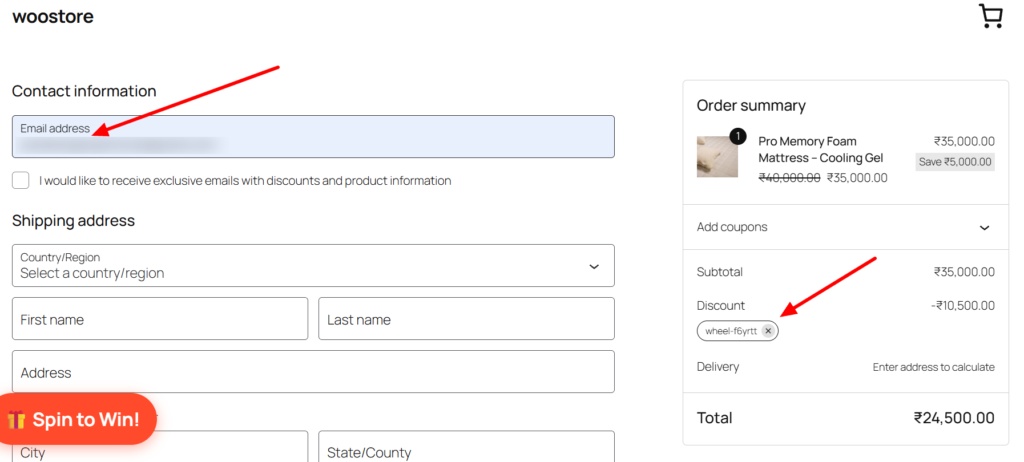
4. Coupon Applied at Checkout :
After winning, the customer receives a unique WooCommerce coupon code that can be applied during checkout. The discount is instantly reflected in the order summary, providing a seamless purchasing experience. This encourages customers to complete their orders while enjoying exclusive rewards.
Boost Customer Engagement and Increase Conversions with a Spin-to-Win Coupon Wheel
Boost Customer Engagement and Increase Conversions with a Spin-to-Win Coupon Wheel
Frequently Asked Questions
See the list below for our most frequently asked questions about our plugins.
If this doesn’t satisfy your requirement, please reach out to support team.
Q: What is Coupon Wheel for WooCommerce?
A: Coupon Wheel for WooCommerce is a gamified marketing plugin that displays an interactive spin-to-win wheel on your WooCommerce store. Visitors can spin the wheel to win discounts, free shipping, or other rewards while you collect valuable customer information for future marketing campaigns.
Q: What types of rewards can I offer?
A: You can configure multiple reward types, including percentage discounts, fixed cart discounts, fixed product discounts, free shipping, custom coupon codes, or no-prize options to create engaging promotional campaigns.
Q: Can I customize the coupon wheel?
A: Yes. You can fully customize the wheel segments, colors, prize labels, popup appearance, button text, success messages, and display settings to match your brand identity.
Q: What customer information can I collect?
A: The plugin allows you to collect customer details such as email address, first name, last name, and phone number before allowing users to spin the wheel. You can also enable a consent checkbox for GDPR compliance.
Q: Does the plugin generate WooCommerce coupons automatically?
A: Yes. Winning spins automatically generate unique WooCommerce coupons based on your configured reward settings, and customers can use them immediately during checkout.
Q: Can I control how often the popup appears?
A: Absolutely. You can configure display frequency, target specific pages, limit spins per visitor using cookies, IP address, or email, and prevent repeated abuse with built-in anti-cheat protection.
Q: Is the plugin mobile-friendly?
A: Yes. Coupon Wheel for WooCommerce is fully responsive and optimized to provide a smooth experience across desktops, tablets, and mobile devices.
Q: Is coding knowledge required to use this plugin?
A: No. The plugin is beginner-friendly with an intuitive admin interface, allowing you to set up and launch your coupon wheel in just a few minutes without writing any code.