

Coupon Wheel for WooCommerce
Overview
Coupon Wheel for WooCommerce is an engaging marketing plugin designed to increase conversions, reduce cart abandonment, and grow your customer email list. Display a customizable spin-to-win popup where visitors can win exciting rewards such as percentage discounts, fixed discounts, free shipping, or custom coupon offers. The plugin automatically generates WooCommerce coupons and helps convert more visitors into customers.
Key Features
- Interactive Spin-to-Win Coupon Wheel
- Automatic WooCommerce Coupon Generation
- Unlimited Prize Segments
- Percentage & Fixed Discount Coupons
- Free Shipping Rewards
- Custom Prize Configuration
- Fully Customizable Popup Design
- Customer Data Collection
- Email, Name & Phone Collection
- GDPR Consent Checkbox Support
- Anti-Cheat Protection
- Cookie, IP & Email Restrictions
- Popup Display Rules
- Mobile Responsive Design
- WooCommerce Native Coupon Integration
- Customer Spin History
- Easy-to-Use Admin Dashboard
Installation
- Upload the plugin ZIP or folder via Plugins > Add New > Upload Plugin.
- Activate the plugin.
- Ensure WooCommerce is installed and activated.
Display Options :
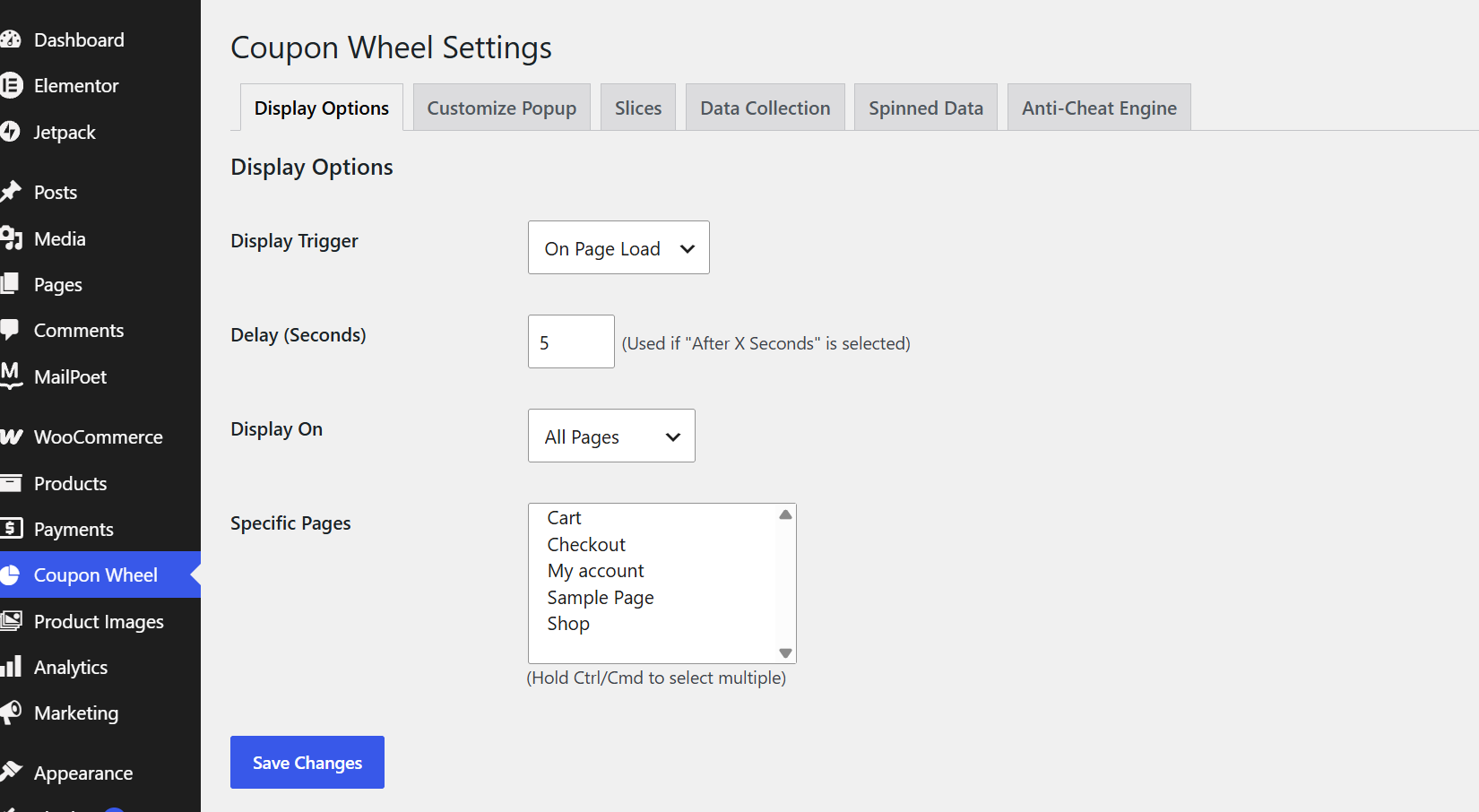
The Display Options section allows you to control how and where the Coupon Wheel is displayed on your WooCommerce store. You can choose the popup trigger, such as displaying the wheel immediately when a page loads or after a specified delay. The plugin also lets you decide whether the coupon wheel should appear across your entire website or only on selected pages, including the Shop, Cart, Checkout, My Account, or any custom page. These flexible display settings help you target visitors at the most effective moment, improving engagement without interrupting the shopping experience.Enable Quantity Pricing to offer automatic bulk discounts for individual WooCommerce products.
Create multiple pricing rules by specifying minimum and maximum quantity ranges.
Choose between percentage or fixed-amount discounts and enter the corresponding discount value.
Add, edit, or remove pricing rules at any time to match your promotional strategy.
Customers automatically receive the applicable discount when their order quantity meets a defined rule.
Customize Popup :
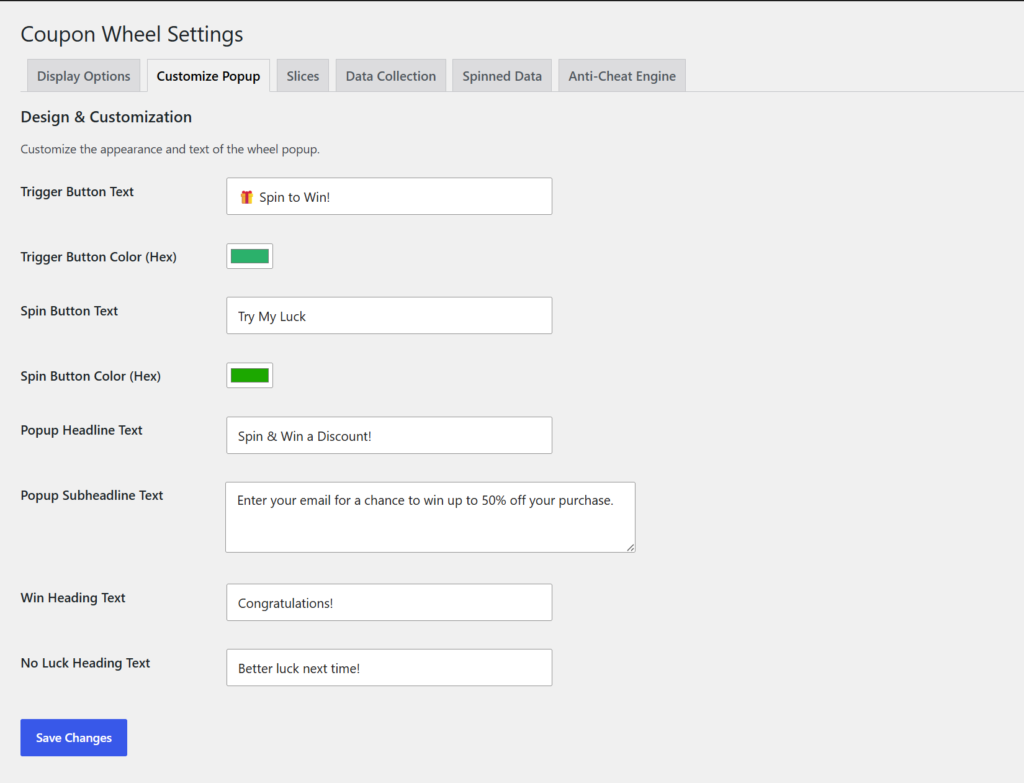
The Customize Popup section enables you to personalize the appearance and messaging of your coupon wheel popup. You can modify the floating trigger button text and color, customize the spin button label and its color, and edit the popup headline and promotional message displayed to customers. Additionally, you can define separate messages for winning and losing outcomes, allowing you to create a branded and engaging experience that matches the overall design of your WooCommerce store.
Slices :
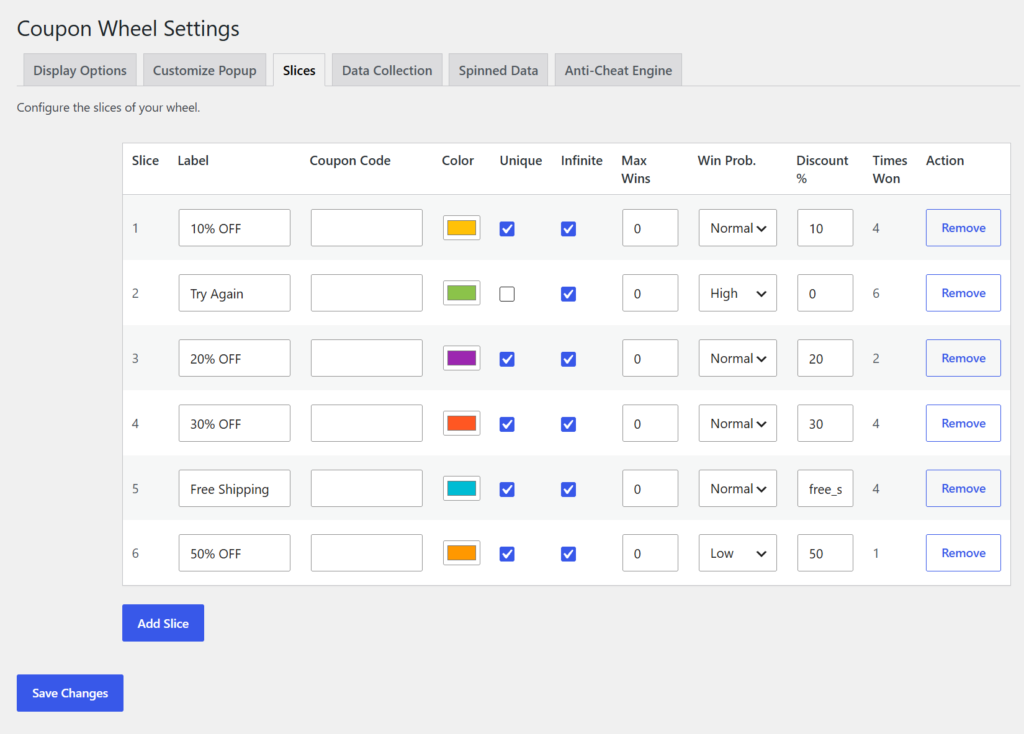
The Slices section is where you create and manage the rewards displayed on the coupon wheel. Each slice can be configured with its own prize label, WooCommerce coupon code, color, discount percentage, winning probability, and maximum number of wins. You can also choose whether each reward uses unique coupon codes or allows unlimited redemptions. The plugin makes it easy to add, edit, or remove slices, giving you complete flexibility to create attractive promotional campaigns tailored to your marketing strategy.
Data Collection :
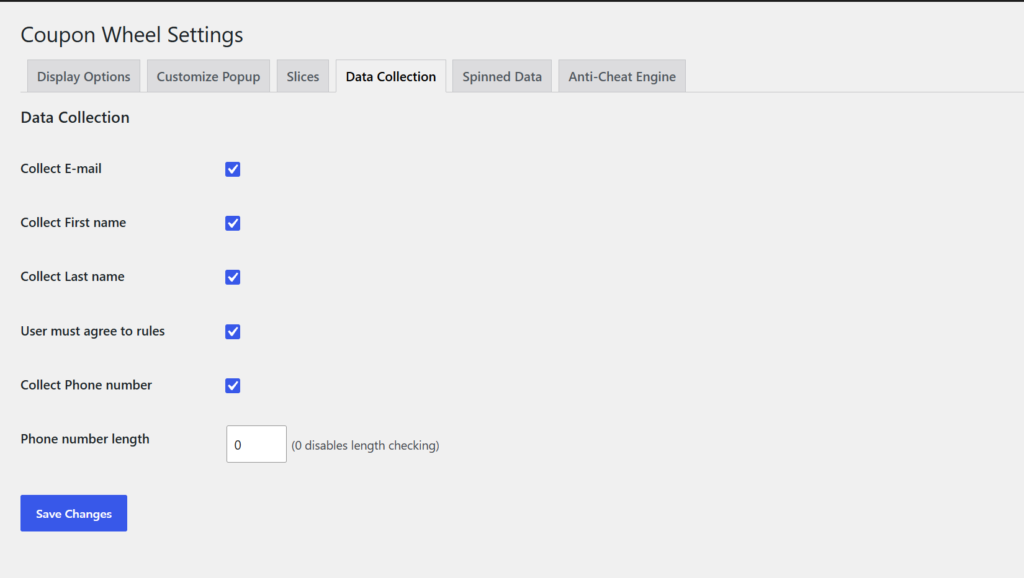
The Data Collection section allows you to determine which customer information should be collected before visitors are allowed to spin the wheel. Depending on your marketing requirements, you can request details such as the customer’s email address, first name, last name, and phone number. You can also require customers to accept your terms and conditions before participating. These settings help you generate valuable leads while ensuring that only the information you need is collected during the promotion.
Spinned Data :
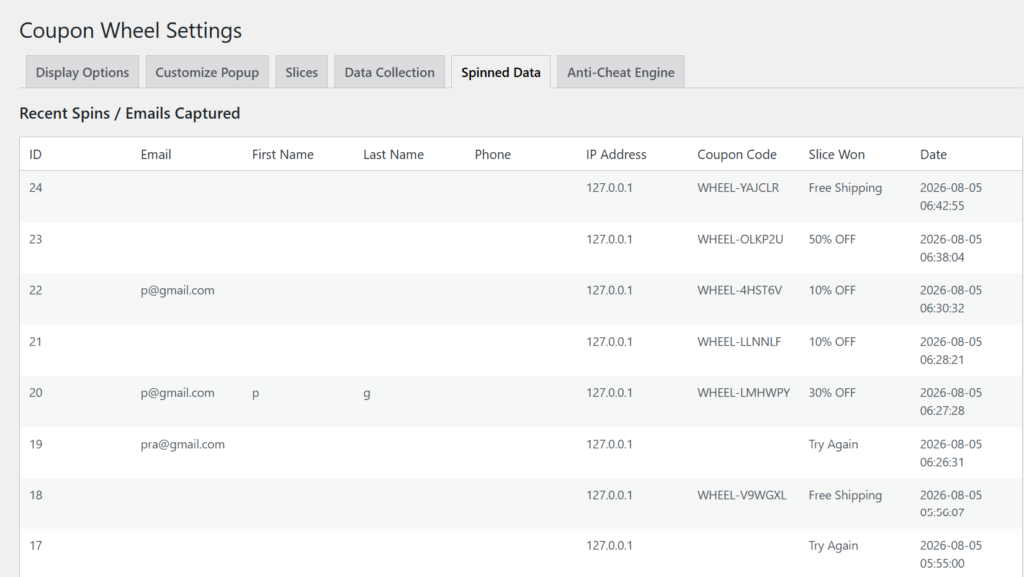
The Spinned Data section provides a complete record of every customer who has interacted with the coupon wheel. It displays useful information including the customer’s contact details, IP address, generated coupon code, prize won, and the exact date and time of each spin. This centralized reporting page makes it easy to monitor customer participation, review campaign performance, and verify coupon distribution whenever required.
Anti-Cheat Engine :
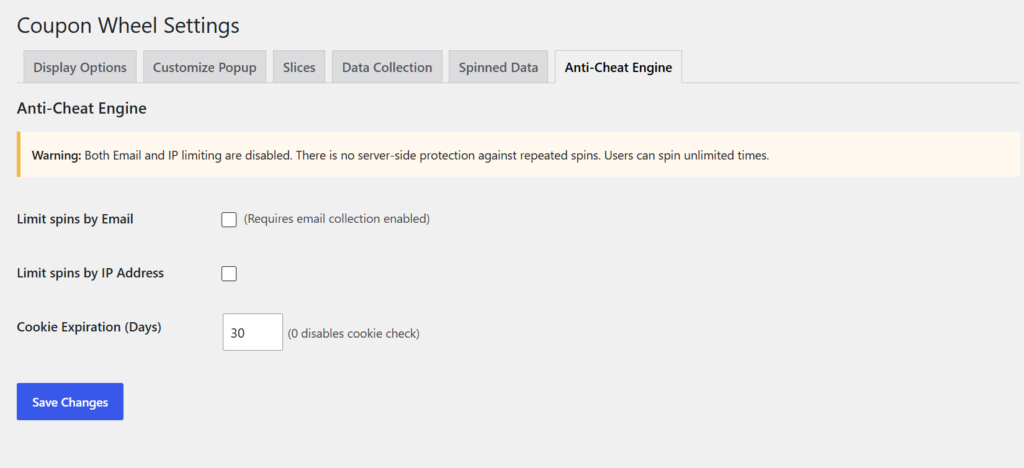
The Anti-Cheat Engine helps protect your promotional campaigns by preventing customers from repeatedly spinning the coupon wheel to claim multiple rewards. You can restrict spins based on email address or IP address and configure cookie expiration to control how frequently a visitor can participate. These security options help ensure fair usage, reduce coupon abuse, and maintain the integrity of your marketing campaigns while providing a better experience for genuine customers.
Frontend
Spin to Win Button :
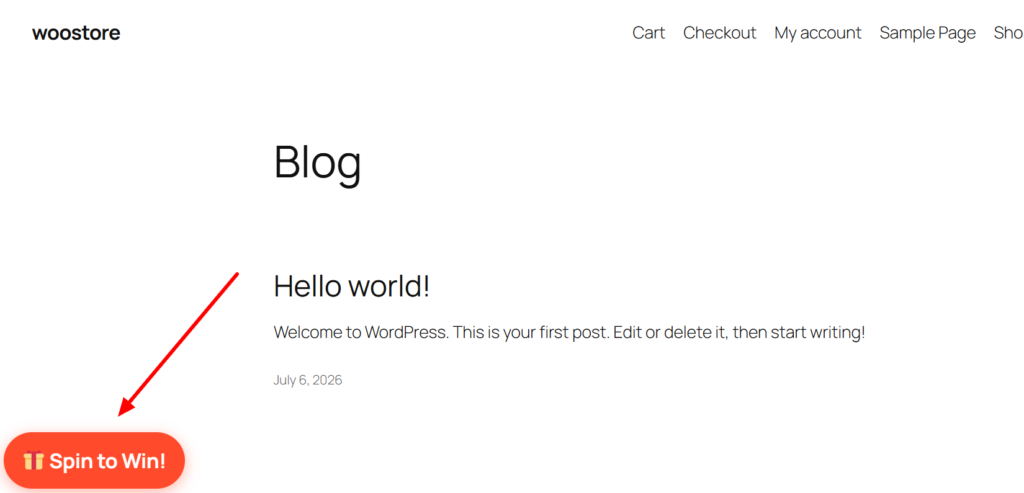
The Spin to Win button serves as the entry point to the coupon wheel and is displayed according to the settings configured by the store administrator. It can appear on selected pages or across the entire website, encouraging visitors to interact with the promotion. The floating button is fully customizable, allowing you to modify its text and colors to match your store’s branding while attracting customer attention.
Customer Information Popup :
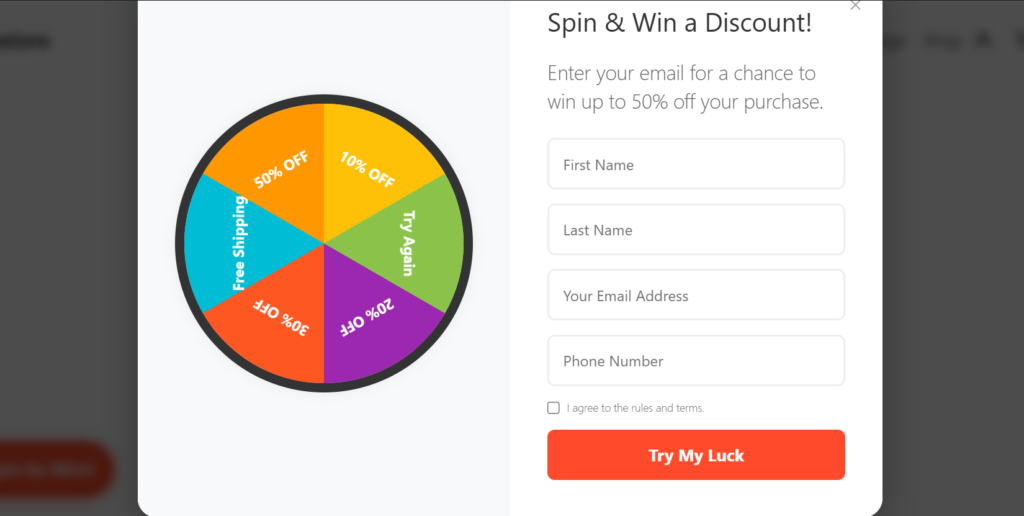
When customers click the Spin to Win button, an interactive popup appears displaying the coupon wheel along with a registration form. Depending on the configured settings, customers can enter their first name, last name, email address, and phone number before participating. If enabled, they must also accept the store’s terms and conditions before clicking the Try My Luck button. This process helps collect valuable customer information while creating an engaging shopping experience.
Spin Result & Coupon Code :
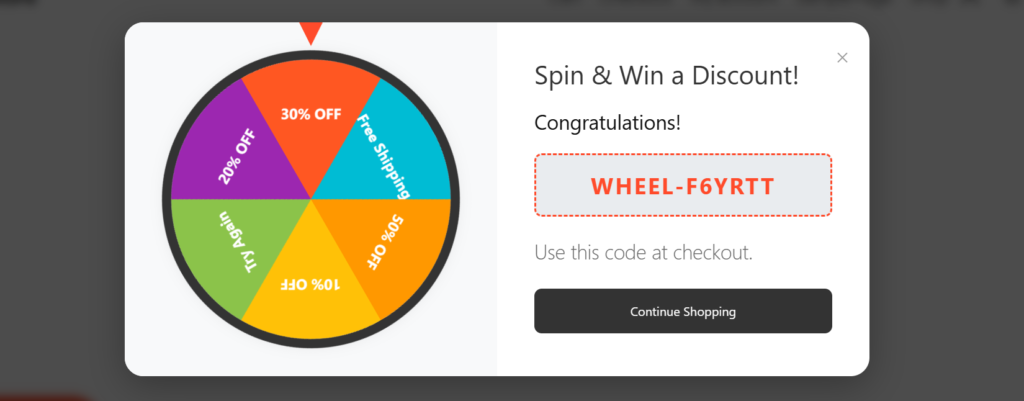
After the customer spins the wheel, it randomly stops on one of the configured reward slices. If the customer wins, a congratulations message is displayed along with a unique WooCommerce coupon code. The generated coupon can be copied instantly and used during checkout to claim the reward. This provides customers with immediate gratification while encouraging them to complete their purchase.
Coupon Applied at Checkout :
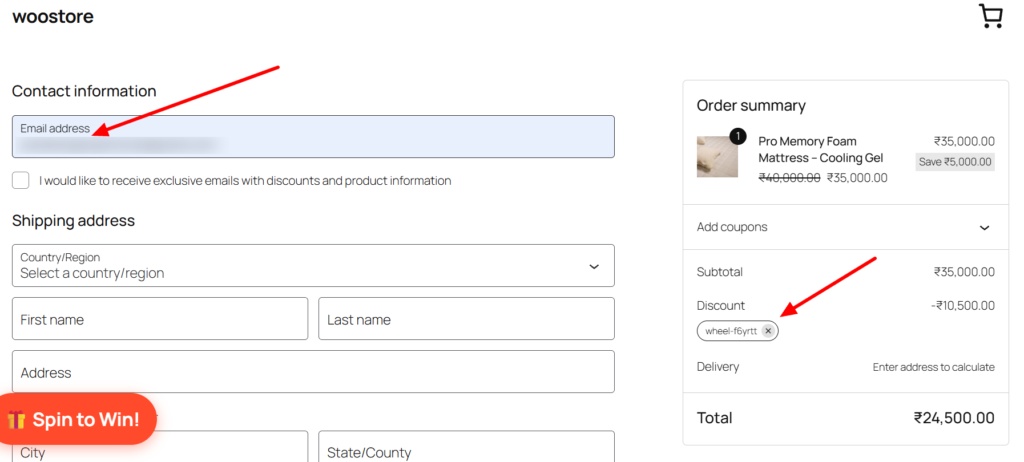
During checkout, customers simply apply the coupon code they received from the coupon wheel. Once applied, WooCommerce automatically calculates and displays the discount in the order summary. Customers can clearly view the applied coupon, the discount amount, and the updated order total before completing their purchase. This seamless redemption process improves the overall shopping experience and increases conversion rates.
Frequently Asked Questions
See the list below for our most frequently asked questions about our plugins.
If this doesn’t satisfy your requirement, please reach out to support team.
Q: What is Coupon Wheel for WooCommerce?
A: Coupon Wheel for WooCommerce is a gamified marketing plugin that displays an interactive spin-to-win wheel on your WooCommerce store. Visitors can spin the wheel to win discounts, free shipping, or other rewards while you collect valuable customer information for future marketing campaigns.
Q: What types of rewards can I offer?
A: You can configure multiple reward types, including percentage discounts, fixed cart discounts, fixed product discounts, free shipping, custom coupon codes, or no-prize options to create engaging promotional campaigns.
Q: Can I customize the coupon wheel?
A: Yes. You can fully customize the wheel segments, colors, prize labels, popup appearance, button text, success messages, and display settings to match your brand identity.
Q: What customer information can I collect?
A: The plugin allows you to collect customer details such as email address, first name, last name, and phone number before allowing users to spin the wheel. You can also enable a consent checkbox for GDPR compliance.
Q: Does the plugin generate WooCommerce coupons automatically?
A: Yes. Winning spins automatically generate unique WooCommerce coupons based on your configured reward settings, and customers can use them immediately during checkout.
Q: Can I control how often the popup appears?
A: Absolutely. You can configure display frequency, target specific pages, limit spins per visitor using cookies, IP address, or email, and prevent repeated abuse with built-in anti-cheat protection.
Q: Is the plugin mobile-friendly?
A: Yes. Coupon Wheel for WooCommerce is fully responsive and optimized to provide a smooth experience across desktops, tablets, and mobile devices.
Q: Is coding knowledge required to use this plugin?
A: No. The plugin is beginner-friendly with an intuitive admin interface, allowing you to set up and launch your coupon wheel in just a few minutes without writing any code.