
Woo Optimise for WooCommerce
Woo Optimise for WooCommerce helps you keep your WooCommerce store clean, fast, and organized by safely removing unnecessary data.
Preview data before deleting
Clean unused WooCommerce records
Schedule automatic cleanups
14 Days Money Back Guarantee
99% Customer Satisfaction Rating
Support
- Enjoy 12 months of updates and dedicated support starting from your purchase date. Renewal is optional and can be cancelled anytime.
- Prices displayed on this site are in United States Dollars (USD).
- Trusted by 5000+ Websites
Rating
45 Reviews
1.0.0
Plugin Version
2000+
Downloads
July 27, 2026
Last Updated
HOW IT WORKS?
Woo Optimise for WooCommerce
Woo Optimise for WooCommerce helps you keep your WooCommerce store clean, fast, and organized by safely removing unnecessary data. Instead of manually searching your database, the plugin lets you Preview data before deleting, Clean unused WooCommerce records, Keep recent data using retention rules, Schedule automatic cleanups, View cleanup history through logs.
Preview exactly what will be removed before performing any cleanup. Review matching records, verify the data, and clean with confidence while reducing the risk of accidental deletions.
Safely remove unnecessary WooCommerce data such as trashed products, expired sessions, orphaned records, completed scheduled actions, and other unused entries to keep your store fast, organized, and optimized.
Automate routine maintenance by scheduling cleanup tasks to run hourly, daily, weekly, or monthly. Keep your WooCommerce database optimized without the need for manual intervention.
Trusted by clients from 50+ Countries
Try with Confidence

100% Money-Back Guarantee
Our 30-day No-Risk Money Back Policy assures 100% money back.

99% Satisfaction Rating
We make every effort to make sure our customers are happy.

Average 5 star rating
Our plugins are highly regarded in WordPress forums and review platforms.
How Does The Plugin Work?
See How the Woo Optimise for WooCommerce Plugin Works
Admin page
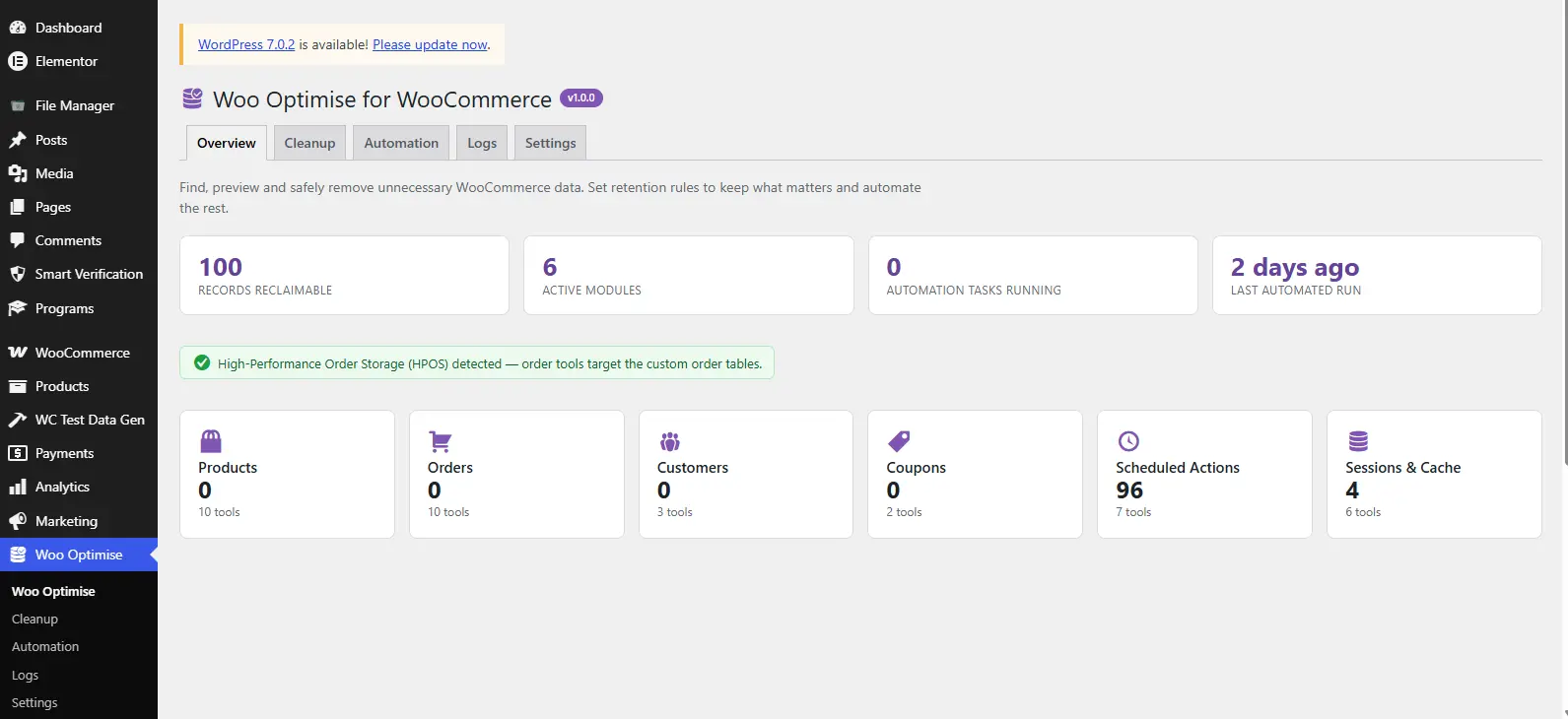
1. Woo Optimise Overview
The Overview page displays:
- Total reclaimable records
- Active cleanup modules
- Running automation tasks
- Last automation run
- HPOS status (if enabled)
It also provides quick access to every cleanup module.
2. Cleanup Modules
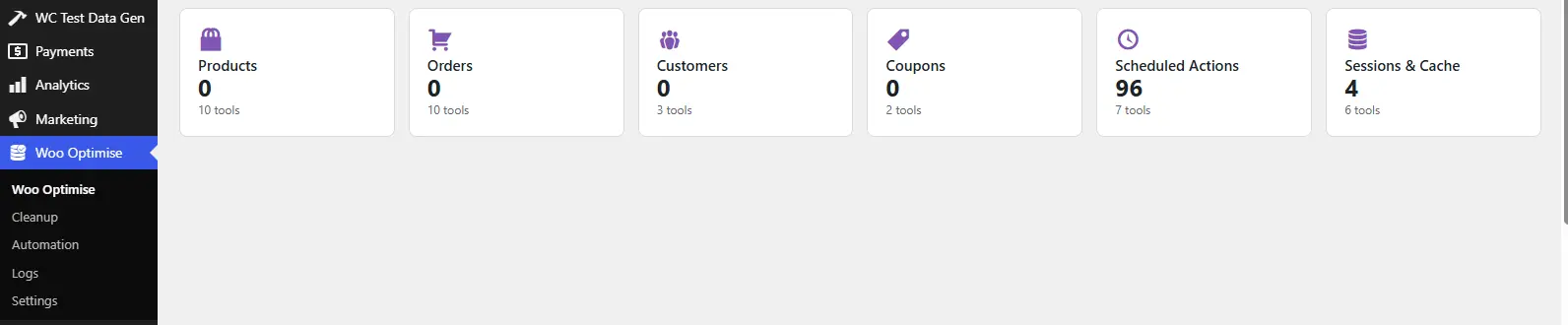
The plugin contains 39 cleanup tools grouped into six modules.
3. Products Cleanup
Clean unnecessary product-related data.
Available tools include:
- Trashed Products
- Auto Draft Products
- Product Revisions
- Orphaned Variations
- Unused Attribute Terms
- Orphaned Term Relationships
- Orphaned Product Comments
- Orphaned Product Meta
- Orphaned Reviews
- Products with Missing Data (Diagnostic)
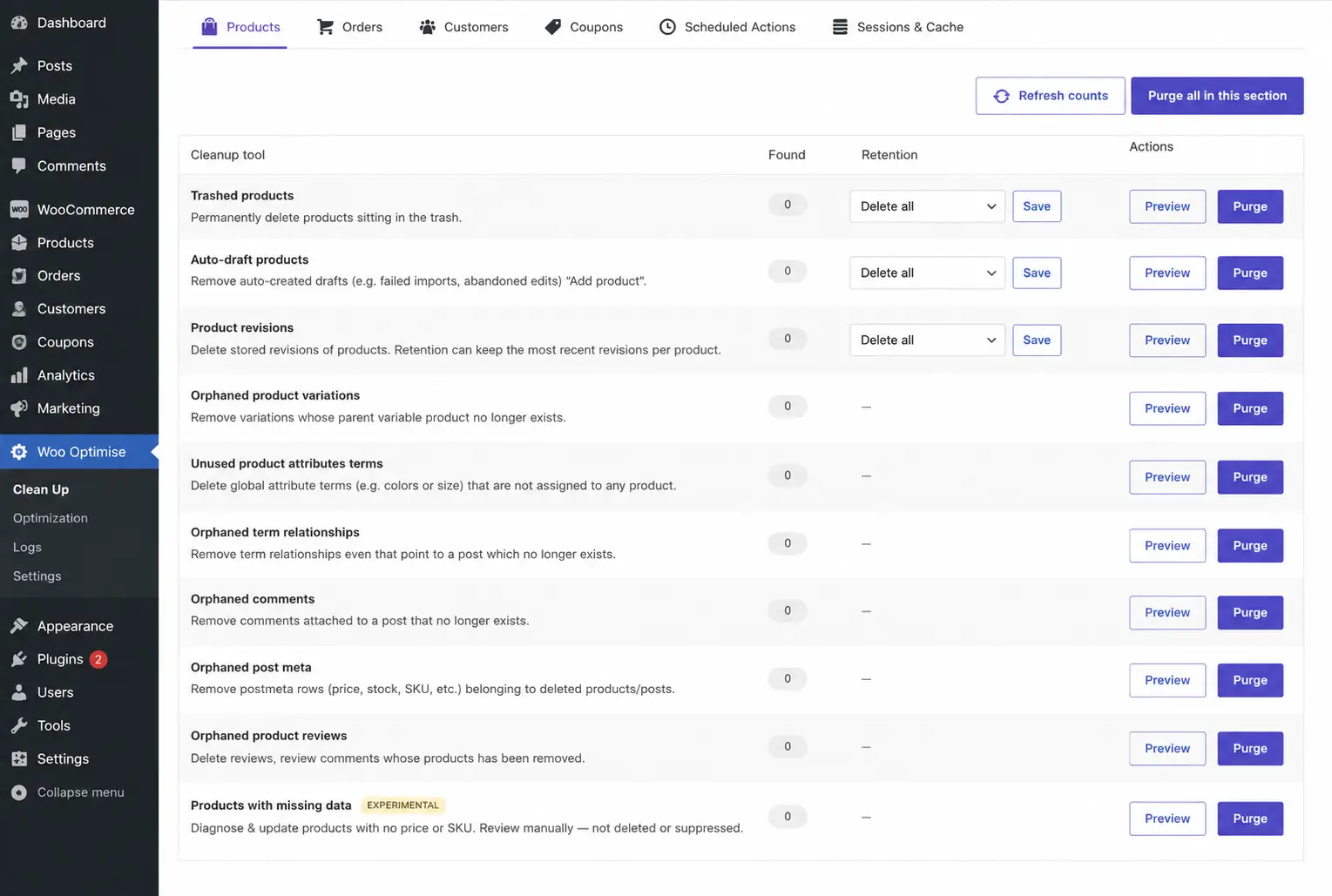
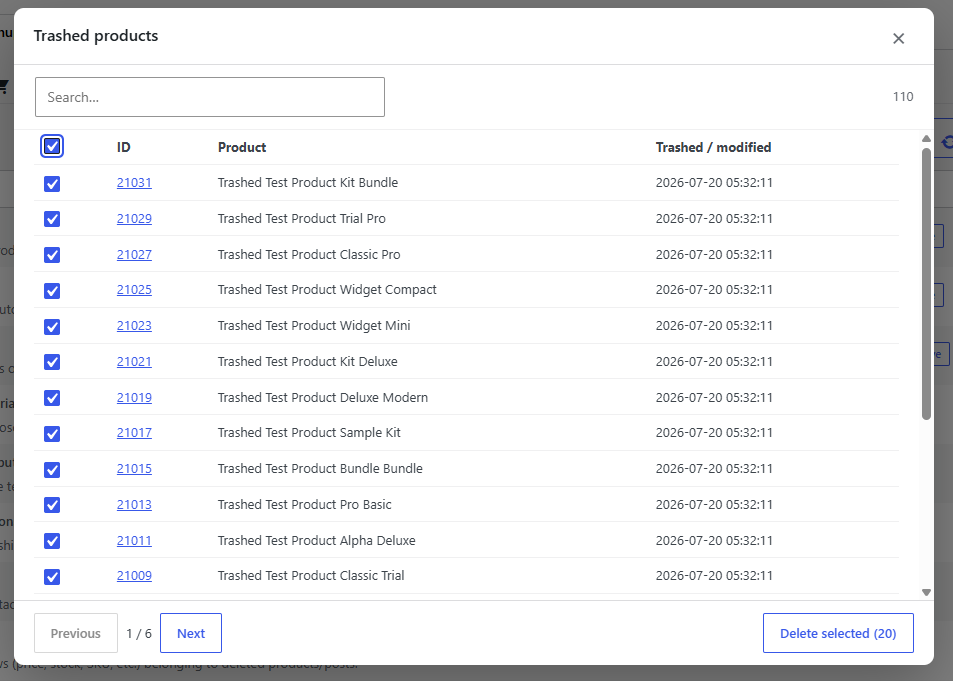
How to use:
- Open Cleanup
- Select Products
- Choose a tool
- Click Preview
- Review the records
- Configure retention rules (optional)
- Click Delete
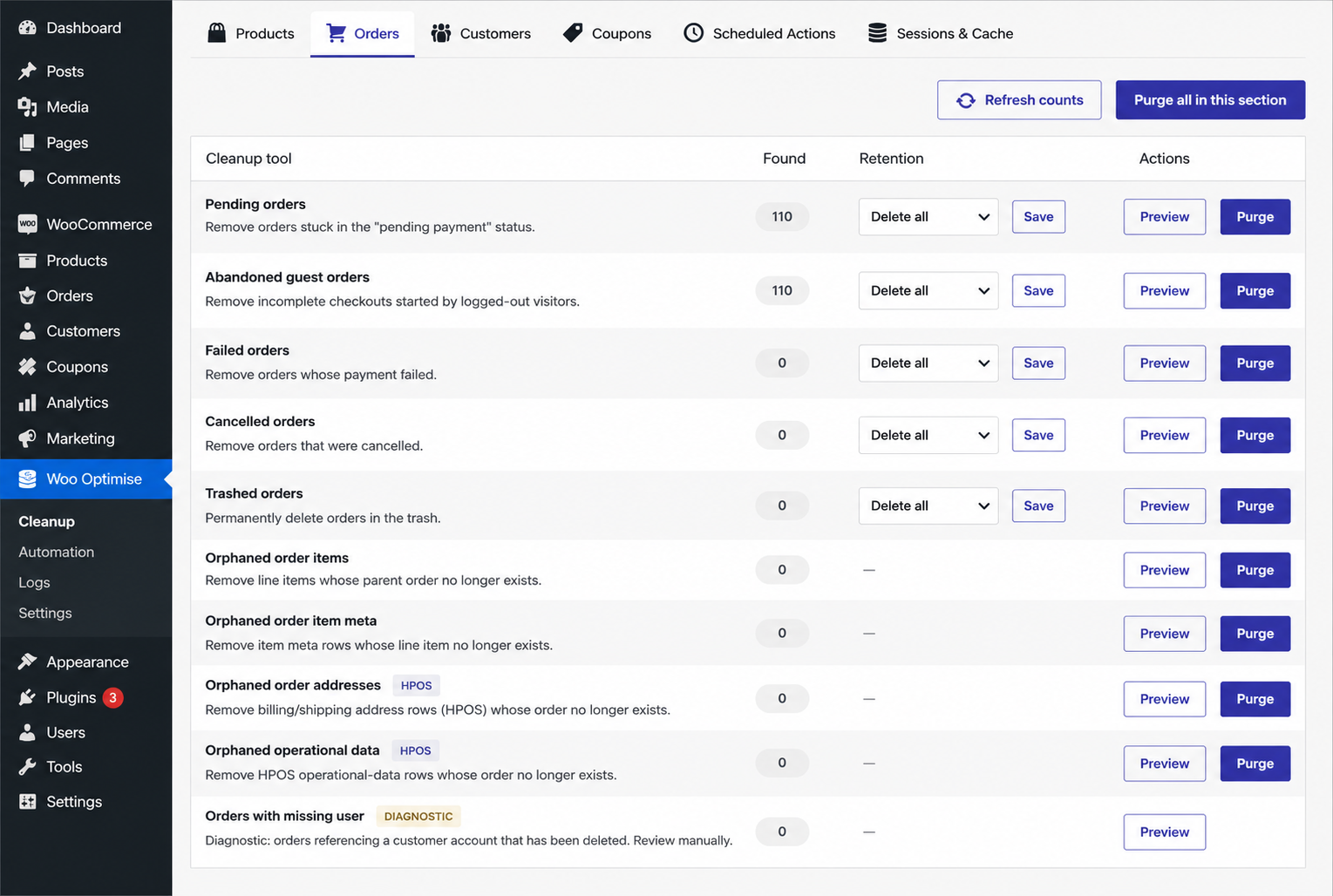
4. Orders Cleanup
Remove unnecessary order records.
Available tools include:
- Pending Orders
- Failed Orders
- Cancelled Orders
- Guest Abandoned Orders
- Trashed Orders
- Orphaned Order Items
- Orphaned Item Meta
- Orphaned Addresses (HPOS)
- Orphaned Operational Data (HPOS)
- Orders with Missing Users (Diagnostic
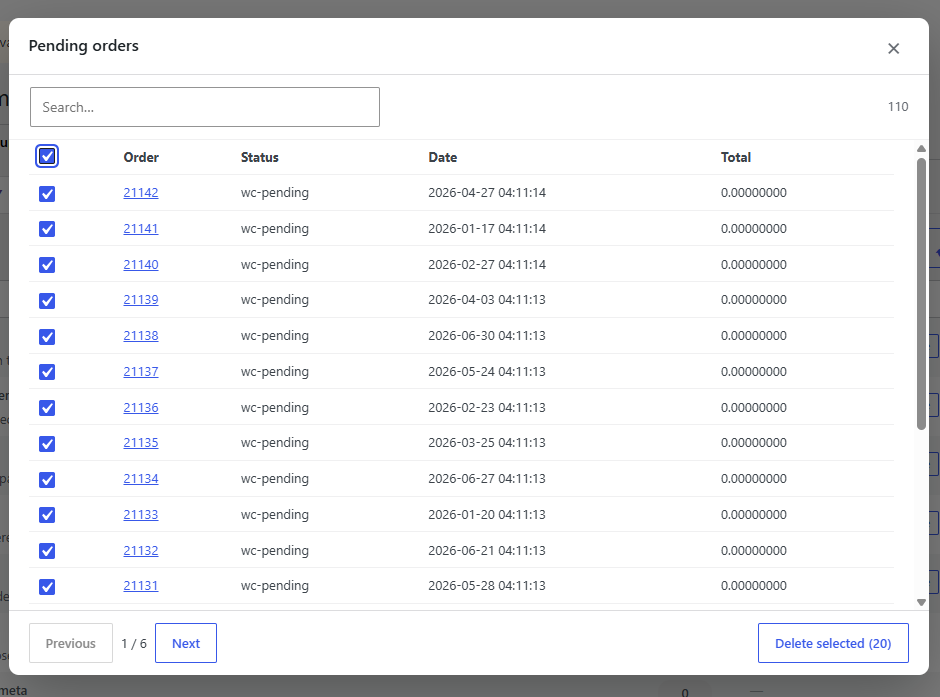
How to use:
- Open Cleanup
- Select Orders
- Choose a tool
- Click Preview
- Review the records
- Configure retention rules (optional)
- Click Delete
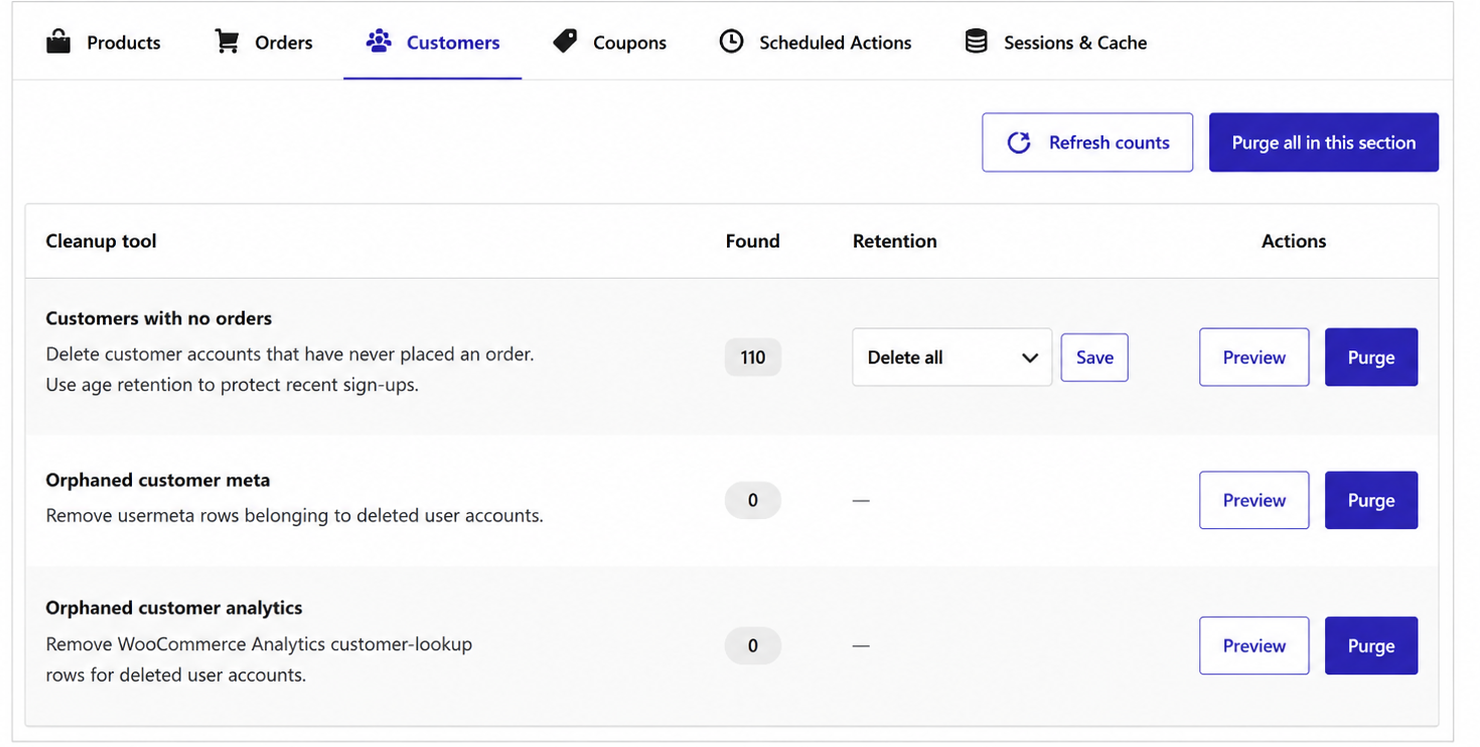
5. Customers Cleanup
Keep your customer database clean.
Tools include:
- Customers with No Orders
- Orphaned Customer Meta
- Orphaned Customer Analytics
How to use:
- Open Cleanup
- Select Customers
- Choose a tool
- Click Preview
- Review the records
- Configure retention rules (optional)
- Click Delete
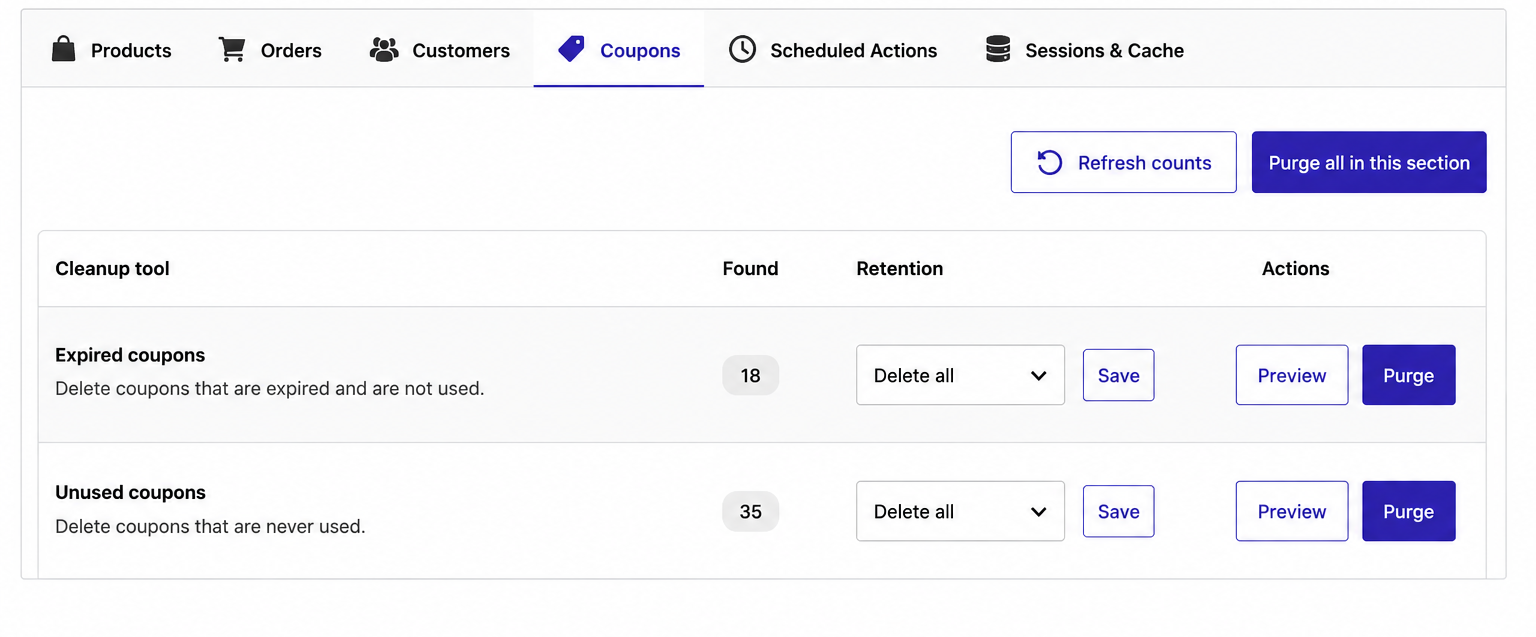
6. Coupons Cleanup
Manage unused coupons.
Tools include:
- Expired Coupons
- Unused Coupons
How to use:
- Open Cleanup
- Select Coupons
- Choose a tool
- Click Preview
- Review the records
- Configure retention rules (optional)
- Click Delete
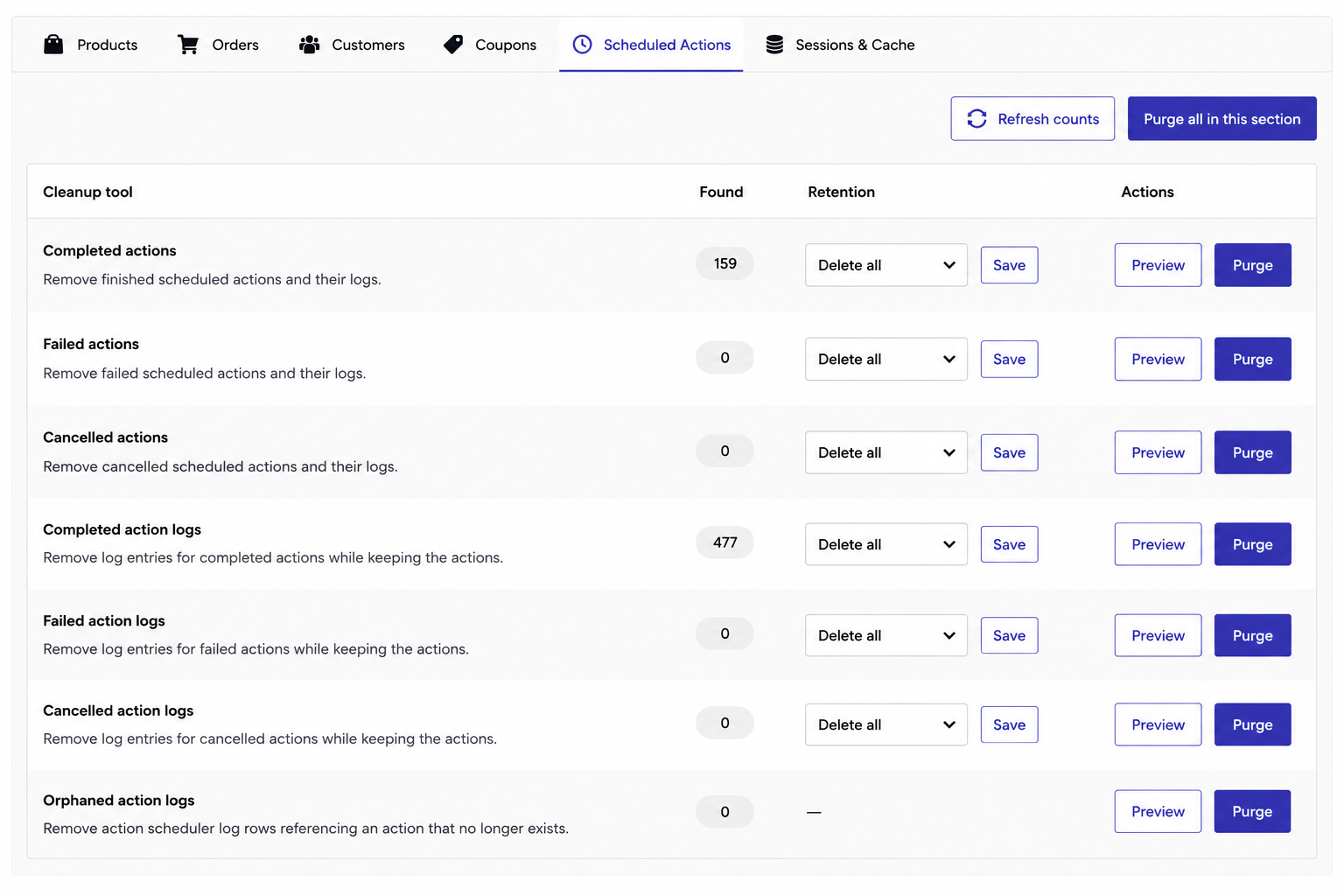
7. Scheduled Actions Cleanup
Clean Action Scheduler tables.
Available tools:
- Completed Actions
- Failed Actions
- Cancelled Actions
- Completed Logs
- Failed Logs
- Cancelled Logs
- Orphaned Logs
Useful for stores running many background tasks.
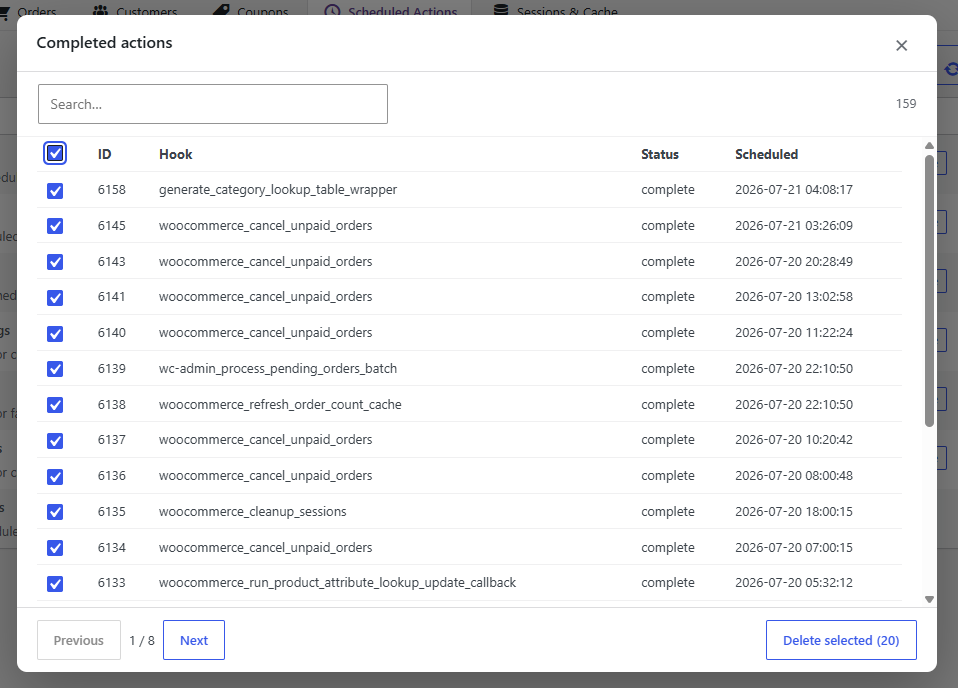
How to use:
- Open Cleanup
- Select Scheduled Actions
- Choose a tool
- Click Preview
- Review the records
- Configure retention rules (optional)
- Click Delete
8. Sessions & Cache Cleanup
Remove temporary WooCommerce data.
Tools include:
- Expired Sessions
- WooCommerce Transients
- Theme Info Cache
- Analytics Cache
- Template Cache
- WooCommerce.com Cache
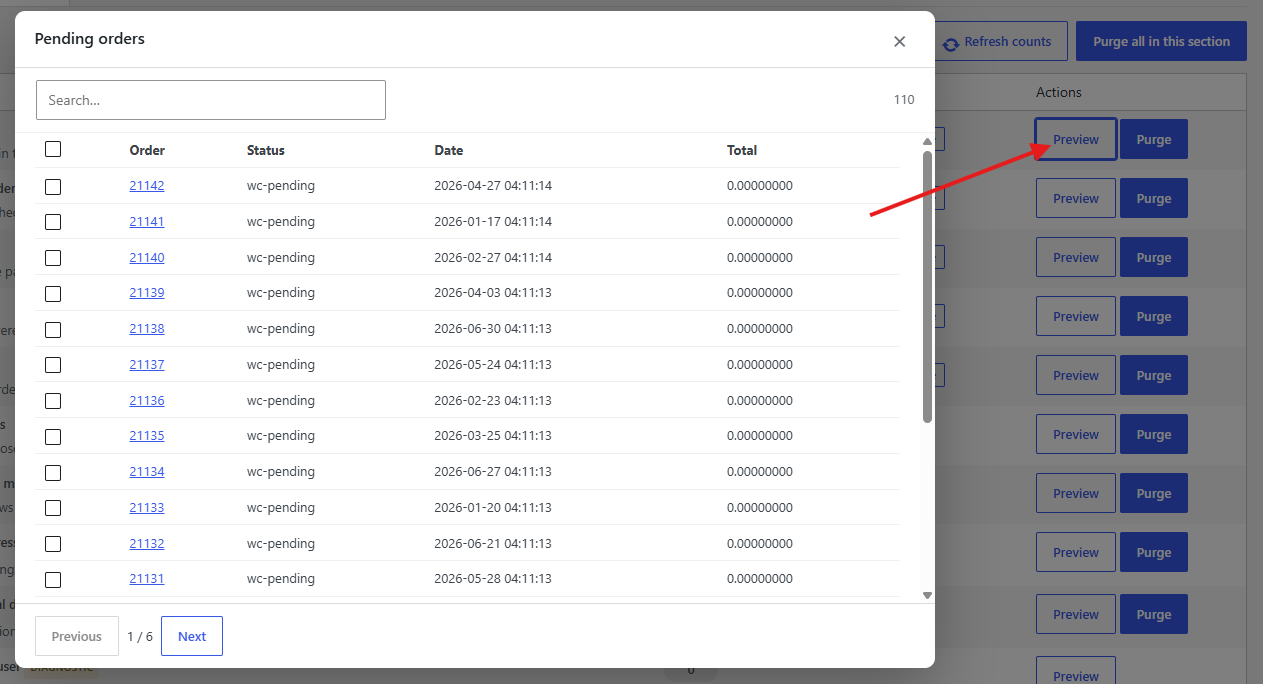
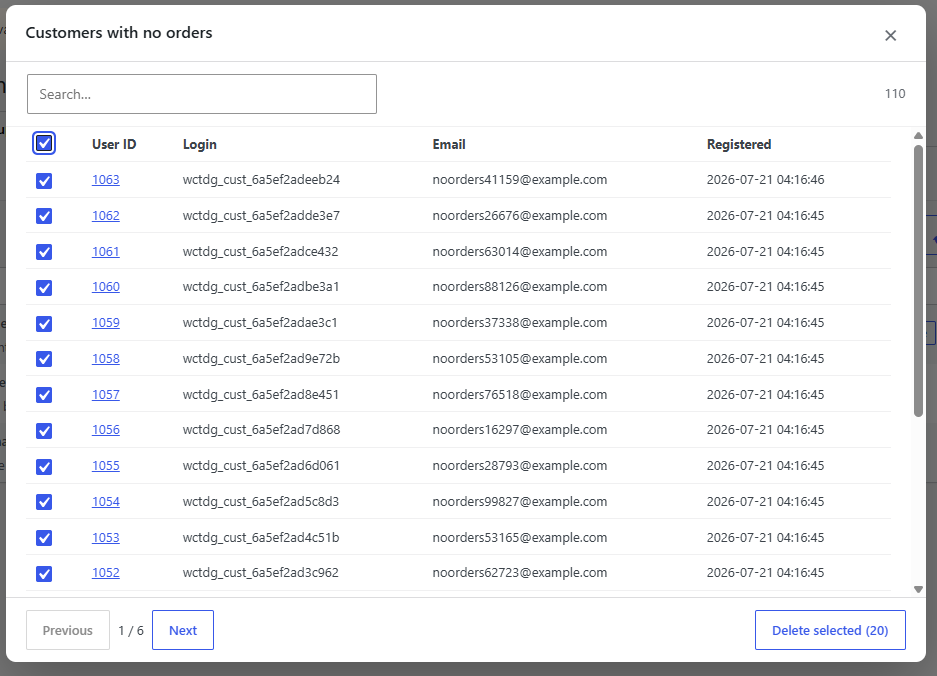
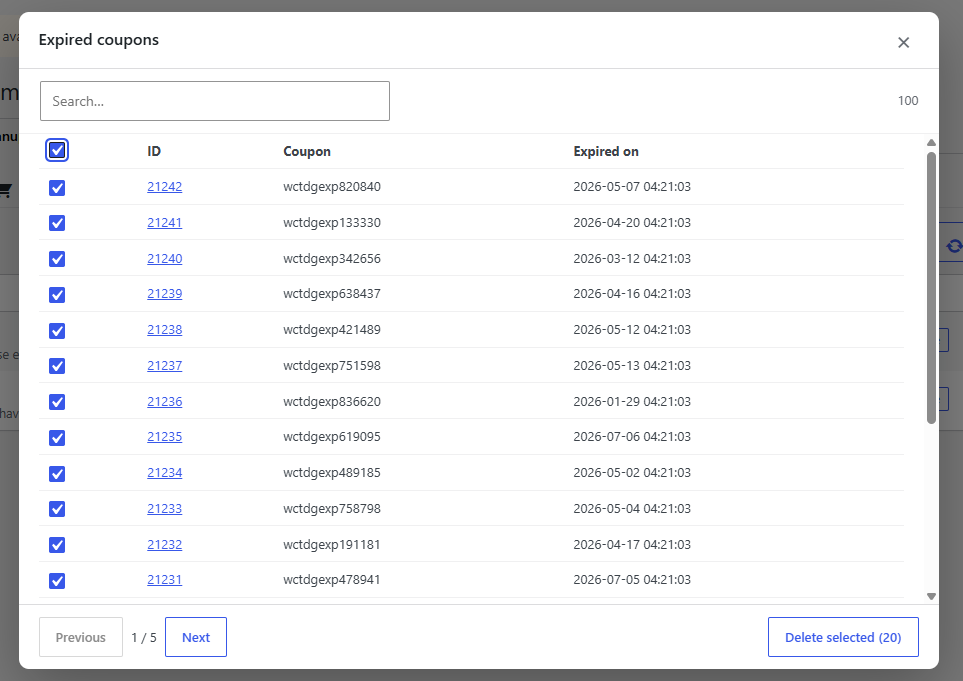
9. Preview Before Delete
Every cleanup tool provides a preview.
Before deleting, you can:
- View matching records
- Search records
- Review IDs and details
- Confirm exactly what will be removed
This minimizes accidental deletion.
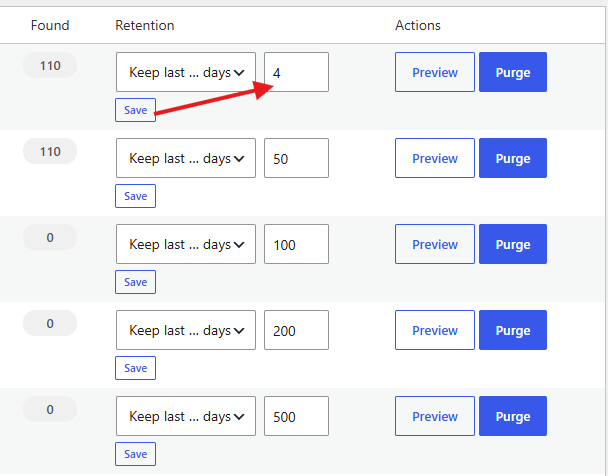
10. Retention Rules
Retention Rules allow you to preserve important data. Keep the last 90 days of orders. Older records will be removed.
11. Cleanup Methods
Two cleanup methods are available.
1. Fast SQL
- Fastest option
- Direct database deletion
- Recommended for large stores
2. WordPress Method
- Uses WordPress APIs
- Fires WordPress hooks
- Better compatibility with third-party plugins
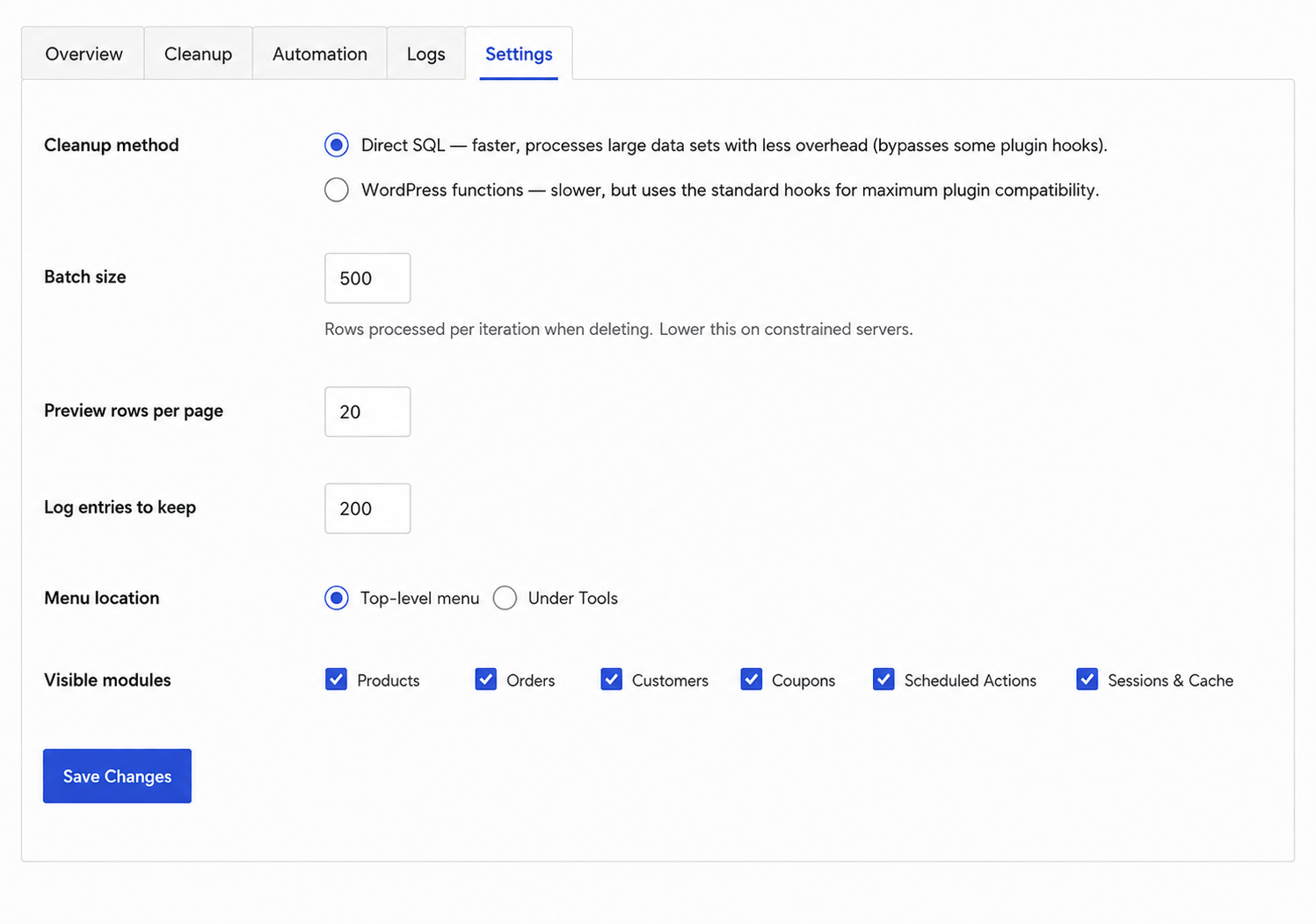
12. Automation
Instead of running cleanups manually, you can automate them.
Create a Task
- Open Automation
- Click Add Task
- Give the task a name
- Select cleanup tools
- Configure retention rules
- Choose schedule
Available schedules include:
- Hourly
- Twice Daily
- Daily
- Weekly
- Monthly
Save and enable the task. The plugin will execute automatically.
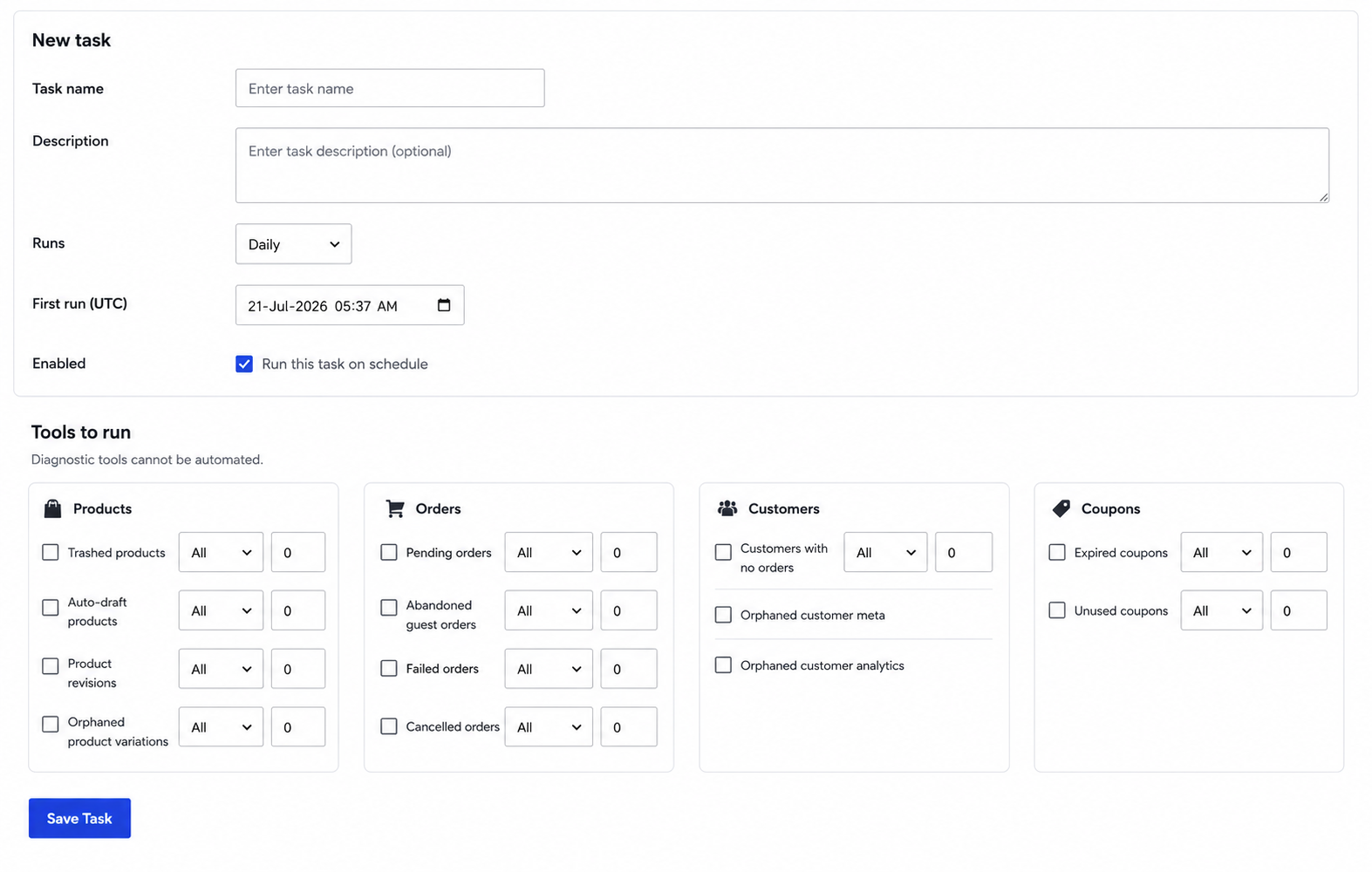
13. Logs
Every cleanup is recorded.
The Logs page shows:
- Date and time
- Cleanup task
- Manual or automated execution
- Number of deleted records
- Status
Logs help you monitor maintenance activity.
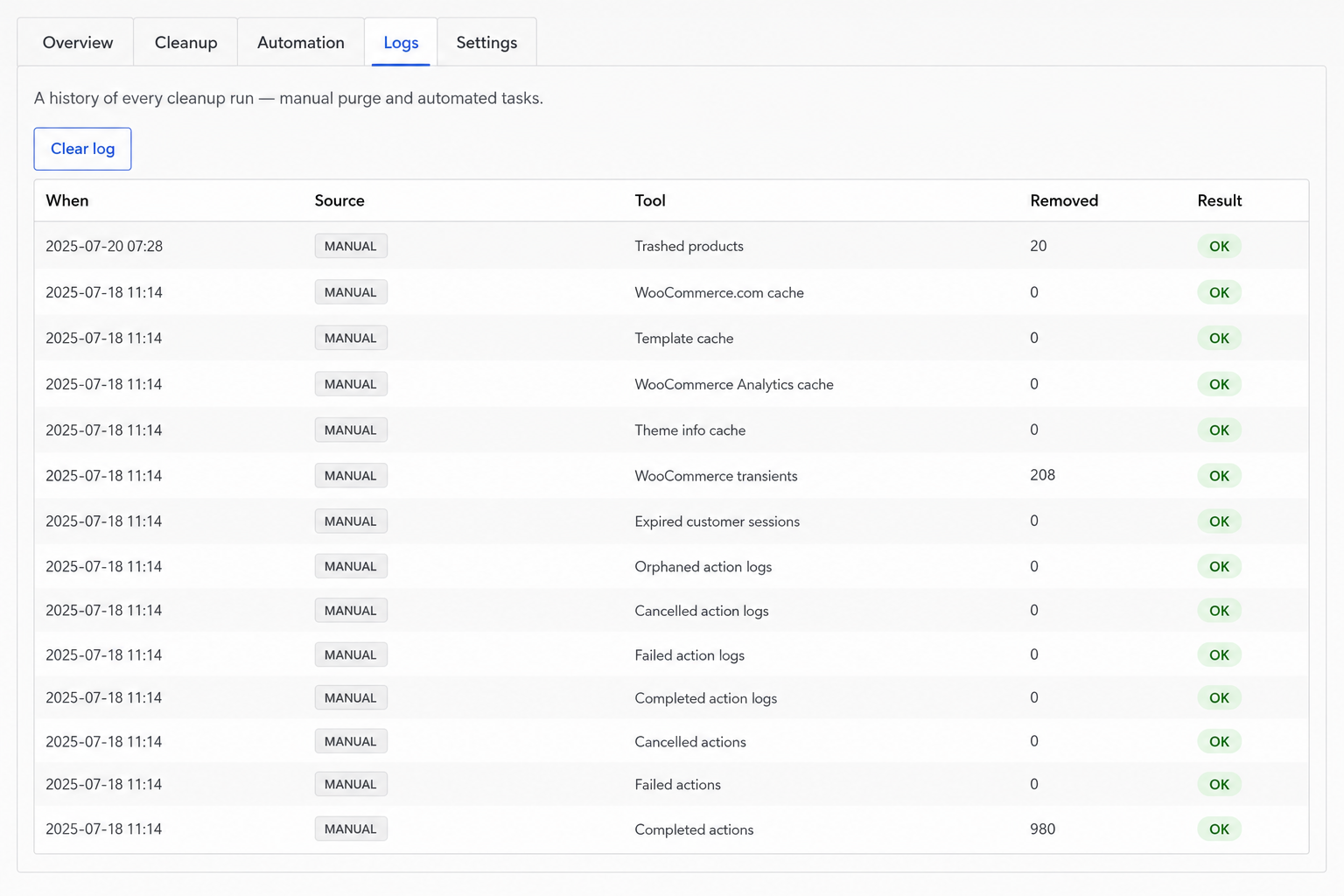
14. Plugin Settings
From Settings, you can:
- Choose cleanup method
- Batch Size
- Preview rows per page
- Log entries to keep
- Choose Menu location
- Choose Visible modules
Woo Optimise for WooCommerce helps you keep your WooCommerce store clean, fast, and organized by safely removing unnecessary data.
Frequently Asked Questions
See the list below for our most frequently asked questions about our plugins.
If this doesn’t satisfy your requirement, please reach out to support team.
Q: What does Woo Optimise for WooCommerce do?
A: Woo Optimise for WooCommerce helps clean and optimize your WooCommerce database by removing unnecessary data such as trashed products, expired sessions, orphaned records, scheduled actions, old orders, coupons, and other unused WooCommerce data. This improves your store’s performance and keeps your database organized.
Q: Is it safe to delete data using this plugin?
A: Yes. The plugin includes a Preview Before Delete feature that lets you review all matching records before any cleanup is performed. However, we always recommend creating a full database backup before running large cleanups.
Q: What is the "Preview Before Delete" feature?
A: This feature displays all records that match your selected cleanup criteria before anything is removed. You can review the data, verify what will be deleted, and proceed with confidence.
Q: What are Retention Rules?
A: Retention Rules allow you to preserve important data while cleaning older records. You can choose to:
- Keep the last X days of data.
- Keep the latest X records.
This helps prevent accidental removal of recent orders, products, or customer information.
Q: Can I schedule automatic cleanups?
A: Yes. The plugin includes an Automation feature that allows you to create scheduled cleanup tasks. You can run cleanups hourly, daily, weekly, or monthly without any manual intervention.
Q: Does the plugin support WooCommerce HPOS?
A: Yes. Woo Optimise for WooCommerce fully supports High-Performance Order Storage (HPOS). The plugin automatically detects whether HPOS is enabled and cleans the appropriate WooCommerce order tables.
Q: What's the difference between Fast SQL and WordPress cleanup methods?
A: The plugin offers two cleanup methods:
- Fast SQL: Performs direct database queries for maximum speed and is recommended for large stores.
- WordPress Method: Uses native WordPress APIs, ensuring better compatibility with plugins that rely on WordPress hooks.
Q: Can I recover deleted data?
A: No. Once cleanup is completed, deleted records cannot be restored by the plugin. We strongly recommend creating a complete database backup before performing any cleanup operations.
Q: Will this plugin improve my website's performance?
A: Yes. Removing unnecessary WooCommerce data can reduce database size, improve database queries, decrease scheduled task overhead, and help your WooCommerce store perform more efficiently, especially on larger websites.
Q: Does the plugin keep a record of cleanup activities?
A:Yes. Every manual and automated cleanup is recorded in the Logs section. You can review when a cleanup was performed, which modules were executed, the number of records removed, and the cleanup status.