

Shipping based on weight for WooCommerce
Automatically calculate WooCommerce shipping costs based on cart weight with flexible rules, subtotal conditions, shipping class restrictions, country restrictions, and free shipping thresholds.
Overview
Shipping Based on Weight for WooCommerce allows store owners to create powerful weight-based shipping methods without writing code. Configure shipping charges using a base cost, cost per unit of weight, or weight-step pricing while controlling shipping availability using minimum and maximum weight, cart subtotal, shipping classes, and destination countries.
The plugin integrates seamlessly with WooCommerce Shipping Zones, Cart & Checkout Blocks, and HPOS, making it an ideal solution for stores that require flexible shipping calculations.
Key Features
- Weight-based shipping calculation
- Base shipping cost support
- Cost per weight unit
- Weight-step pricing
- Minimum weight restriction
- Maximum weight restriction
- Minimum order subtotal
- Maximum order subtotal
- Free shipping threshold
- Country restrictions
- Shipping class restrictions
- WooCommerce Shipping Zone support
- HPOS compatibility
- Cart & Checkout Blocks support
- Customer-friendly validation messages
- Easy WooCommerce integration
Installation
- Download the extension from your WooCommerce dashboard.
- Go to Plugins > Add New > Upload and select the ZIP file you just downloaded.
- Click Install Now, and then Activate.
How It Works ?
- Enable the Shipping Based on Weight method from your WooCommerce Shipping Zone.
- Configure the shipping cost, weight limits, subtotal conditions, and other rules.
- When a customer adds products to the cart, the plugin calculates the total cart weight.
- The plugin checks all configured conditions and calculates the shipping cost automatically.
- The shipping charge is displayed on the Cart and Checkout pages for the customer.
Backend Settings
Manage Shipping Zones :
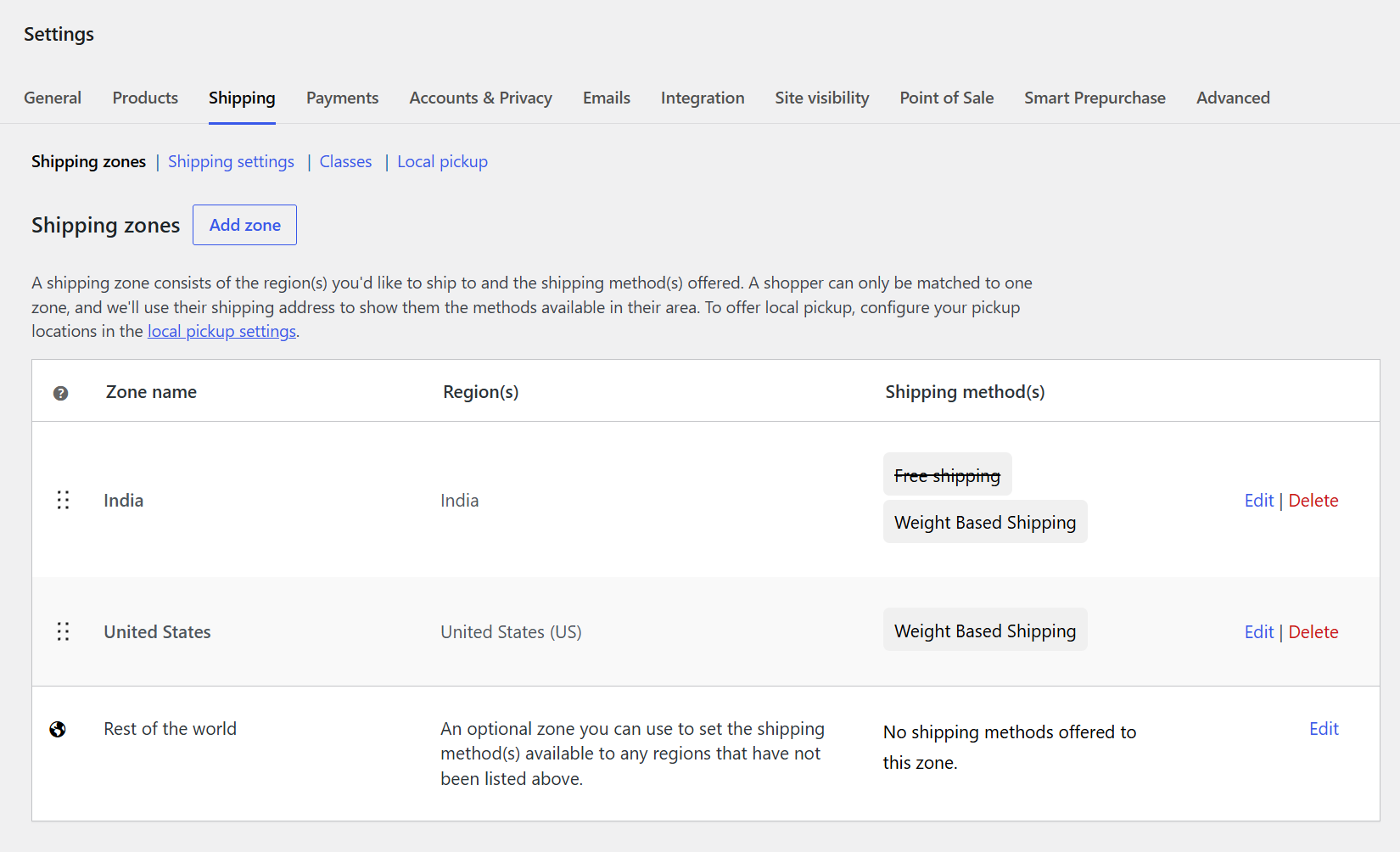
The Shipping Zones section provides an overview of all configured shipping locations.
You can view each zone’s name, assigned regions, and available shipping methods.
Configure Weight Based Shipping separately for different countries or regions.
For example, different rates can be created for India and the United States.
Use the Edit option to modify an existing zone or its shipping methods.
The Delete option allows you to remove a shipping zone that is no longer required.
Create Shipping Zone :
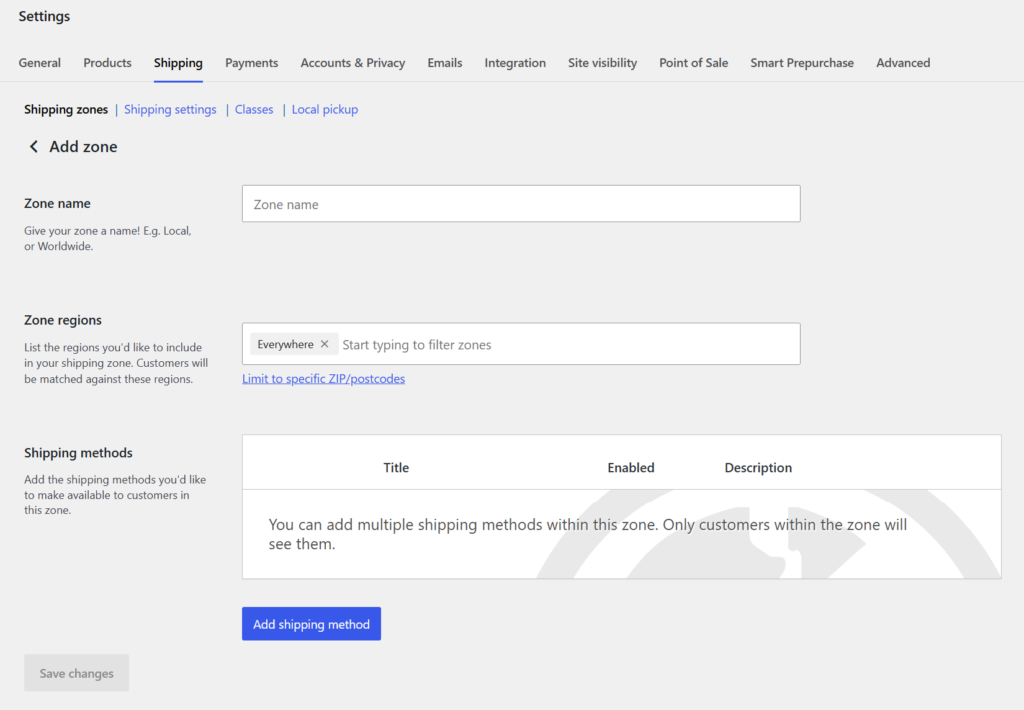
Create a WooCommerce shipping zone by entering a suitable Zone Name for your target location.
Select the countries or regions where the shipping zone should apply.
WooCommerce allows you to further restrict the zone using specific ZIP or postcode ranges.
Under Shipping Methods, click Add shipping method to select the required shipping option.
Choose Weight Based Shipping to enable weight-based rates for the selected zone.
Save the shipping zone after completing the configuration to make the method available to customers.
Add Weight Based Shipping Method :
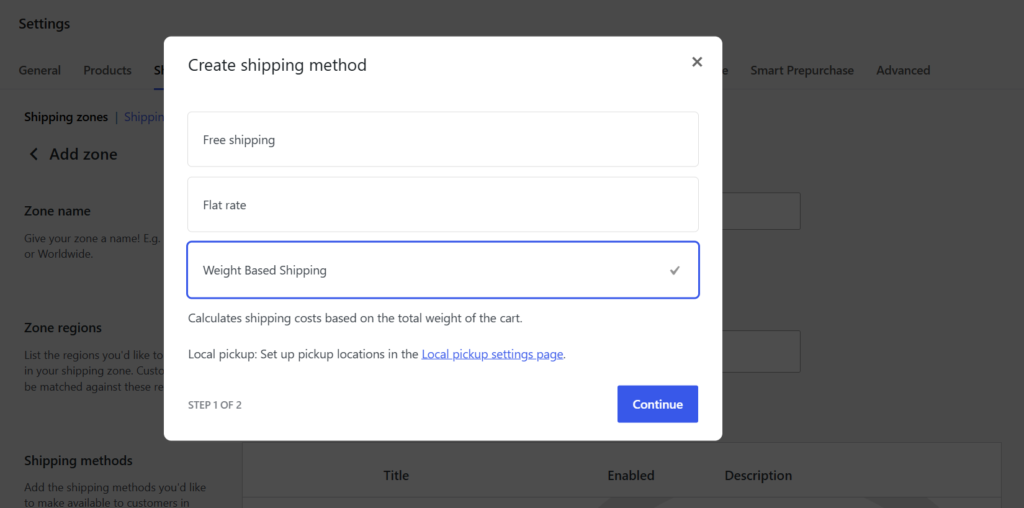
From the Create shipping method screen, select Weight Based Shipping to add the plugin’s shipping method.
The method description explains that shipping charges are calculated based on the total cart weight.
Select the shipping method when setting up a new WooCommerce shipping zone.
Click Continue to move to the configuration settings.
This allows you to create customized weight-based shipping rates for different locations.
The shipping method can be configured independently for each WooCommerce Shipping Zone.
Configure Weight Based Shipping :
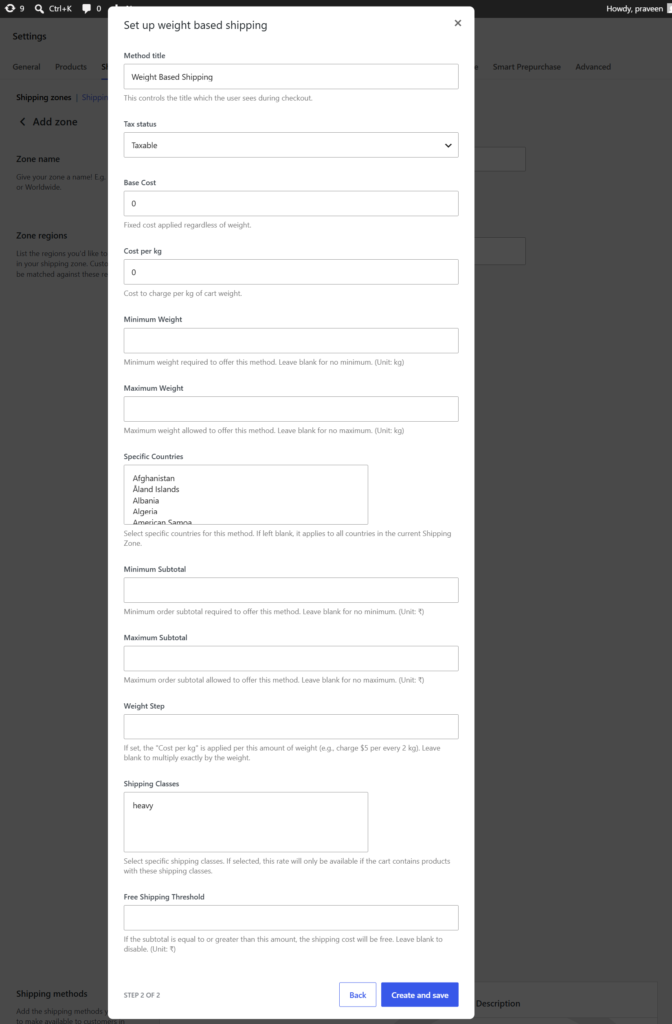
The Set up weight based shipping screen allows you to configure the shipping method according to your store requirements.
Enter a Method Title that customers will see during checkout and select the required Tax Status.
Set a Base Cost and Cost per kg to calculate shipping charges based on cart weight.
Configure minimum and maximum weight limits to control when the shipping method is available.
You can also define specific countries, subtotal limits, weight steps, and shipping classes.
Use the Free Shipping Threshold to provide free shipping when the order reaches the specified subtotal.
Frontend Workflow
Frontend Checkout :
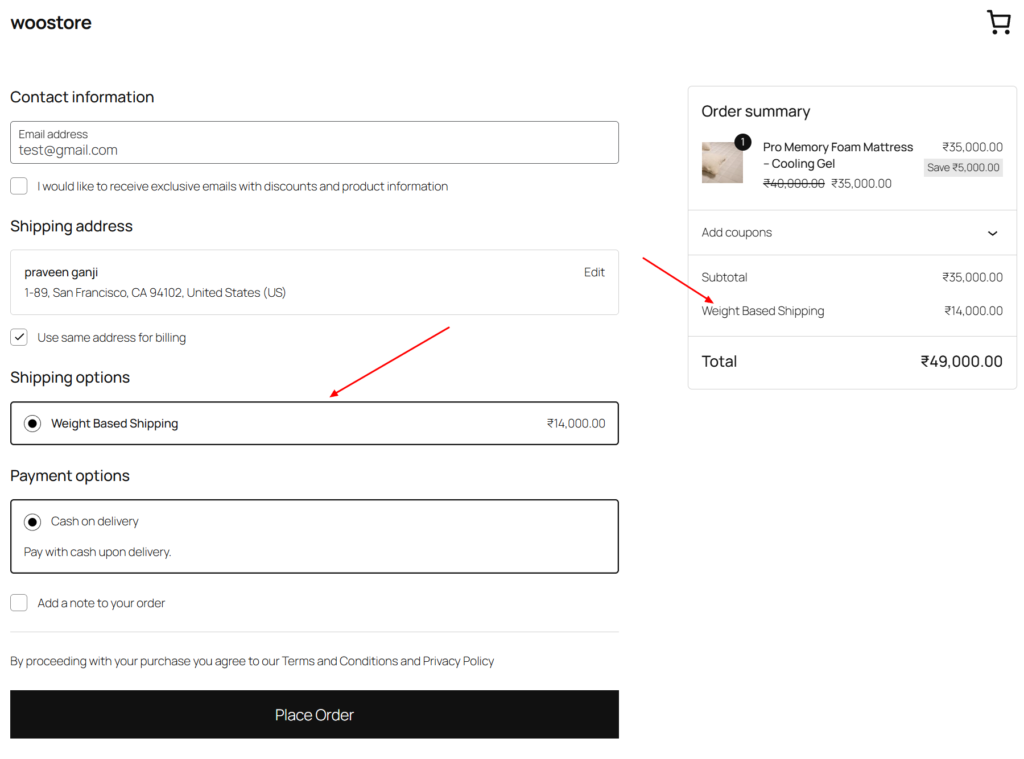
The Weight Based Shipping method is displayed on the checkout page.
Customers can select the available shipping option for their order.
The plugin automatically calculates the shipping charge based on the cart weight.
The calculated shipping cost is clearly shown in the order summary.
Customers can review the shipping charge before placing their order.
Frequently Asked Questions
See the list below for our most frequently asked questions about our plugins.
If this doesn’t satisfy your requirement, please reach out to support team.
Q: What is Shipping Based on Weight for WooCommerce?
A: Shipping Based on Weight for WooCommerce is a flexible shipping plugin that automatically calculates shipping charges based on the total cart weight. It also supports subtotal conditions, shipping classes, country restrictions, and free shipping thresholds.
Q: How is the shipping cost calculated?
A: The plugin calculates shipping costs using a configurable base shipping cost and a cost per unit of weight. You can also enable weight-step pricing to charge shipping in predefined weight intervals.
Q: Can I set minimum and maximum weight limits?
A: Yes. You can define minimum and maximum cart weight limits. If the customer’s cart falls outside the configured range, the shipping method will not be available.
Q: Can I offer free shipping?
A: Yes. You can specify a free shipping threshold based on the cart subtotal. Once the customer’s order reaches the configured amount, shipping charges can automatically become free.
Q: Can I restrict shipping by country or shipping class?
A: Absolutely. The plugin allows you to restrict shipping methods to specific countries and WooCommerce shipping classes, giving you complete control over when the shipping method is available.
Q: Does the plugin work with WooCommerce Shipping Zones?
A: Yes. The plugin integrates seamlessly with WooCommerce Shipping Zones, allowing you to configure different weight-based shipping methods for different locations.
Q: Is the plugin compatible with WooCommerce Cart & Checkout Blocks?
A: Yes. The plugin fully supports WooCommerce Cart & Checkout Blocks, ensuring a smooth checkout experience with modern WooCommerce stores.
Q: Do I need coding knowledge to use this plugin?
A: No. The plugin is designed with an intuitive settings interface, allowing you to configure advanced weight-based shipping rules without writing any code.