

Smart Addresses for WooCommerce
Save Multiple Addresses
Flexible Checkout Experience
Multiple Shippings
14 Days Money Back Guarantee
99% Customer Satisfaction Rating
Support
- Enjoy 12 months of updates and dedicated support starting from your purchase date. Renewal is optional and can be cancelled anytime.
- Prices displayed on this site are in United States Dollars (USD).
- Trusted by 5000+ Websites
Rating
45 Reviews
1.0.0
Plugin Version
200+
Downloads
04-04-2026
Last Updated
Smart Addresses for WooCommerce Plugin for Seamless Work Process
Enable customers to save multiple addresses and ship items to different locations in a single order. Simplify checkout, improve convenience, and support multi-destination deliveries with an easy-to-use smart address system built for WooCommerce stores.
Let customers store multiple shipping addresses in their account for faster checkout. Whether for home, office, or gifting, users can easily manage and select saved addresses.
Enhance customer experience by allowing shoppers to choose different addresses for different items in a single order. This flexibility is perfect for sending gifts or managing bulk purchases, making your store more user-friendly and efficient.
Enable multi-location shipping within one order. Customers can assign products to different addresses, streamlining deliveries and improving order handling for both users and store owners.
Trusted by clients from 50+ Countries
Try with Confidence

100% Money-Back Guarantee
Our 30-day No-Risk Money Back Policy assures 100% money back.

99% Satisfaction Rating
We make every effort to make sure our customers are happy.

Average 5 star rating
Our plugins are highly regarded in WordPress forums and review platforms.
How Does The Plugin Work?
See How ‘Smart Addresses for WooCommerce ‘ plugin function.
Admin WooCommerce Tab
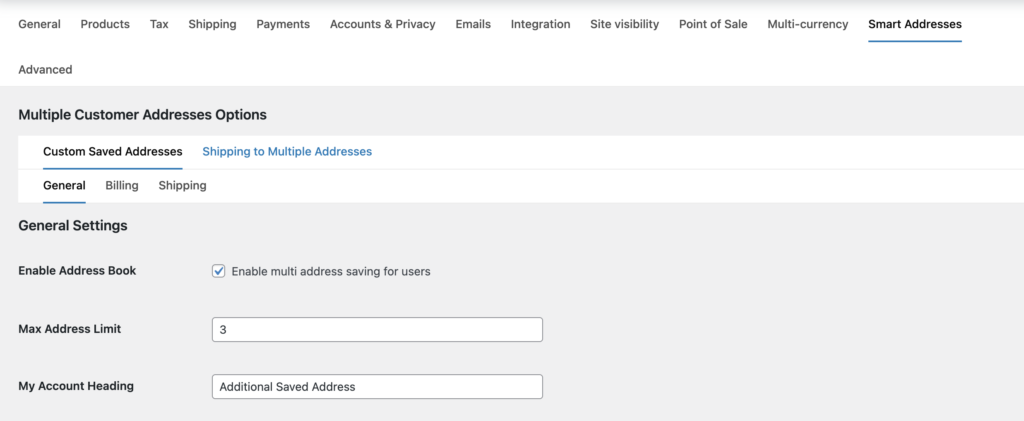
After installing and activating this plugin, a ‘Smart Addresses’ tab will appear in the WooCommerce admin settings panel, located similar to the image on the right side. For instructions on customizing these settings within the ‘Smart Addresses’ tab, refer to the documentation provided for the Smart Addresses for WooCommerce plugin.
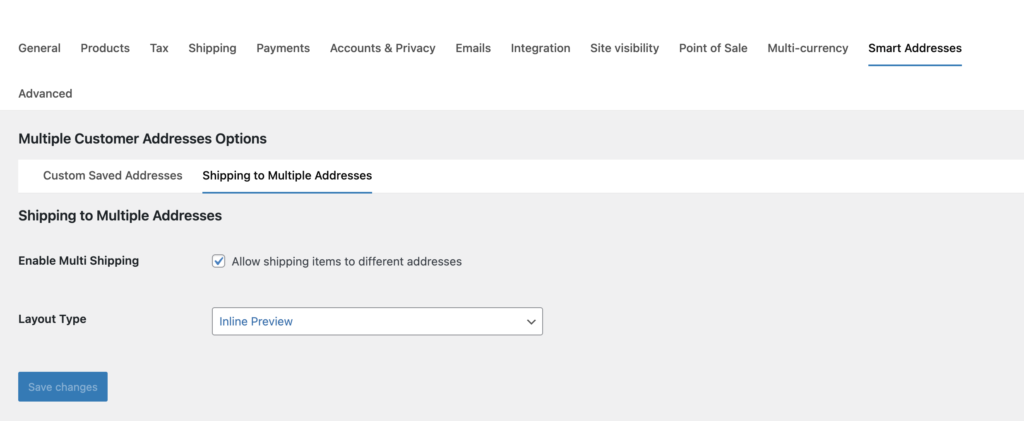
Shipping to multiple addresses
In this tab we can enable/disable the option to ship the products in one order to multiple shipping addresses. only products will be sent to different locations not the items remember.
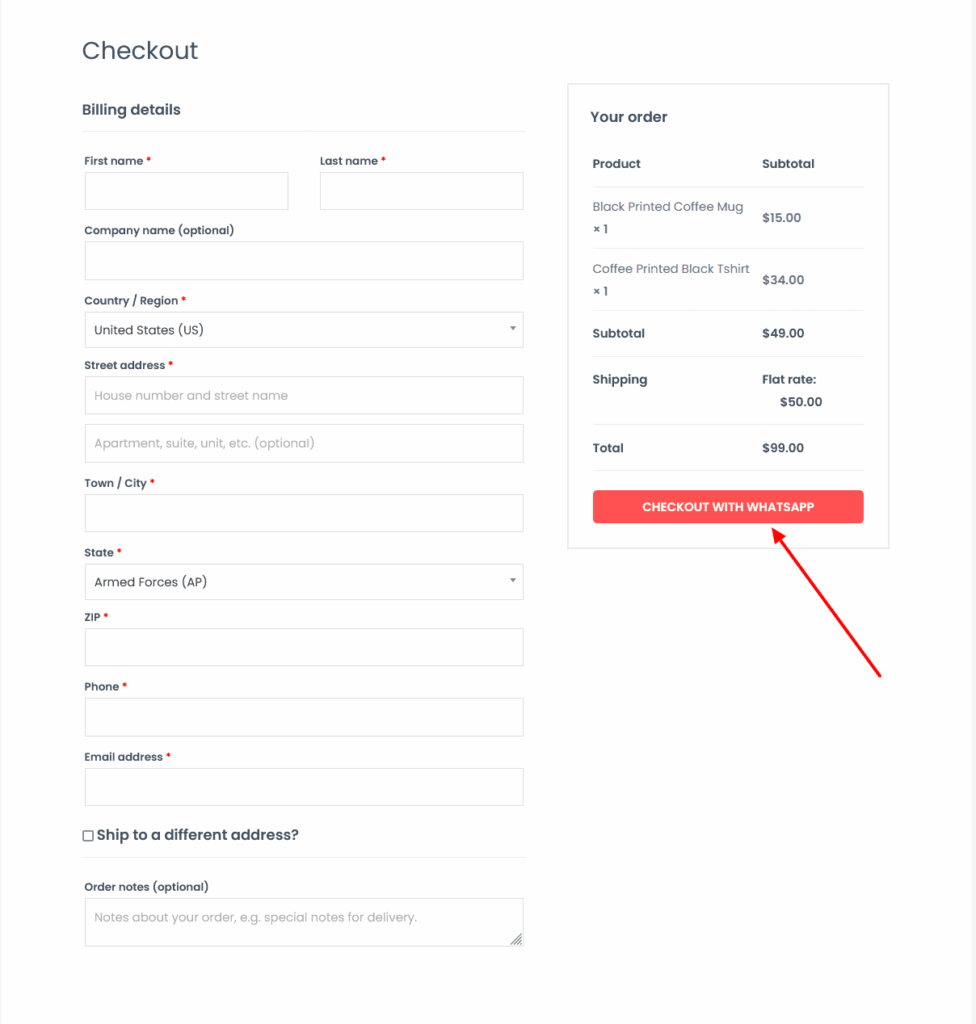
Checkout Page
Finally, after filling the Billing details, the customer will click on the Checkout With WhatsApp button. Clicking on this button will take the customer to the WhatsApp chat screen to the admin whatsapp number with all the products details in the cart along with the customer name, phone and billing details.
Click here for setting and how to install this plugin
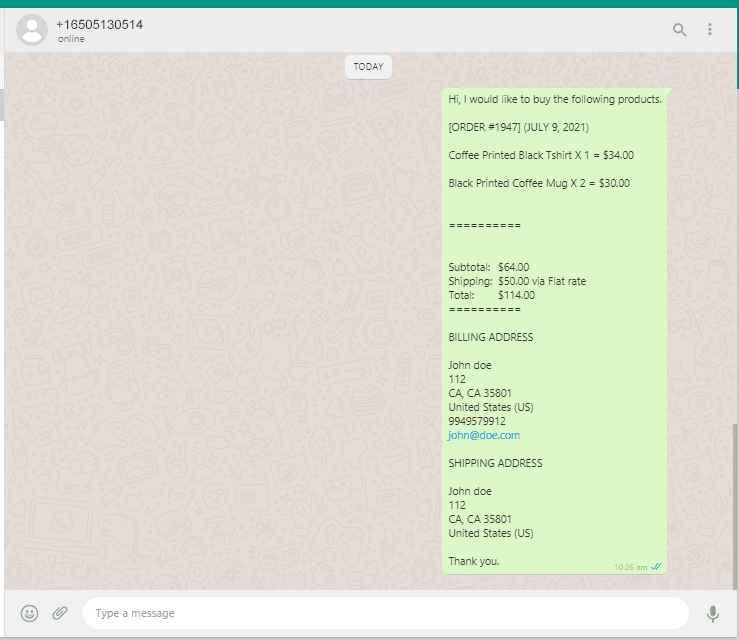
Finally, the order on WhatsApp for woocommerce
After the customer clicks on Checkout with WhatsApp / Buy on WhatsApp button, the client details and the card product data will be sent to store manager’s WhatsApp like the right side screenshot.
Turn every chat into a confirmed order – add WhatsApp Checkout to your store today!
Frequently Asked Questions
See the list below for our most frequently asked questions about our plugins.
If this doesn’t satisfy your requirement, please reach out to support team.
Do your plugins support all the themes?
All of our plugins come with their own styles, ensuring compatibility with both free and premium themes. However, occasionally, plugin styles may be overwritten by your theme. If you encounter this issue, please contact us, as we’re happy to help. In most cases, it’s a simple fix with just a few lines of CSS code.
Do you offer documentation and support?
Yes, we provide for all of our plugins. Our support team is available 24/7 via email.
What if i dont want to renew my subscription to a plugin? What should i do?
All of our plugins automatically renew the subscription. If you want to cancel, simply contact us at least 7 days before expiration or do it yourself through your payment portal.
Do you offer refund
Related Plugins

4.6
Free | Starts from $20.00