

Delivery & Pickup Date Time for WooCommerce
Flexible Delivery Scheduling
Customer Experience
Multiple Delivery Options
14 Days Money Back Guarantee
99% Customer Satisfaction Rating
- Enjoy 12 months of updates and dedicated support starting from your purchase date. Renewal is optional and can be cancelled anytime.
- Prices displayed on this site are in United States Dollars (USD).
- Trusted by 5000+ Websites
Rating
45 Reviews
1.3.4
Plugin Version
2000+
Downloads
18-07-2025
Last Updated
Delivery & Pickup Date Time for WooCommerce Plugin for Seamless Work Process
Delight customers and reduce cart abandonment with Delivery & Pickup Date Time for WooCommerce – schedule with ease, receive on time
Minimize missed deliveries and customer inconvenience by allowing them to choose their preferred delivery date and time.
Improve customer satisfaction by providing convenient delivery choices and reducing the chances of missed or delayed deliveries.
Offer various delivery types, including home delivery, store pickup, and dine-in options, enhancing customer flexibility.
Trusted by clients from 50+ Countries
Try with Confidence

100% Money-Back Guarantee
Our 30-day No-Risk Money Back Policy assures 100% money back.

99% Satisfaction Rating
We make every effort to make sure our customers are happy.

Average 5 star rating
Our plugins are highly regarded in WordPress forums and review platforms.
How Does The Plugin Work?
See How ‘Delivery & Pickup Date Time for WooCommerce ‘ plugin function.
Check Out page
Once this plugin is installed and activated, an ‘Order Delivery & Pickup Type, Date, and Time‘ option will appear during checkout. This allows your customers to select their preferred delivery type, date, and time directly on the checkout page, ensuring a convenient and customized shopping experience.
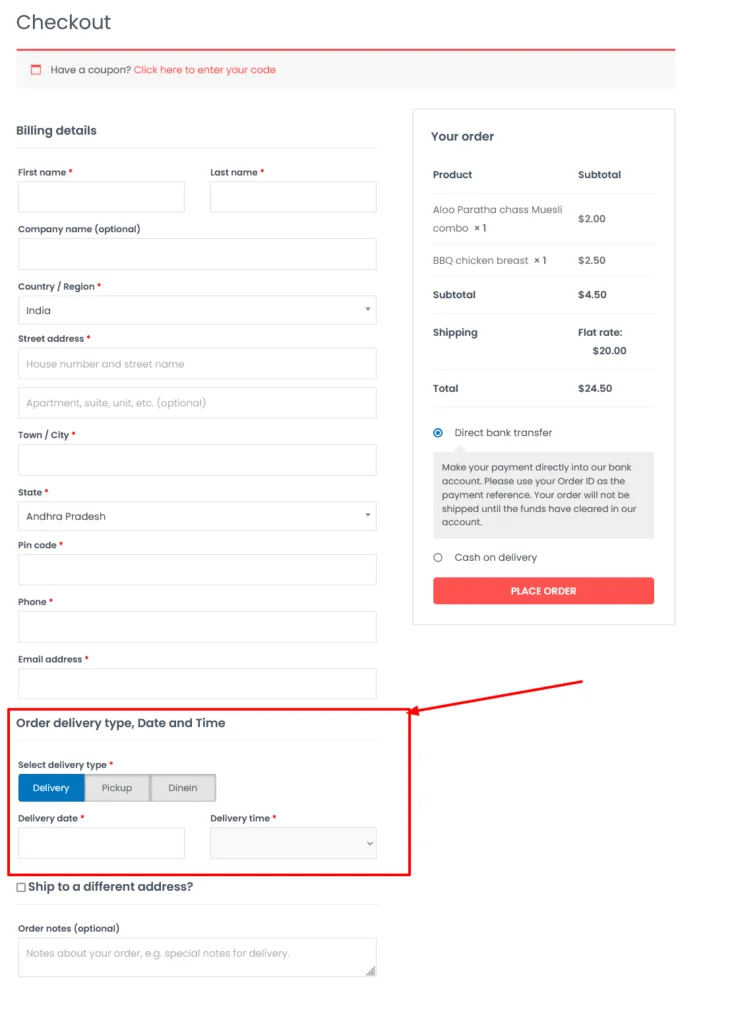
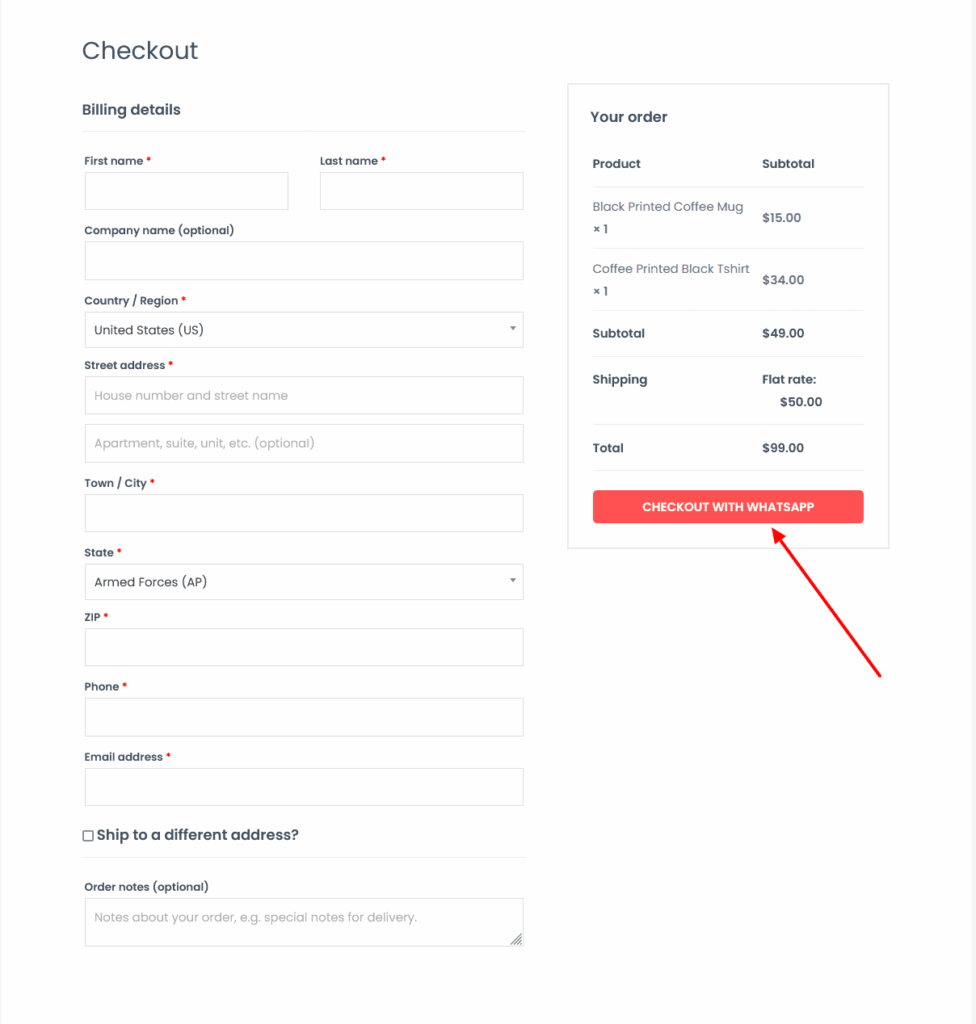
Checkout Page
Finally, after filling the Billing details, the customer will click on the Checkout With WhatsApp button. Clicking on this button will take the customer to the WhatsApp chat screen to the admin whatsapp number with all the products details in the cart along with the customer name, phone and billing details.
Click here for setting and how to install this plugin
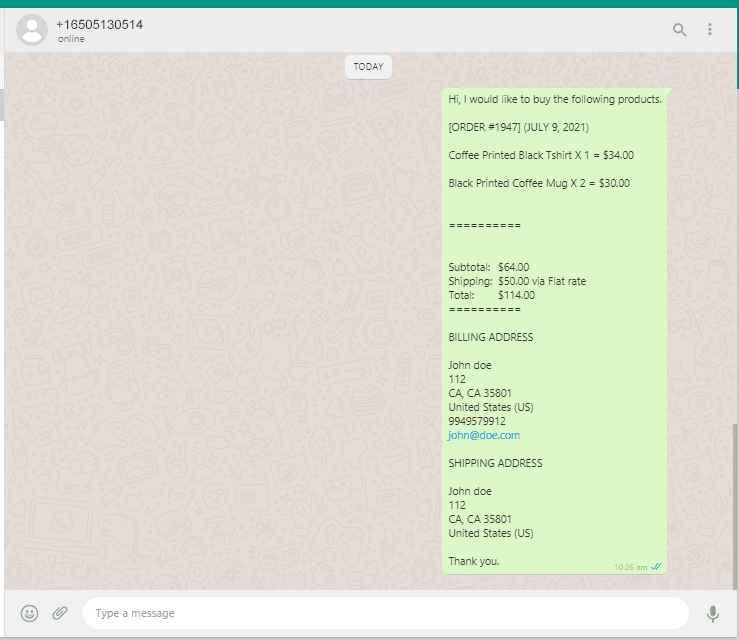
Finally, the order on WhatsApp for woocommerce
After the customer clicks on Checkout with WhatsApp / Buy on WhatsApp button, the client details and the card product data will be sent to store manager’s WhatsApp like the right side screenshot.
Turn every chat into a confirmed order – add WhatsApp Checkout to your store today!
Frequently Asked Questions
See the list below for our most frequently asked questions about our plugins.
If this doesn’t satisfy your requirement, please reach out to support team.
Do your plugins support all the themes?
All of our plugins come with their own styles, ensuring compatibility with both free and premium themes. However, occasionally, plugin styles may be overwritten by your theme. If you encounter this issue, please contact us, as we’re happy to help. In most cases, it’s a simple fix with just a few lines of CSS code.
Do you offer documentation and support?
Yes, we provide for all of our plugins. Our support team is available 24/7 via email.
What if i dont want to renew my subscription to a plugin? What should i do?
All of our plugins automatically renew the subscription. If you want to cancel, simply contact us at least 7 days before expiration or do it yourself through your payment portal.