

Name Your Price for WooCommerce - User Guide
This guide explains how to install, configure, and use the Name Your Price for WooCommerce plugin.
Overview
Name Your Price for WooCommerce allows customers to choose how much they want to pay for selected products. Perfect for donations, digital products, tips, charity campaigns, and flexible pricing.
Key Features
- Let customers enter their own price.
- Set Suggested, Minimum & Maximum Price.
- Supports Simple & Variable Products.
- Global settings for labels and button text.
- Custom “Choose Price” button on Shop page.
- Option to hide quantity field.
- Option to disable plugin CSS.
- Compatible with WooCommerce HPOS.
Installation
- Upload the plugin ZIP or folder via Plugins > Add New > Upload Plugin.
- Activate the plugin.
- Ensure WooCommerce is installed and activated.
Name Your Price Settings
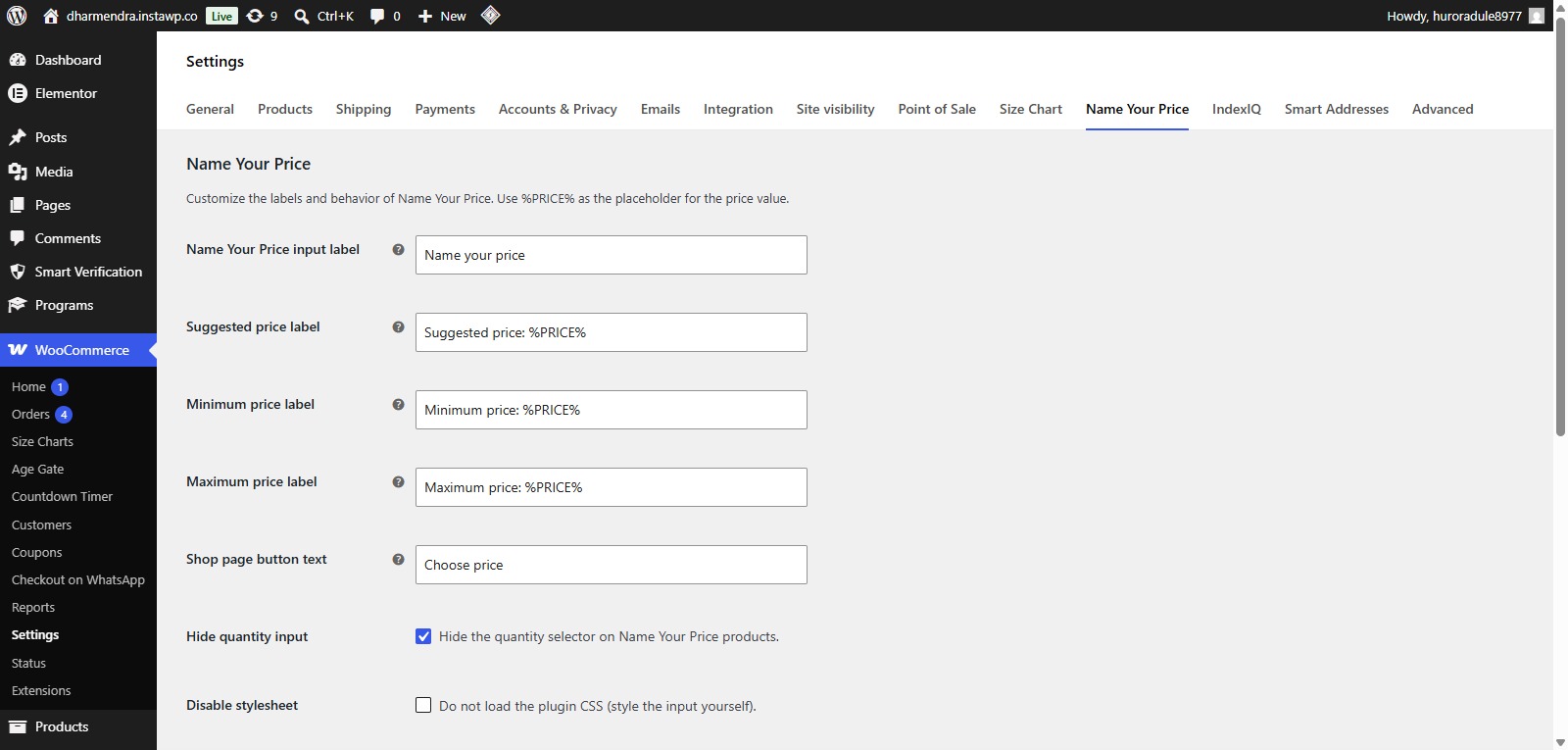
- Go to WooCommerce > Settings.
- Go to Name Your Price Tab.
- Customize the labels and behavior of Name Your Price. Use %PRICE% as the placeholder for the price value.
Product Level Configuration
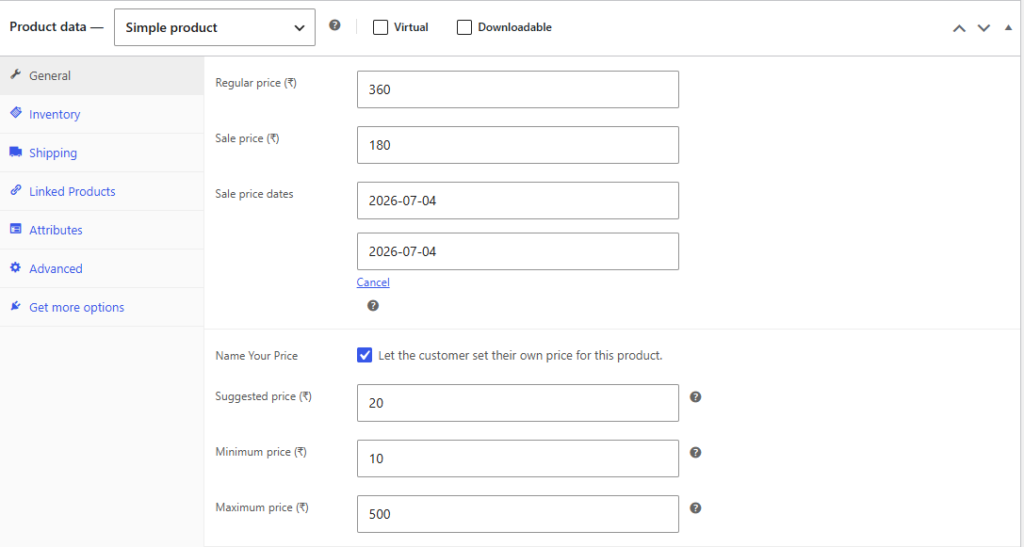
- Go to Products.
- Edit any WooCommerce product.
- Under Product Data → General, enable Name Your Price.
- Configure:
- Suggested Price
- Minimum Price
- Maximum Price
- Update the product.
Frontend
Product Page

Frequently Asked Questions
See the list below for our most frequently asked questions about our plugins.
If this doesn’t satisfy your requirement, please reach out to support team.
Q: What is Name Your Price for WooCommerce?
A: Name Your Price for WooCommerce lets customers enter their own purchase price instead of using a fixed product price. It’s ideal for donations, fundraising, digital products, and “Pay What You Want” campaigns.
Q: Can I set a minimum and maximum price?
A: Yes. You can define both minimum and maximum price limits to ensure customers only enter values within your desired price range.
Q: Can I display a suggested price?
A: Absolutely. You can show a suggested price to guide customers while still allowing them to choose their own amount.
Q: Does the plugin support variable products?
A: Yes. The plugin supports both Simple and Variable WooCommerce products, allowing you to configure pricing for each product or variation.
Q: Can I customize the labels and button text?
A: Yes. You can easily customize labels such as “Name Your Price,” “Suggested Price,” and the Shop button text from the plugin settings.
Q: Can I hide the quantity field?
A: Yes. The plugin includes an option to hide the quantity field if you want customers to purchase only one item at a time.
Q: Is the plugin compatible with WooCommerce HPOS?
A: Yes. The plugin is fully compatible with WooCommerce High-Performance Order Storage (HPOS).
Q: Will the plugin work with my WordPress theme?
A: Yes. The plugin is designed to work with most well-coded WooCommerce themes. You can also disable the plugin’s default stylesheet if you’d like to use your own custom styling.
Q: Can I use this plugin for donations or fundraising?
A: Yes. The plugin is perfect for donation products, charity campaigns, tips, crowdfunding, and other flexible pricing scenarios.