

Checkout on WhatsApp for WooCommerce
Overview
Checkout on WhatsApp for WooCommerce allows customers to place orders directly through WhatsApp instead of completing the traditional checkout process. It simplifies purchasing by sending order details instantly to the store owner via WhatsApp chat. This is especially useful for businesses that prefer manual confirmation or cash-on-delivery workflows. The plugin improves communication and speeds up order processing. It also enhances customer convenience by using a familiar messaging platform.
Key Features
- One-click checkout via WhatsApp
- Sends complete order details automatically
- Supports custom WhatsApp numbers
- Works on product, cart, and checkout pages
- Customizable button text and message format
- Ideal for COD and manual order processing
Installation
- Download the extension from your WooCommerce dashboard.
- Go to Plugins > Add New > Upload and select the ZIP file you just downloaded.
- Click Install Now, and then Activate.
How It Works ?
- Customers click the “Order on WhatsApp” button instead of the standard checkout.
- The plugin automatically generates a message with product details, quantity, and total price.
- This message opens in WhatsApp and is sent to the store owner.
- The admin can then confirm and process the order manually.
Backend Settings
Checkout on WhatsApp (General Settings) :
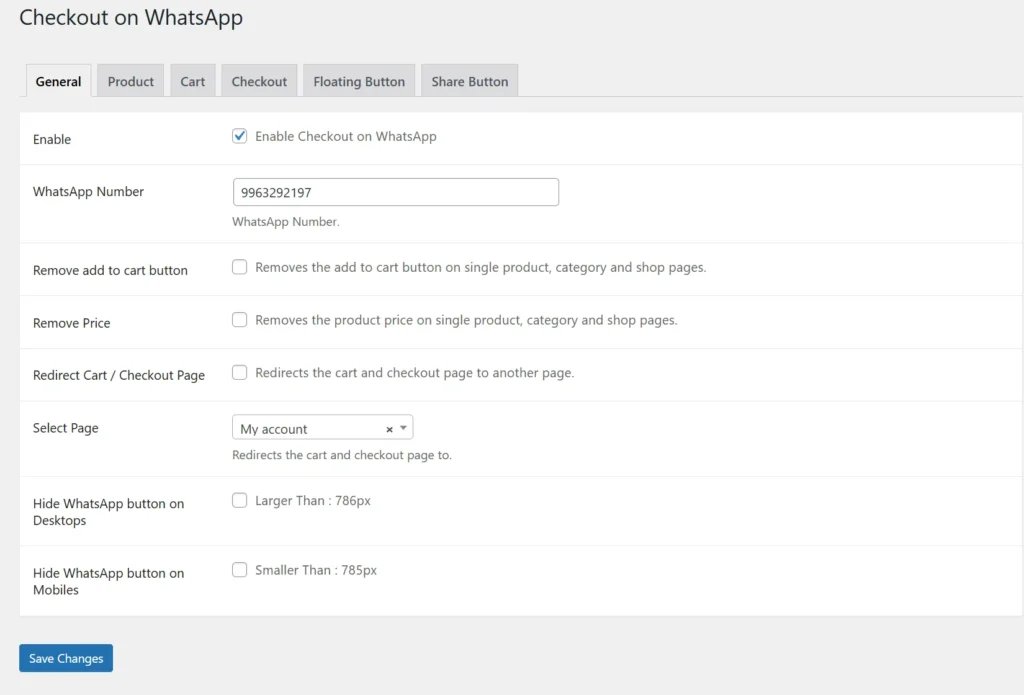
This section enables the overall WhatsApp checkout functionality for the store. You can configure the WhatsApp number, hide Add to Cart or price if needed, and redirect users after action. It also allows controlling visibility on mobile or desktop devices. This provides complete flexibility to replace traditional checkout with WhatsApp ordering.
Product Settings :
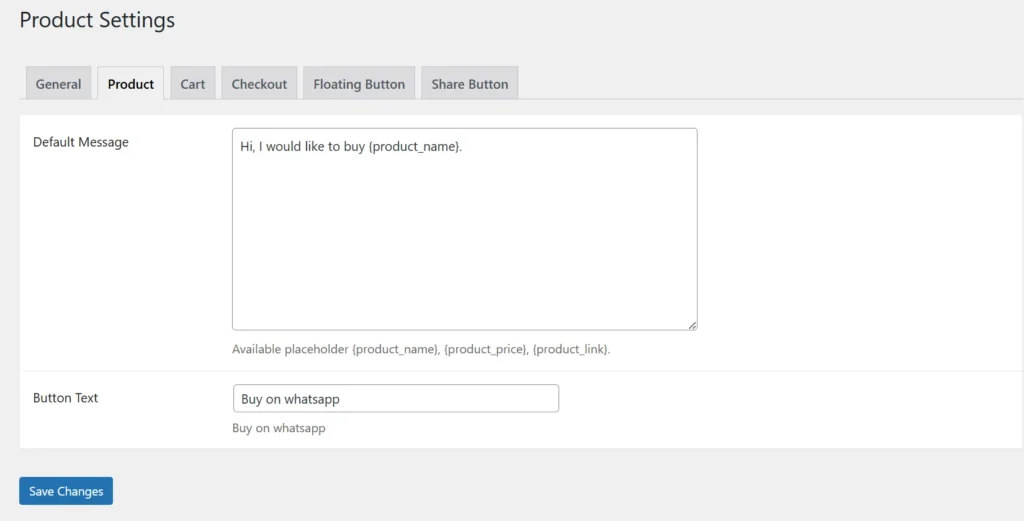
This section controls WhatsApp behavior on individual product pages. You can set a default message template using placeholders like product name, price, and link. It also allows customizing the “Buy on WhatsApp” button text. This ensures a smooth and direct purchase experience from product pages.
Cart Settings :
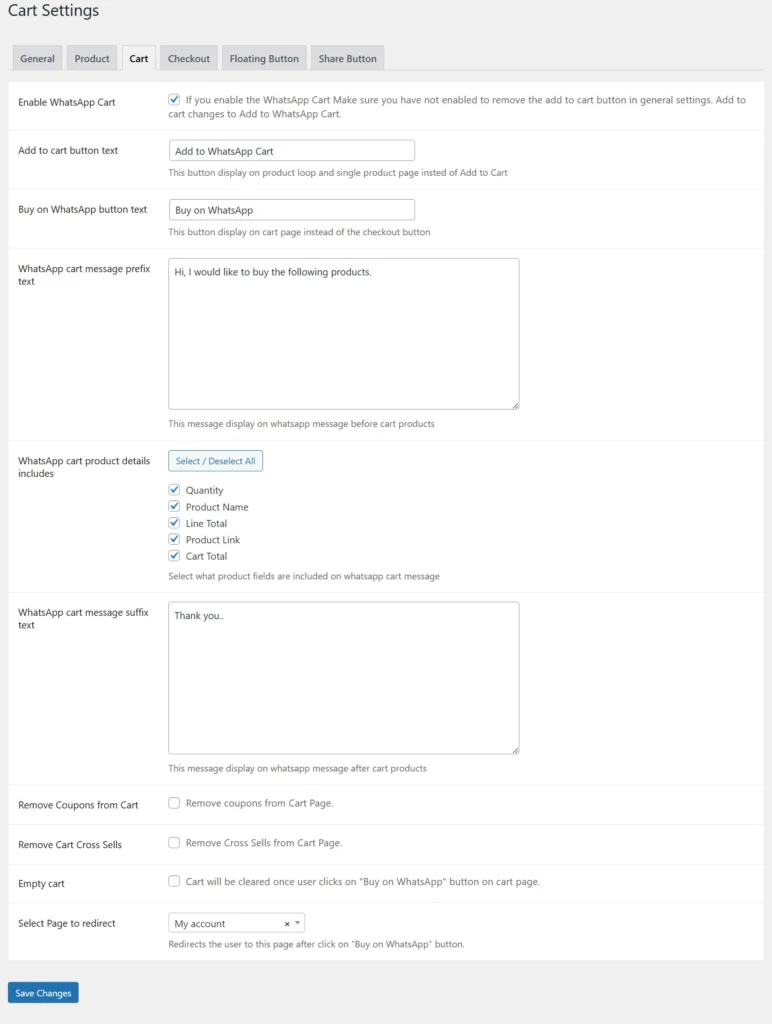
Cart settings allow users to send their cart details directly via WhatsApp instead of proceeding to checkout. You can customize button labels and control what product details are included in the message. Options like removing coupons or cross-sells help simplify the cart page. It also supports auto-clearing the cart after sending the WhatsApp order.
Checkout Settings :
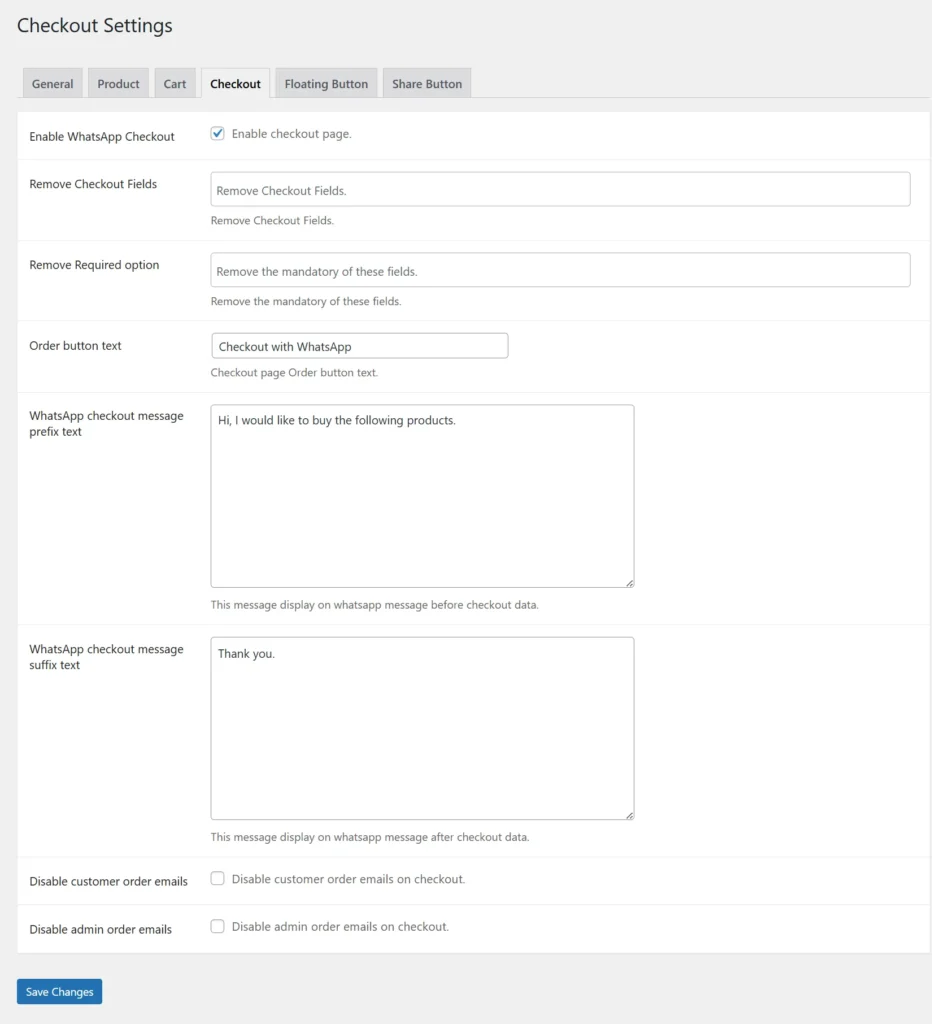
This section enables WhatsApp checkout and lets you replace the default WooCommerce checkout process. You can customize the order button text and define prefix/suffix messages sent on WhatsApp. It also allows removing unnecessary checkout fields for a simplified experience. Additionally, you can disable email notifications if managing orders manually via WhatsApp.
Floating Button Settings :
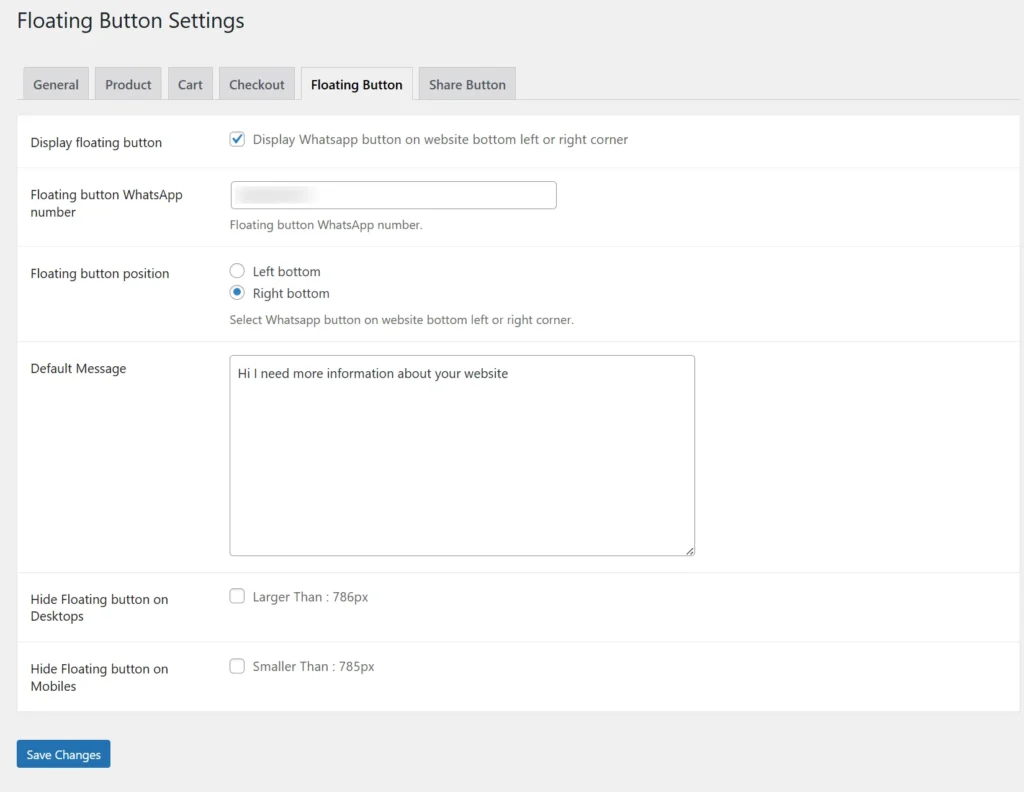
The floating WhatsApp button appears on the website for quick customer interaction from any page. You can set the WhatsApp number, choose button position (left or right), and define a default message. It improves instant communication and customer support. Visibility can also be controlled based on device type like mobile or desktop.
Share Button Settings :
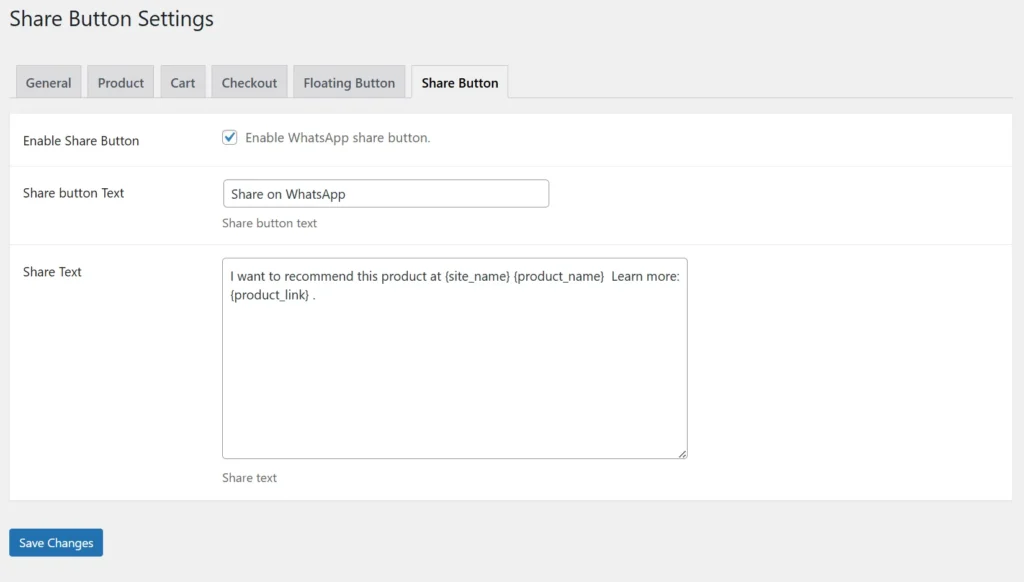
This section allows you to enable a WhatsApp share button so customers can easily share products with others. You can customize the button text and define the message format using dynamic placeholders like product name and link. It helps increase product visibility through social sharing. This feature is useful for organic promotion and customer recommendations.
Frontend Workflow
Shop Page – WhatsApp Cart Integration :
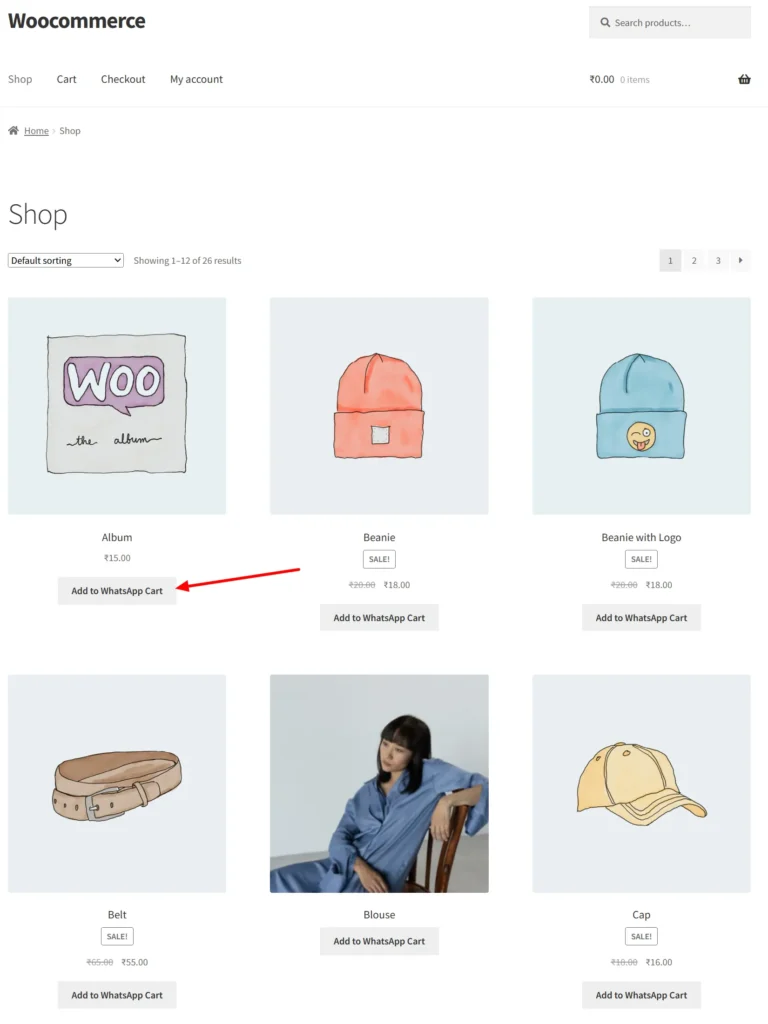
On the shop page, each product includes an “Add to WhatsApp Cart” button for quick ordering. Customers can directly select products and initiate a WhatsApp conversation without navigating multiple pages. This improves user convenience and reduces drop-offs. It makes browsing and purchasing faster and more interactive.
Product Page – Add to WhatsApp Cart :
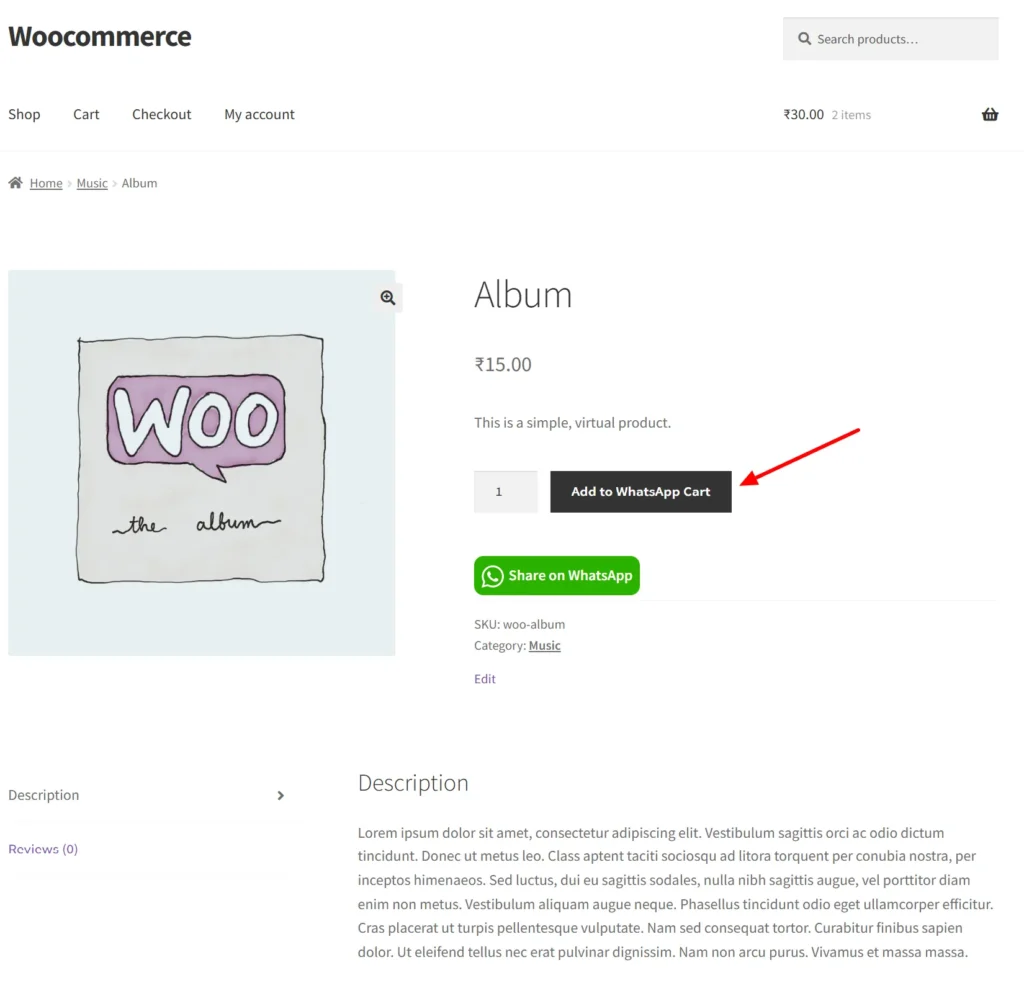
The “Add to WhatsApp Cart” button replaces the traditional add-to-cart functionality for faster communication. Customers can directly send product details to the store owner via WhatsApp. This eliminates complex checkout steps and simplifies ordering. It is especially useful for businesses handling orders manually.
Product Page – WhatsApp Share Button :
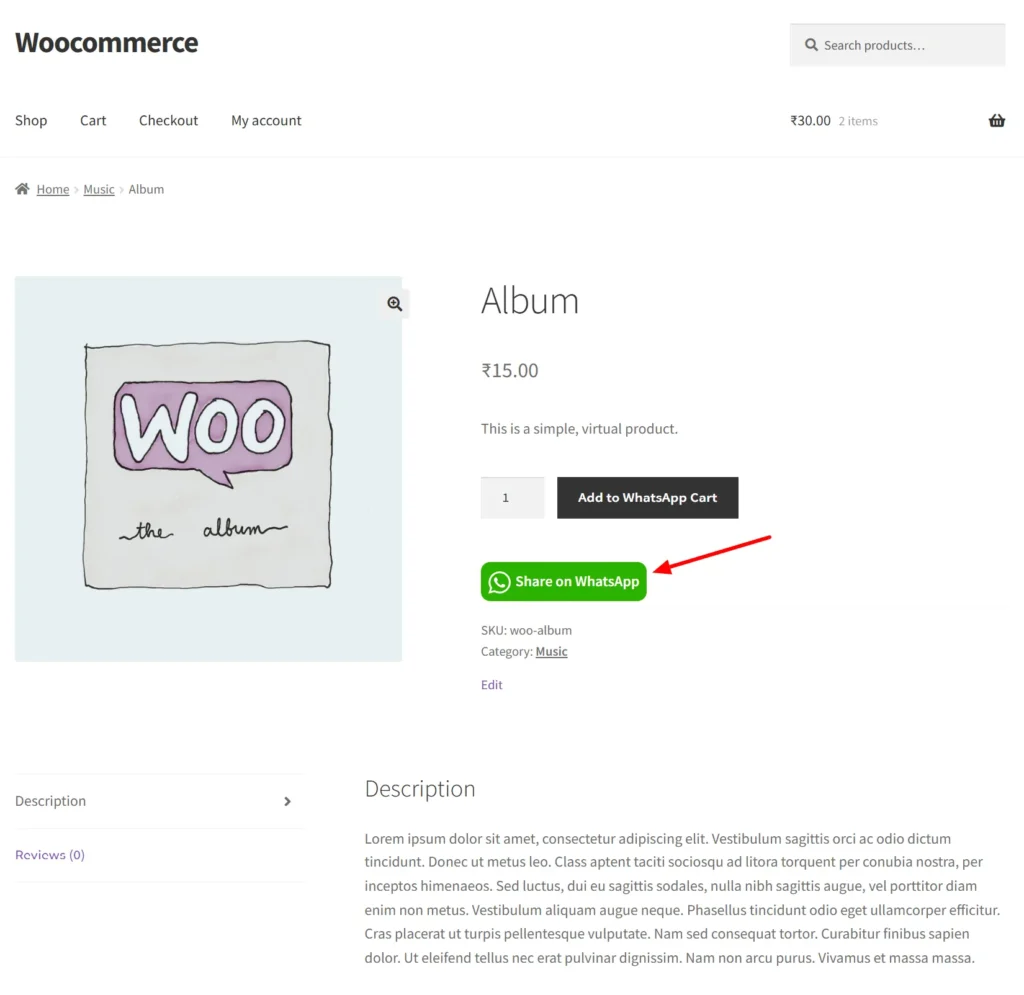
This product page displays a “Share on WhatsApp” button that allows users to instantly share the product with their contacts. With a single click, product details and links are sent directly via WhatsApp. This helps increase product reach through social sharing. It is a simple yet powerful way to boost visibility and engagement.
Checkout Page – WhatsApp Checkout :
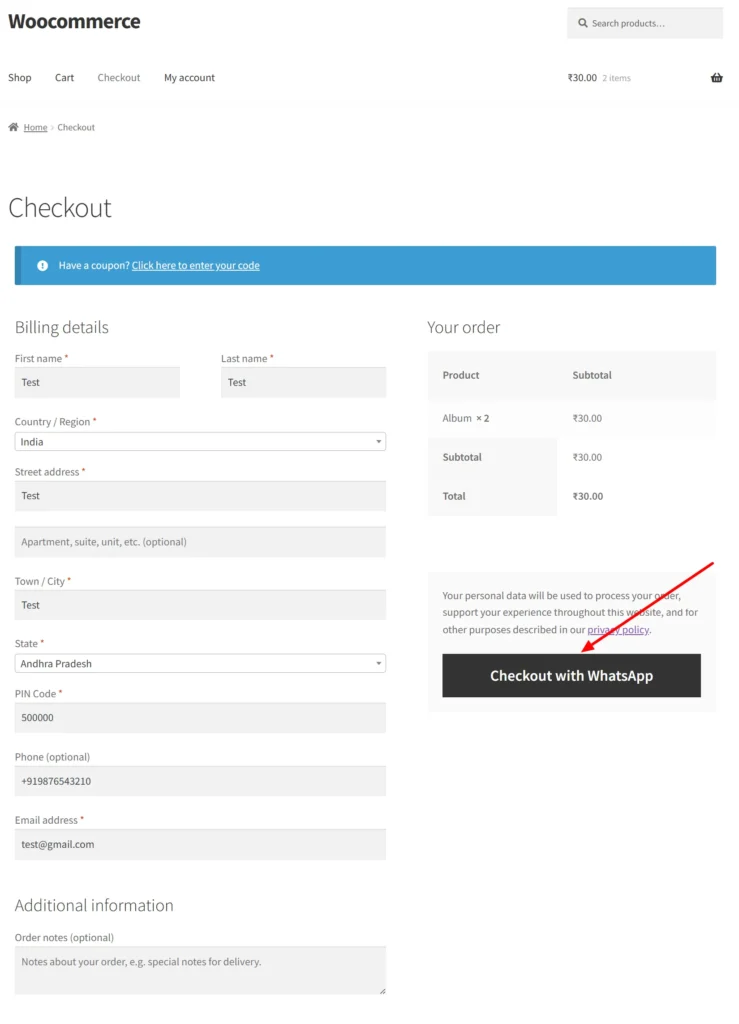
On the checkout page, the “Checkout with WhatsApp” button allows users to complete their order via WhatsApp instead of the default process. Customer details and order summary are automatically shared in the message. This creates a quick and personalized checkout experience. It is ideal for stores that prefer direct communication with customers.
Frequently Asked Questions
See the list below for our most frequently asked questions about our plugins.
If this doesn’t satisfy your requirement, please reach out to support team.
Q: What is Checkout on WhatsApp plugin for WooCommerce?
A: Checkout on WhatsApp for WooCommerce allows customers to place orders directly through WhatsApp instead of using the default checkout process.
Q: How does WhatsApp checkout work in WooCommerce?
A: Customers click the “Order on WhatsApp” button, fill in checkout details, and send the order directly to your WhatsApp with all product and customer information.
Q: Can customers place orders directly on WhatsApp?
A: Yes, customers can complete their order by sending details via WhatsApp, making the process faster and more convenient.
Q: Where can I display the WhatsApp order button?
You can display the WhatsApp order button on product pages, shop pages, cart pages, and even the checkout page.
Q: Does the plugin show a checkout form before sending to WhatsApp?
A: Yes, a checkout form appears in a popup where customers enter their details before placing the order on WhatsApp.
Q: Can I customize the WhatsApp button and message?
A: Yes, you can customize the button text, design, and prefilled WhatsApp message sent by customers.
Q: Can I enable WhatsApp checkout for specific products or categories?
A: Yes, you can apply the WhatsApp checkout option to selected products, categories, or your entire store.
Q: Does the plugin support simple and variable products?
A: Yes, it works seamlessly with both simple and variable products.
Q: Can customers share products on WhatsApp?
A: Yes, the plugin includes a WhatsApp share feature so customers can share products with others easily.
Q: Will orders be saved in WooCommerce as well?
A: Yes, orders placed via WhatsApp can also be created and stored in your WooCommerce admin for tracking and management.