

Order Approval for WooCommerce
Reduce refunds, cancellations
Email Notifications
Multi order approval rules
14 Days Money Back Guarantee
99% Customer Satisfaction Rating
Support
- Enjoy 12 months of updates and dedicated support starting from your purchase date. Renewal is optional and can be cancelled anytime.
- Prices displayed on this site are in United States Dollars (USD).
- Trusted by 5000+ Websites
Rating
45 Reviews
1.0.0
Plugin Version
2000+
Downloads
February 4, 2026
Last Updated
HOW IT WORKS?
Order Approval for WooCommerce Plugin for Seamless Work Process
Stay in control and build trust with Order Approval for WooCommerce – approve orders before they’re processed, hassle-free.
Minimise refunds and order cancellations caused by out-of-stock items.
Customise all the email notifications such as order placed, order approved, order rejected and admin order placed notification. You an also customise the thank you message.
Create multiple rules to approve orders based on various conditions like user roles, shipping methods and cart total.
Trusted by clients from 50+ Countries
Try with Confidence

100% Money-Back Guarantee
Our 30-day No-Risk Money Back Policy assures 100% money back.

99% Satisfaction Rating
We make every effort to make sure our customers are happy.

Average 5 star rating
Our plugins are highly regarded in WordPress forums and review platforms.
How Does The Plugin Work?
See How ‘Order Approval for WooCommerce ‘ plugin function.
Checkout page
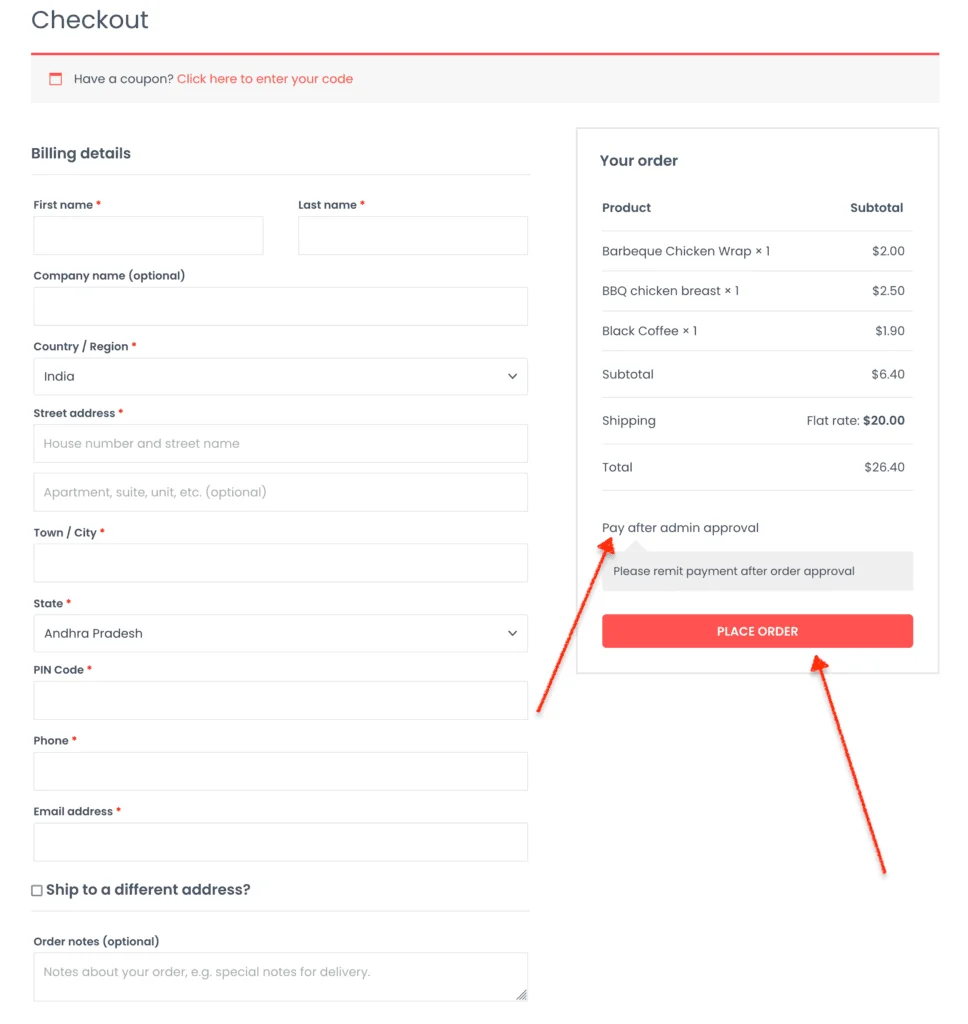
Once this plugin is installed and activated, a “Pay after admin approval” payment method will be displayed on the checkout page. Clicking on Place Order will create the order and redirects the user to the thank you page with order details.
Order success page
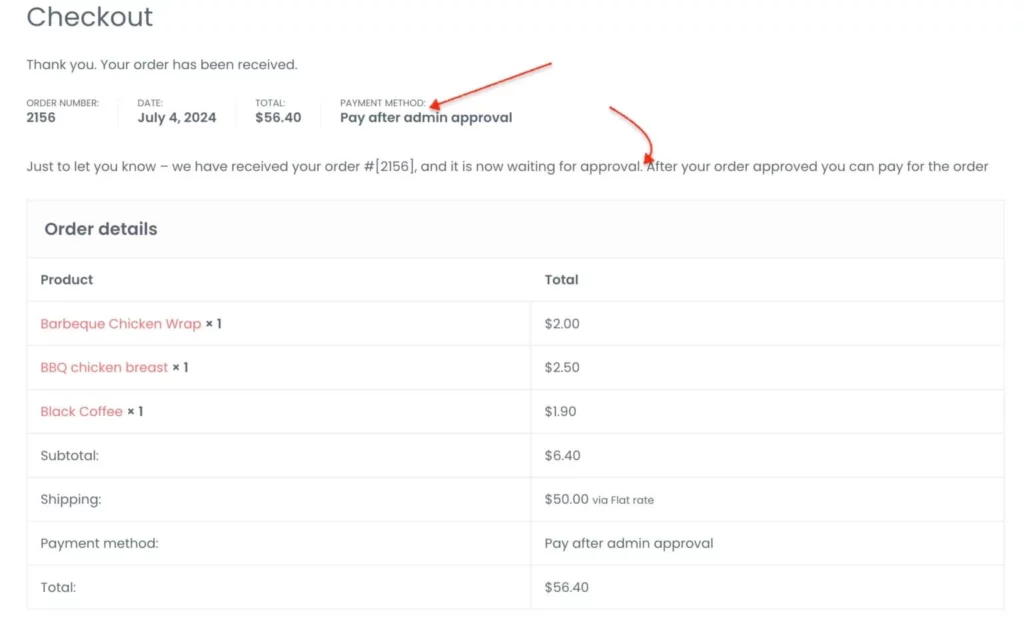
On this page, the thank you message with the order details will be displayed to the customer. In addition to this, an order email will be sent to both customer and the store admin.
Admin order screen
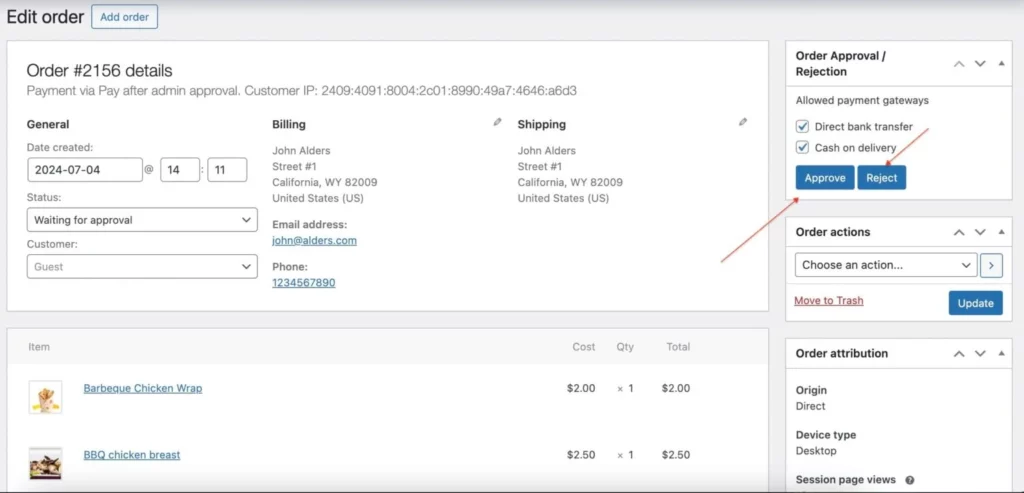
By navigating to Dashboard > WooCommerce > Orders, admin can Approve / Reject the order. After that an email with the order status will be sent to customers email. If order is approved, then the customer can complete the order with their preferred payment method from the store.
Checkout Page
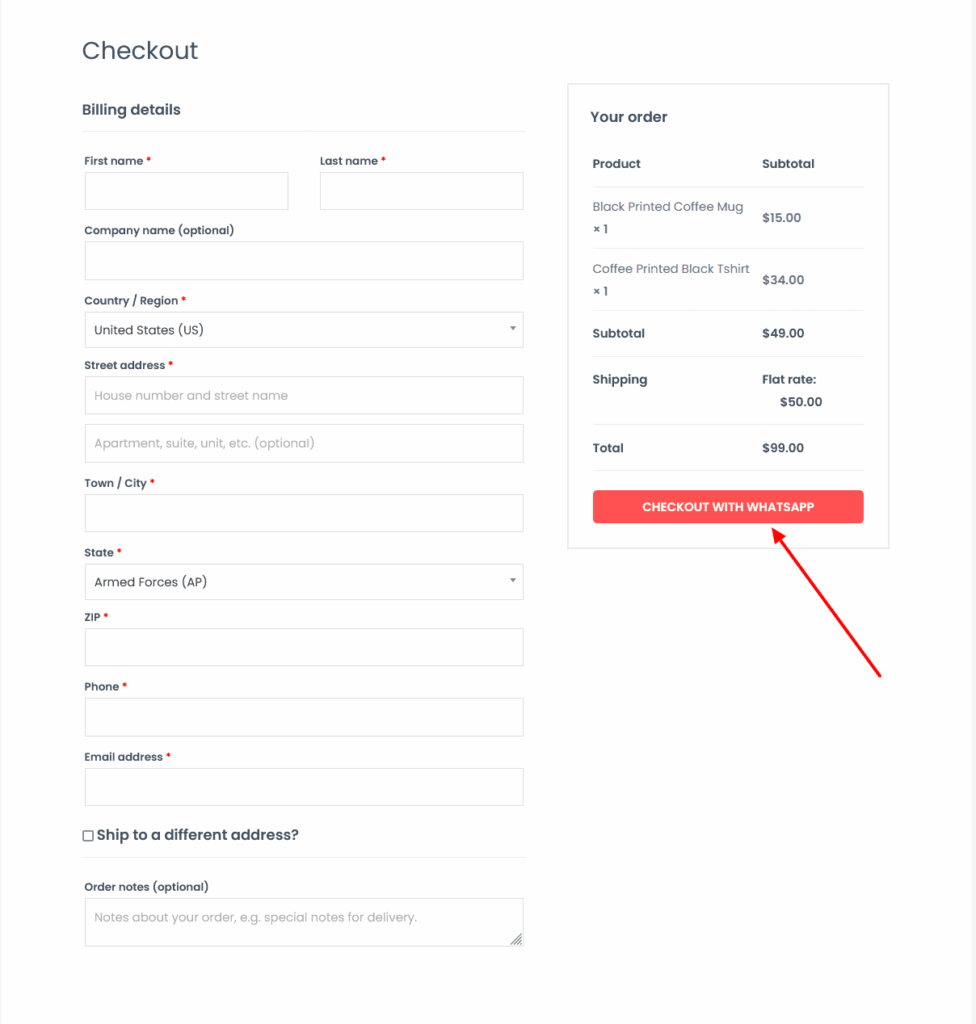
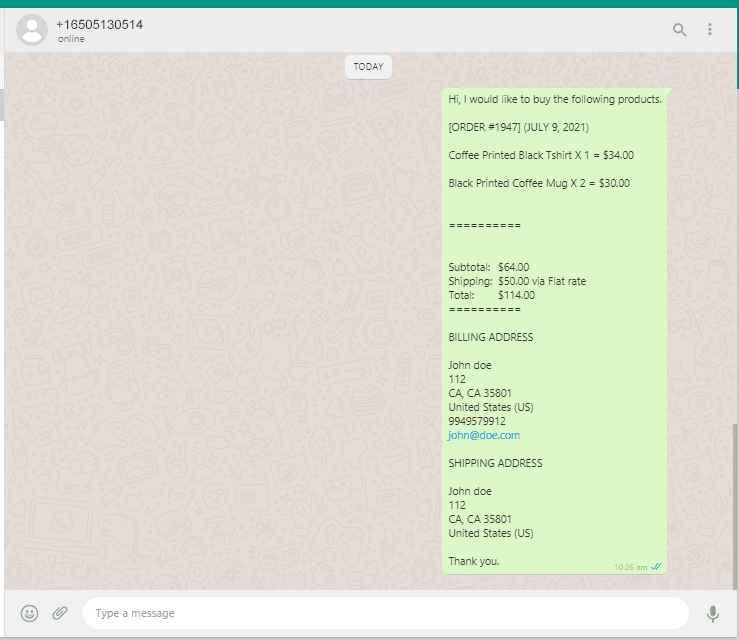
Finally, after filling the Billing details, the customer will click on the Checkout With WhatsApp button. Clicking on this button will take the customer to the WhatsApp chat screen to the admin whatsapp number with all the products details in the cart along with the customer name, phone and billing details.
Click here for setting and how to install this plugin
Finally, the order on WhatsApp for woocommerce
After the customer clicks on Checkout with WhatsApp / Buy on WhatsApp button, the client details and the card product data will be sent to store manager’s WhatsApp like the right side screenshot.
Turn every chat into a confirmed order – add WhatsApp Checkout to your store today!
Frequently Asked Questions
See the list below for our most frequently asked questions about our plugins.
If this doesn’t satisfy your requirement, please reach out to support team.
Q: What is Order Approval for WooCommerce?
A: Order Approval for WooCommerce allows store owners to review and approve or reject customer orders before processing or payment.
Q: How does the order approval process work?
A: Customers place an order first, and the admin reviews it. The order is then either approved or rejected before further processing.
Q: Can I approve or reject orders manually?
A: Yes, store owners can manually approve or reject orders from the admin panel for better control over order processing.
Q: Can customers complete payment after approval?
A: Yes, once an order is approved, customers receive a payment link or can proceed to complete the payment.
Q: Is payment processed before or after order approval?
A: Payment is processed only after the order is approved, ensuring full control over transactions.
Q: Does the plugin send notifications to customers?
A: Yes, customers receive notifications when their order is approved or rejected, keeping them informed about order status.
Q: Can I customize order statuses like Approved or Rejected?
A: Yes, the plugin supports custom order statuses such as Pending Approval, Approved, or Rejected for better workflow management.
Q: Is this plugin useful for Cash on Delivery (COD) orders?
Yes, it is especially useful for COD and high-value orders where manual verification is required before confirmation.
Q: Does this plugin improve order security?
Yes, it adds an extra layer of verification by allowing admins to review orders before processing.
Q: Can admins manage approvals easily from the dashboard?
Yes, admins can manage approvals directly from the WooCommerce order panel with simple actions.