

Price based on Quantity for WooCommerce
This explains how to install, configure, and use the Price Based on Quantity for WooCommerce plugin to create flexible quantity-based discounts that encourage customers to purchase more.
Overview
Price Based on Quantity for WooCommerce enables store owners to create automatic quantity discounts for individual products. Define pricing rules based on purchase quantity, offer percentage or fixed discounts, and display an attractive pricing table on product pages to encourage bulk purchases and increase average order value.
Key Features
- Flexible Quantity Pricing Rules
- Percentage & Fixed Amount Discounts
- Unlimited Quantity Pricing Tiers
- Product-Level Pricing Configuration
- Automatic Cart Discount Calculation
- Frontend Quantity Pricing Table
- Fully Customizable Table Colors
- Customizable Labels & Text
- Individual Product Enable/Disable
- WooCommerce HPOS Compatible
- Lightweight & Easy to Configure
- Compatible with Latest WordPress & WooCommerce
Installation
- Upload the plugin ZIP or folder via Plugins > Add New > Upload Plugin.
- Activate the plugin.
- Ensure WooCommerce is installed and activated.
Product Quantity Pricing :
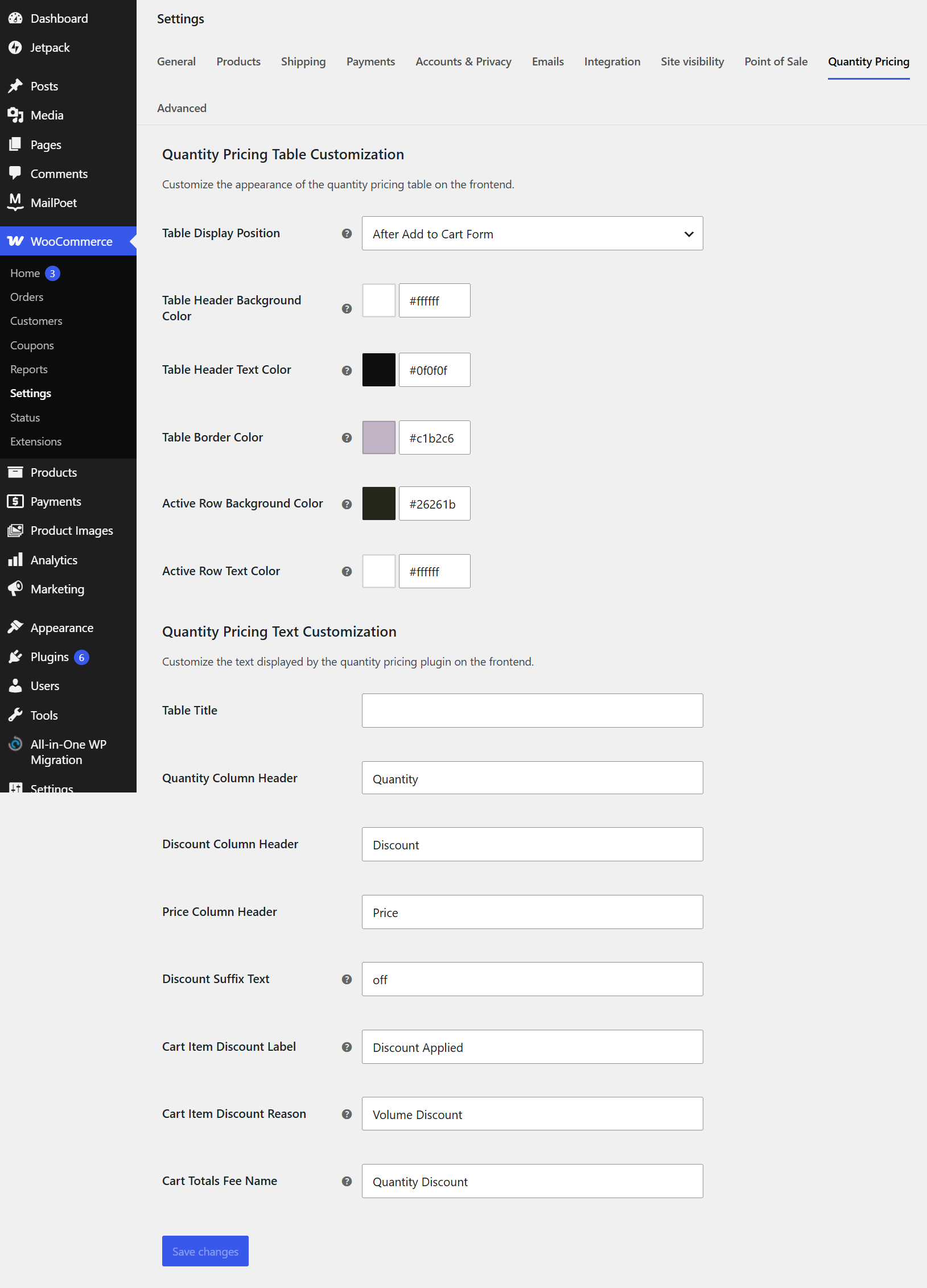
Enable Quantity Pricing to offer automatic bulk discounts for individual WooCommerce products.
Create multiple pricing rules by specifying minimum and maximum quantity ranges.
Choose between percentage or fixed-amount discounts and enter the corresponding discount value.
Add, edit, or remove pricing rules at any time to match your promotional strategy.
Customers automatically receive the applicable discount when their order quantity meets a defined rule.
Quantity Pricing Settings :
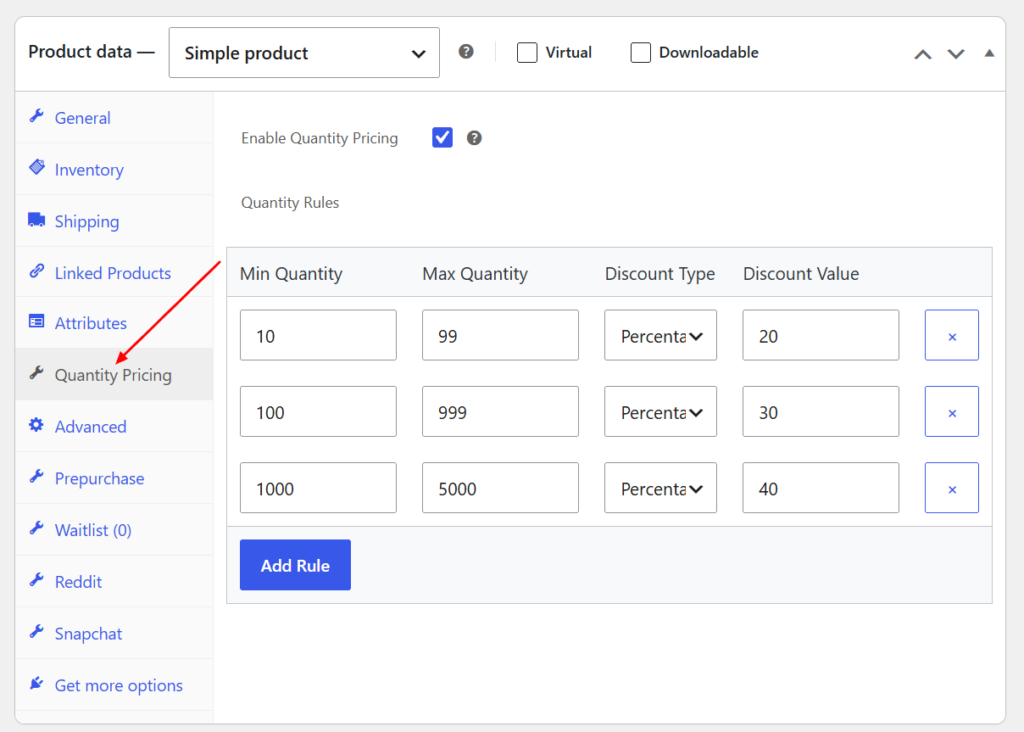
Customize the appearance of the frontend quantity pricing table to match your store’s design.
Choose where the pricing table is displayed on the product page for better visibility.
Personalize table colors, including header, border, and active row styles, to suit your branding.
Modify table titles, column headers, discount labels, and cart messages with custom text.
These settings help create a clear, attractive, and user-friendly bulk pricing experience for your customers.
Frontend
Product Page – Quantity Pricing Table :
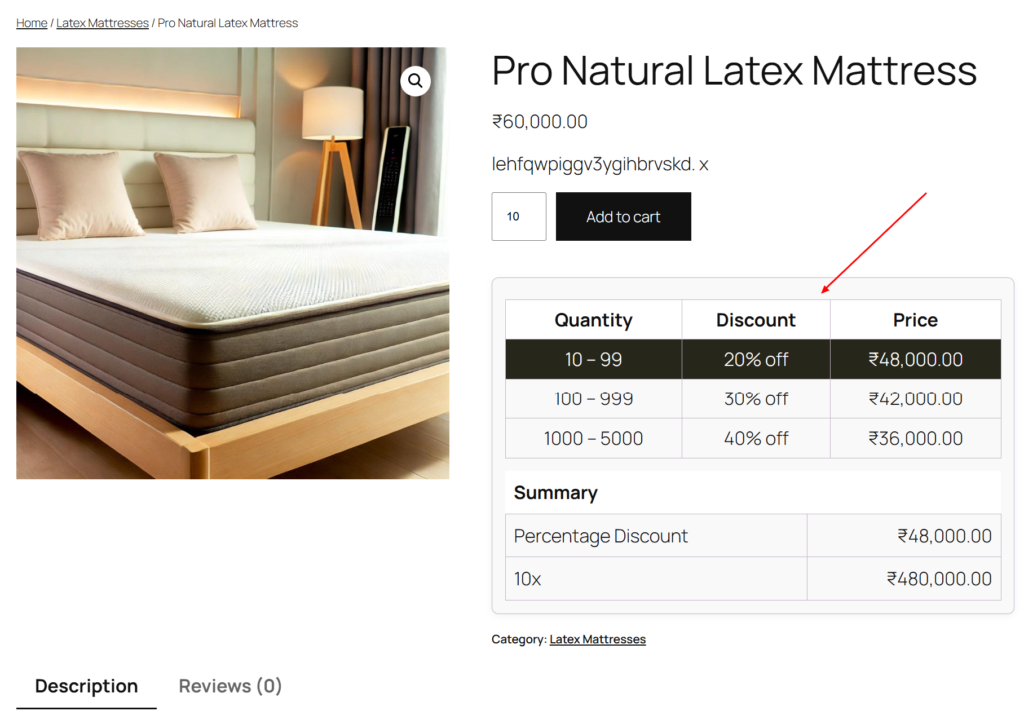
The quantity pricing table displays all available bulk discount tiers directly on the product page.
Customers can compare quantity ranges, discount percentages, and discounted prices before purchasing.The current pricing tier is automatically highlighted based on the selected product quantity.A pricing summary updates instantly to reflect the discounted unit price and total cost.
This helps customers understand the savings they receive when purchasing larger quantities.
Cart Page – Quantity Discount :
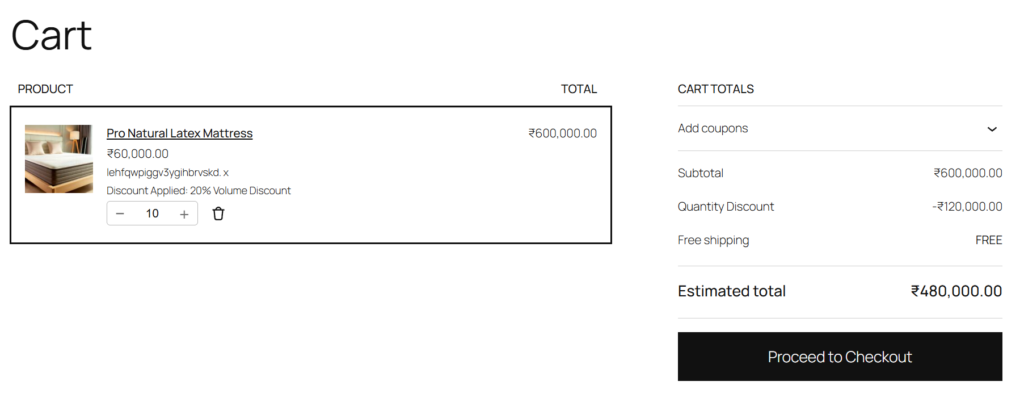
The cart automatically applies the appropriate quantity discount based on the product quantity.
A discount label is displayed below the product, showing the applied bulk pricing rule.
The cart totals include a dedicated Quantity Discount row for complete pricing transparency.Customers can easily review the discount amount before proceeding to checkout.
The estimated total is updated automatically after the quantity discount is applied.
Checkout Page – Order Summary :
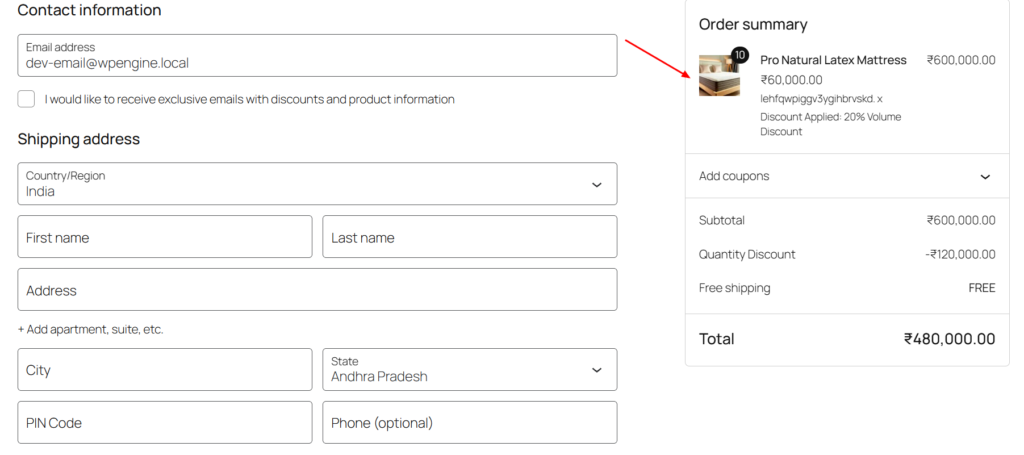
The applied quantity discount is carried over automatically to the checkout page.
The order summary clearly displays the discount details along with the purchased product.
A separate Quantity Discount line item shows the exact amount saved on the order.
The final payable total is calculated instantly after applying the eligible bulk discount.
Customers can verify their savings before completing the purchase with confidence.
Frequently Asked Questions
See the list below for our most frequently asked questions about our plugins.
If this doesn’t satisfy your requirement, please reach out to support team.
Q: What is Price Based on Quantity for WooCommerce?
A: Price Based on Quantity for WooCommerce lets you create quantity-based pricing rules that automatically apply discounts when customers purchase products in bulk, helping increase sales and average order value.
Q: What types of discounts does the plugin support?
A: The plugin supports both Percentage Discounts and Fixed Amount Discounts, allowing you to create flexible pricing strategies for your products.
Q: Can I create multiple quantity pricing rules?
A: Yes. You can create unlimited pricing tiers by defining different minimum and maximum quantity ranges with unique discount values.
Q: Can I enable quantity pricing for specific products only?
A: Yes. Quantity pricing can be enabled or disabled individually for each WooCommerce product, giving you complete control over your catalog.
Q: Can I customize the quantity pricing table?
A: Yes. You can customize the table title, column headings, colors, borders, discount labels, and other frontend text directly from the plugin settings.
Q: Are discounts applied automatically?
A: Yes. Once a customer adds a qualifying quantity to their cart, the appropriate discount is automatically calculated and applied during checkout.
Q: Will customers see available quantity discounts before purchasing?
A: Yes. The plugin displays a clear quantity pricing table on the product page so customers can easily view available discounts and savings.
Q: Is the plugin compatible with the latest WooCommerce version?
A: Yes. The plugin is regularly updated to ensure compatibility with the latest versions of WordPress and WooCommerce.
Q: Will the plugin work with my WordPress theme?
A: No. The plugin features an intuitive interface that allows you to configure quantity pricing rules and customize settings without writing any code.