

Prepurchase for WooCommerce
Prepurchase for WooCommerce enables customers to pre-order products before their official release with customizable pricing, badges, and countdown timers. Easily manage product launches and boost early sales directly from your WooCommerce store.
Overview
Prepurchase for WooCommerce allows store owners to start selling products before they are officially released. The plugin provides a complete pre-order management solution with customizable pricing rules, release dates, countdown timers, badges, buttons, and customer notifications. It integrates seamlessly with WooCommerce, helping merchants increase early sales while keeping customers informed throughout the purchasing proces
Key Features
- Enable pre-orders for individual WooCommerce products.
- Configure expected release date and time.
- Automatically disable pre-orders after the release date.
- Create standard or discounted pre-order pricing.
- Customize the Pre-Order button text and colors.
- Display attractive badges with multiple themes.
- Show countdown timers on product pages.
- Display expected release dates automatically.
- Add custom cart and checkout release messages.
- Limit pre-order quantities per product.
- Global settings for consistent store-wide behavior.
- Fully compatible with WooCommerce.
Installation
- Download the extension from your WooCommerce dashboard.
- Go to Plugins > Add New > Upload and select the ZIP file you just downloaded.
- Click Install Now, and then Activate.
How It Works ?
The plugin works in two simple steps.
- Configure your global pre-order settings.
- Enable pre-orders for the products you want to sell before release.
Customers will immediately see the pre-order badge, release information, countdown timer, and Pre-Order button on the storefront.
Backend Settings
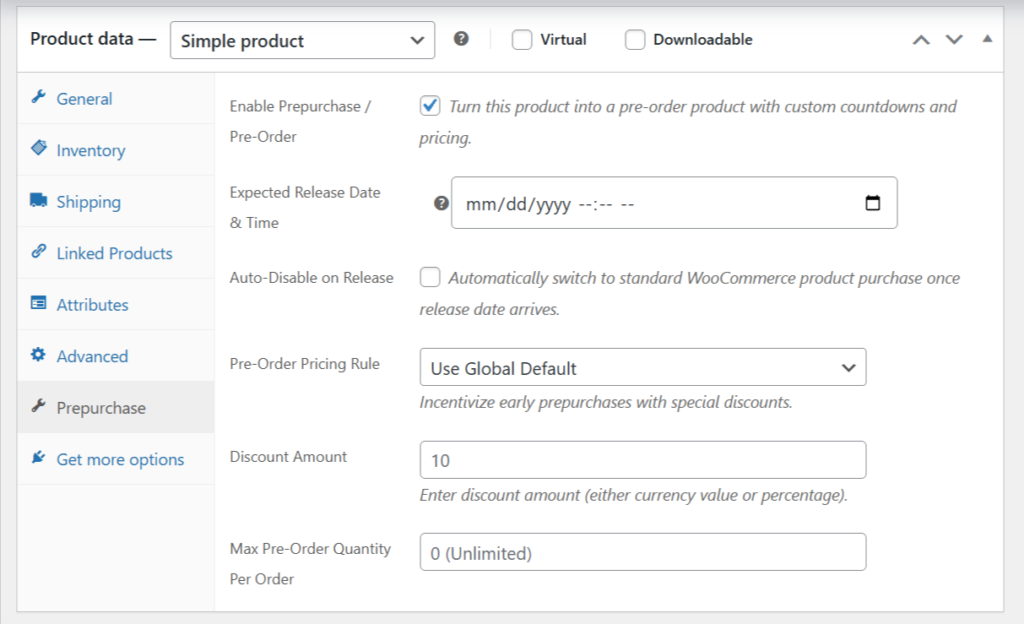
1. Product-Level Prepurchase Settings:
The Prepurchase tab is available under the Product Data section when editing a WooCommerce product. Simply enable the Prepurchase / Pre-Order option to convert a standard product into a pre-order product. Configure the expected release date and time, choose a pricing rule, apply discounts, and set a maximum pre-order quantity if needed. You can also enable Auto-Disable on Release to automatically switch the product back to a normal WooCommerce purchase once the release date arrives. These product-specific settings allow you to manage each pre-order independently while giving customers a clear and consistent purchasing experience.
2. Global Smart Prepurchase Settings:
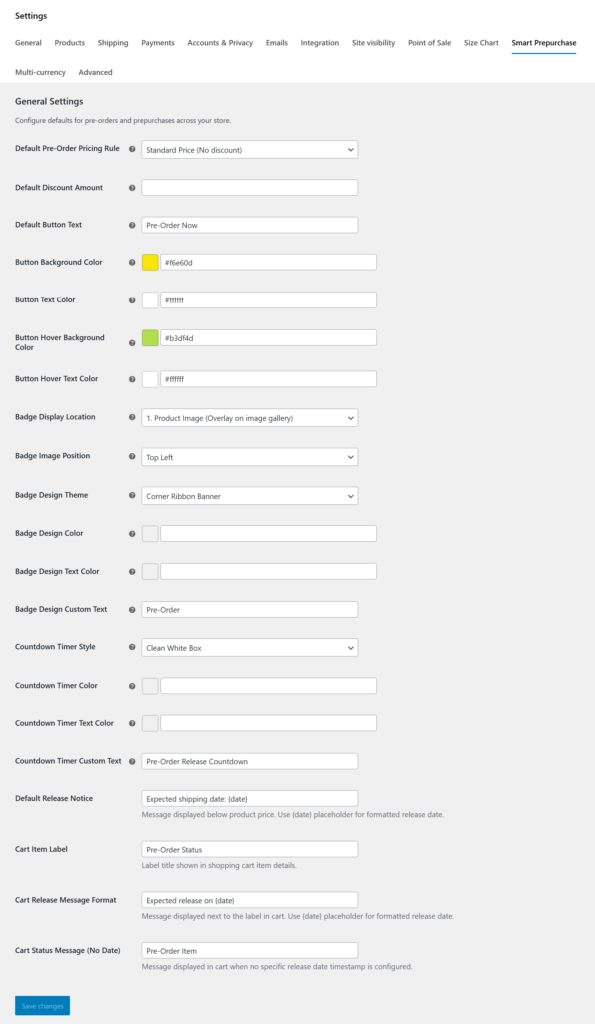
The Smart Prepurchase settings page lets you configure default pre-order behavior for your entire WooCommerce store. Customize pricing rules, button text and colors, badge styles, countdown timer appearance, release notices, and cart messages from a single location. These global settings are automatically applied to all pre-order products unless they are overridden with product-specific configurations. You can also control badge placement, countdown styles, and customer-facing messages to match your store’s branding. Centralized configuration makes it easy to maintain a consistent and professional pre-order experience across your entire online store.
Frontend
1. Shop Page – Pre-Order Product Listing:
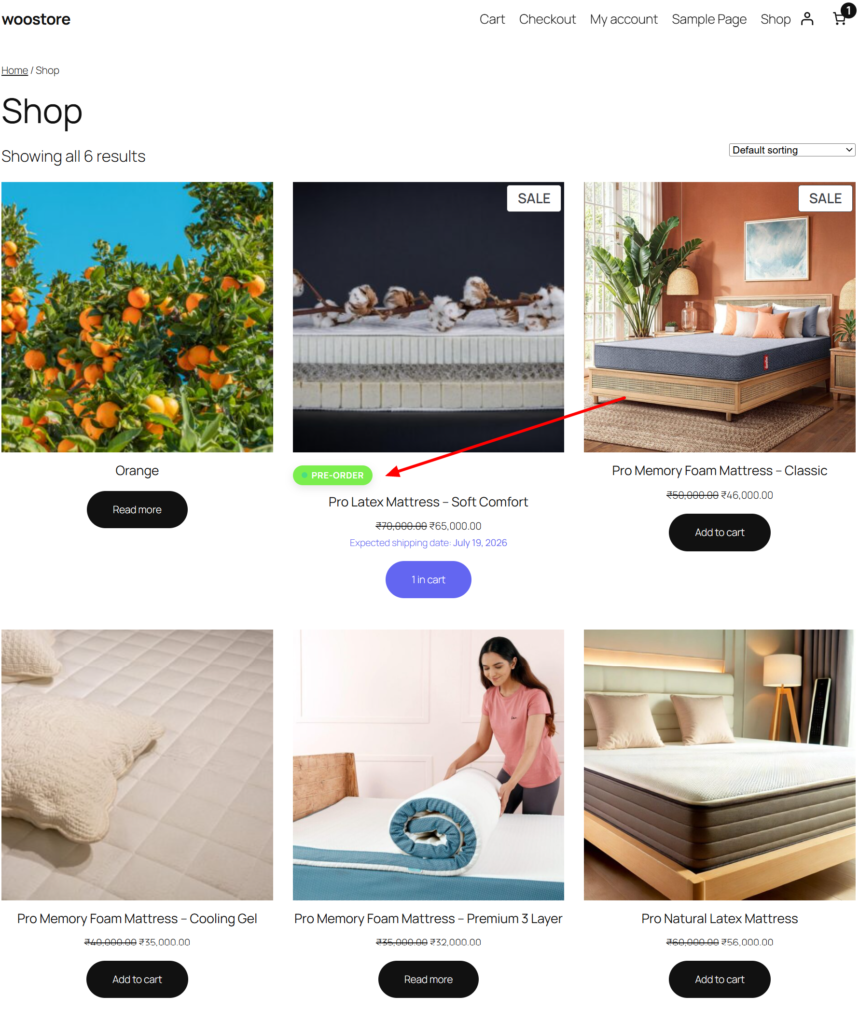
The Shop page automatically highlights products available for pre-order with a customizable Pre-Order badge, making them easy to identify in the product catalog. Customers can view discounted pricing, expected shipping or release dates, and the pre-order action directly from the shop page. This eliminates the need to open each product individually to check its availability. The badge design, position, colors, and text are fully customizable from the plugin settings. Displaying release information at the catalog level improves customer awareness and encourages early reservations. This feature helps increase product visibility while creating excitement for upcoming launches.
2. Product Page – Pre-Order Experience:
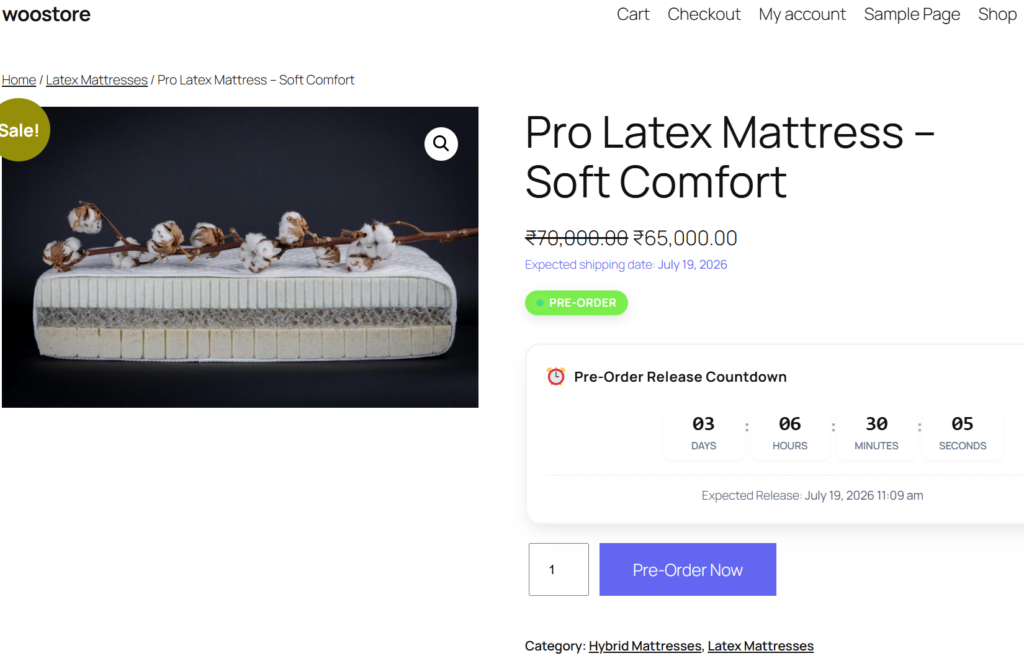
The Product page provides customers with a complete pre-order experience by displaying the expected release date, a customizable Pre-Order badge, and a live countdown timer. The standard WooCommerce purchase button is automatically replaced with a customizable Pre-Order Now button when pre-orders are enabled. Customers can clearly see how much time remains before the product becomes available, helping build anticipation and urgency. The countdown timer, button styles, and release notices can all be customized to match your store’s branding. This informative layout ensures customers understand the product’s availability before placing their order. The result is a professional and engaging product page that encourages early purchases.
3. Shopping Cart – Pre-Order Information:
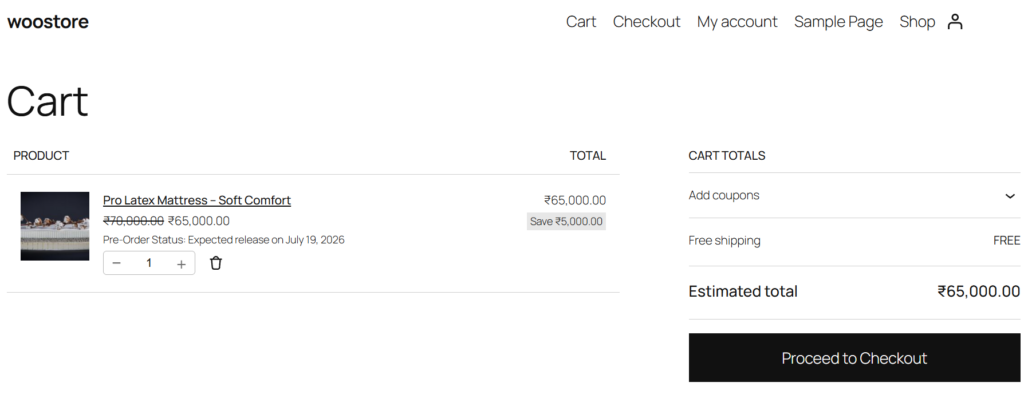
Once a pre-order product is added to the cart, the plugin displays a dedicated Pre-Order Status message along with the expected release date. Customers can easily verify that the item is a pre-order before continuing with their purchase. The cart retains all pricing information, discounts, and custom release messages configured in the plugin settings. This additional information improves transparency and helps reduce confusion about product availability. Quantity adjustments and other WooCommerce cart features continue to work as expected. By clearly presenting release details, the plugin creates a smoother and more confident shopping experience.
4. Checkout Page – Order Summary:
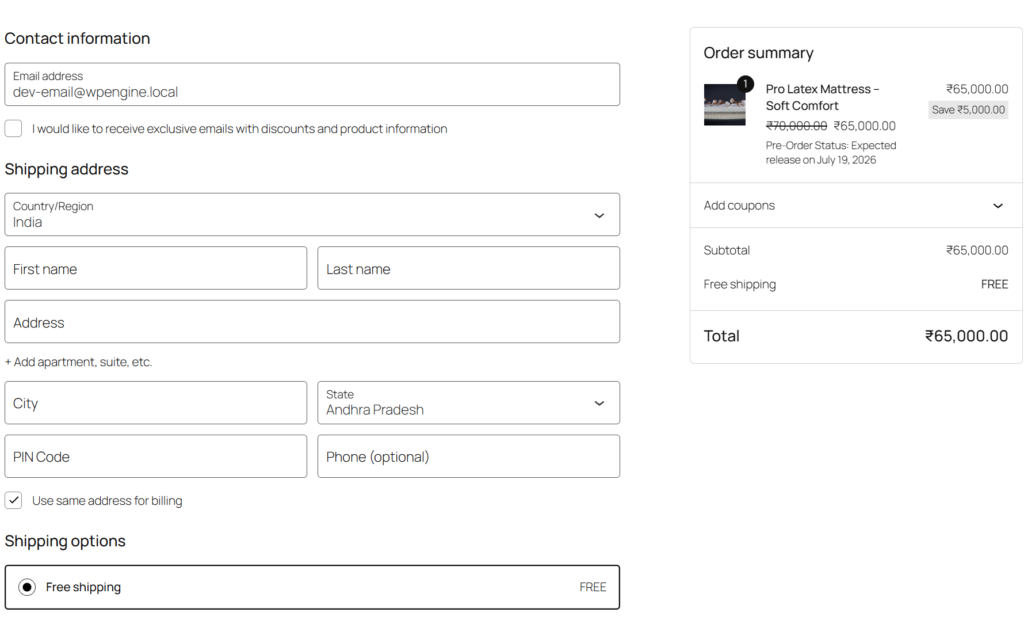
During checkout, the plugin continues to display pre-order details within the order summary so customers remain informed until the purchase is completed. The expected release date is shown alongside the ordered product, providing complete transparency about when the item will become available. This information helps customers understand the fulfillment timeline before placing their order. All configured pricing rules, discounts, and shipping calculations continue to function seamlessly with WooCommerce checkout. The clear presentation of release information improves customer confidence and minimizes post-purchase inquiries. This ensures a professional and trustworthy pre-order experience from product selection to final checkout.
Frequently Asked Questions
See the list below for our most frequently asked questions about our plugins.
If this doesn’t satisfy your requirement, please reach out to support team.
Q: What is Prepurchase for WooCommerce?
A: Prepurchase for WooCommerce allows you to sell products before they are officially released. It provides customizable pre-order buttons, pricing rules, badges, countdown timers, and release notifications to create a professional pre-order experience.
Q: Can I enable pre-orders for specific products only?
A: Yes. You can enable pre-orders for selected WooCommerce products while keeping the rest of your catalog available for regular purchases.
Q: Can I customize the Pre-Order button?
A: Absolutely. You can change the button text, background color, text color, and hover effects to match your store’s branding.
Q: Can I display countdown timers for upcoming products?
A: Yes. The plugin includes customizable countdown timers that help build excitement by showing the remaining time until a product’s release.
Q: Can I customize the Pre-Order badge?
A: Yes. Choose from multiple badge themes, customize colors and text, and decide where the badge appears on the product page.
Q: Can I show expected release dates?
A: Yes. Display release dates and shipping notices using customizable messages with dynamic date placeholders.
Q: Does the plugin support cart and checkout messages?
A: Yes. Customers can view pre-order status labels, expected release information, and custom messages directly in the shopping cart.
Q: Is WooCommerce required?
A: Yes. Smart Prepurchase is designed specifically for WooCommerce and requires WooCommerce to be installed and activated.
Q: Do I need coding knowledge to use this plugin?
A: No. The plugin offers an intuitive admin interface, allowing you to configure all settings without writing a single line of code.