

Smart Age Gate for Woocommerce
Age Gate for WooCommerce helps store owners verify visitors’ age before allowing access to restricted products or content. It ensures legal compliance while providing a secure and seamless browsing experience.
Overview
Age Gate for WooCommerce, a powerful and easy-to-use plugin that helps store owners restrict access to age-sensitive products or content. The plugin verifies visitors’ age before allowing them to browse your store or specific pages.
Whether you sell alcohol, tobacco, adult products, or regulated items, this plugin helps ensure compliance with age restriction policies while maintaining a smooth user experience.
Key Features
- Enable or disable age verification with one click
- Set custom minimum age requirement
- Multiple verification types
- Yes / No popup
- Date of Birth verification
- Checkbox verification
- Popup trigger options
- On page load
- After delay
- Exit intent
- Force verification before access
- Redirect underage users
- Apply to entire website or selected pages
- Skip logged-in users
- Allow specific IPs
- Fully customizable popup design
- Mobile responsive layout
Installation
- Download the extension from your WooCommerce dashboard.
- Go to Plugins > Add New > Upload and select the ZIP file you just downloaded.
- Click Install Now, and then Activate.
How It Works ?
The plugin automatically displays an age verification popup whenever a visitor accesses restricted content, products, or pages based on your configured settings. It works seamlessly in the background without requiring complex setup.
Visitors must complete the selected verification method—such as Yes/No confirmation, Date of Birth entry, or Checkbox verification—to confirm they meet the minimum age requirement before continuing.
Once verification is successful, the plugin grants access to the website or restricted content, while underage visitors can be blocked or redirected to a custom page or external URL.
By ensuring only eligible users can access age-sensitive products or content, the plugin helps improve legal compliance, enhances store security, and provides a smooth browsing experience for customers.
Backend Settings
General Settings :
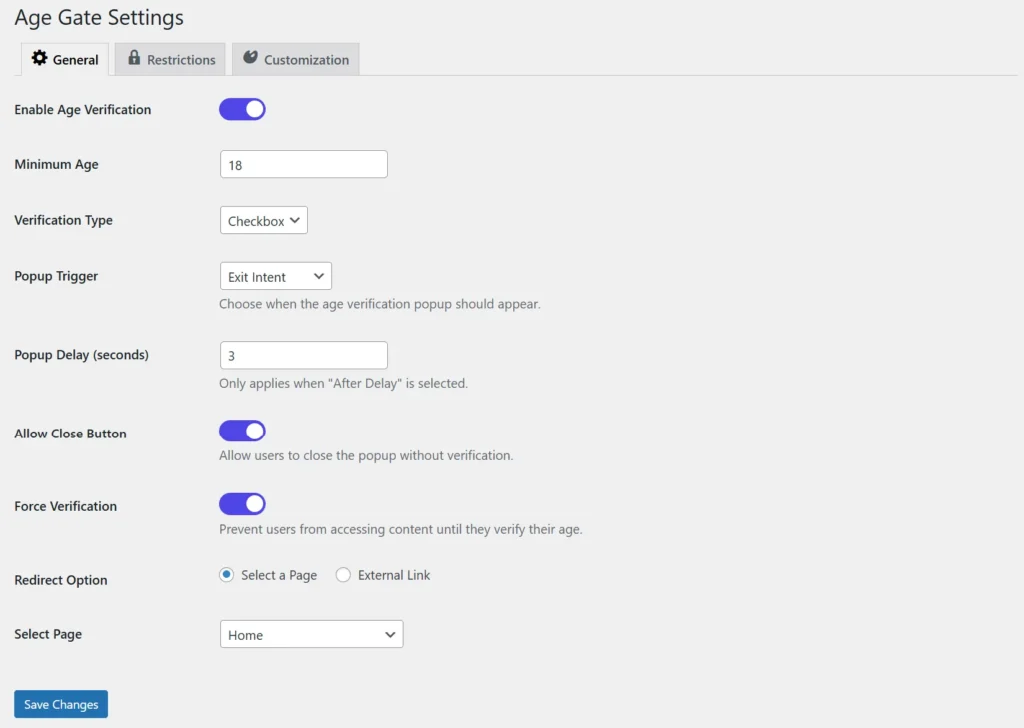
The General Settings page allows you to configure the core behavior of the Age Gate plugin. You can enable or disable age verification and define the minimum age requirement for visitors. It also provides multiple verification methods such as Checkbox, Yes/No, and Date of Birth. Popup trigger options let you control when the verification popup appears. Additional settings include redirect options and force verification for restricted content.
Restrictions Settings
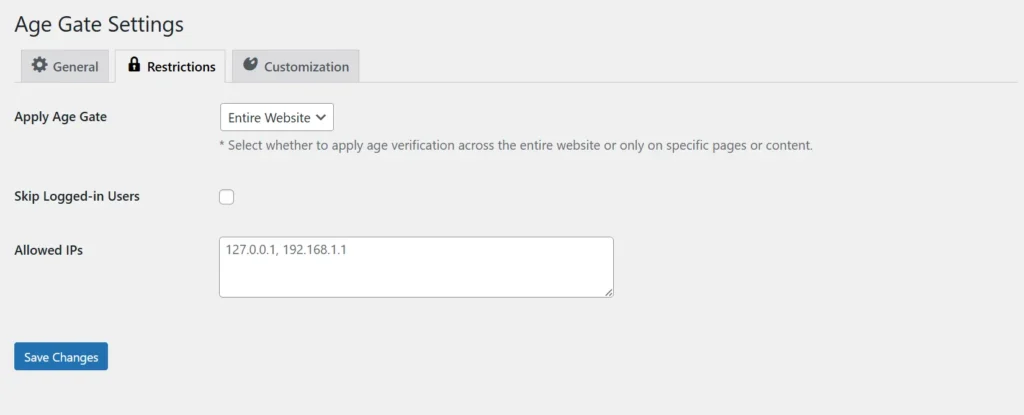
The Restrictions Settings page helps you control where age verification should be applied across your website. You can choose to enable the age gate for the entire website or only specific pages, products, or content. The plugin also allows logged-in users to bypass verification for a smoother experience. Specific IP addresses can be whitelisted to skip verification when needed. These restrictions provide flexible control over protected content access.
Customization Settings :
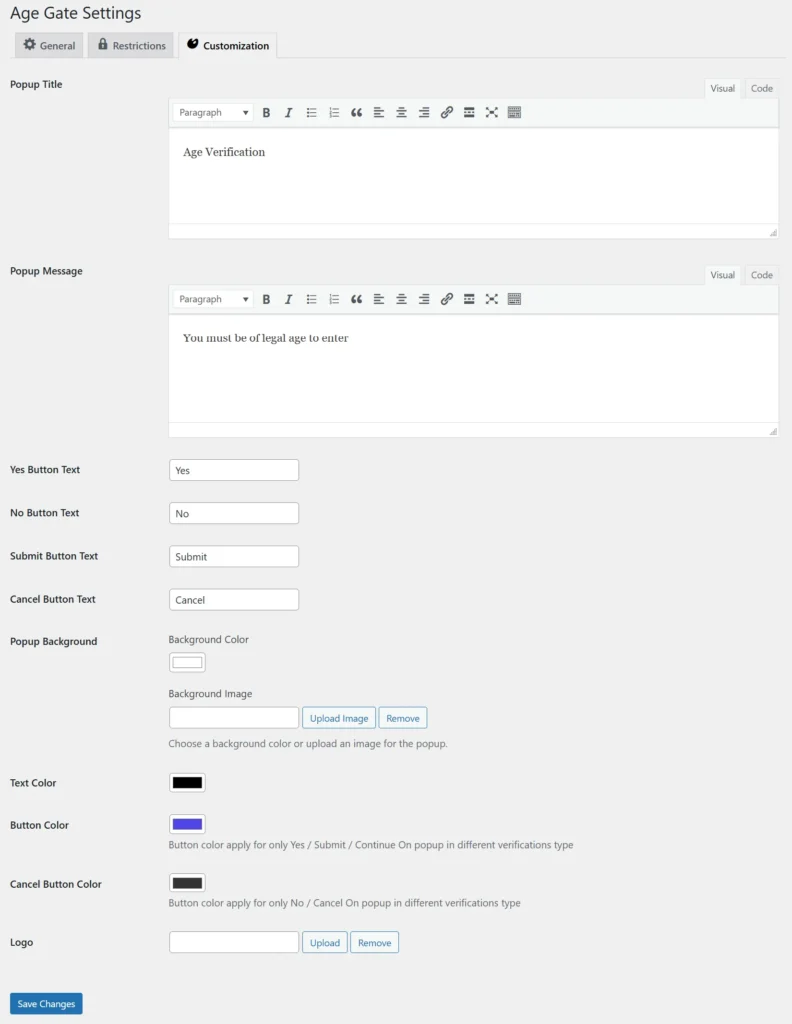
The Customization Settings page allows you to fully personalize the appearance of the age verification popup. You can edit the popup title, message, and button labels to match your store’s requirements. Background colors, images, text colors, and button colors can be customized for branding consistency. The plugin also supports uploading a custom logo for a more professional look. These customization options help create an attractive and seamless user experience.
Frontend
Date of Birth Verification Popup :
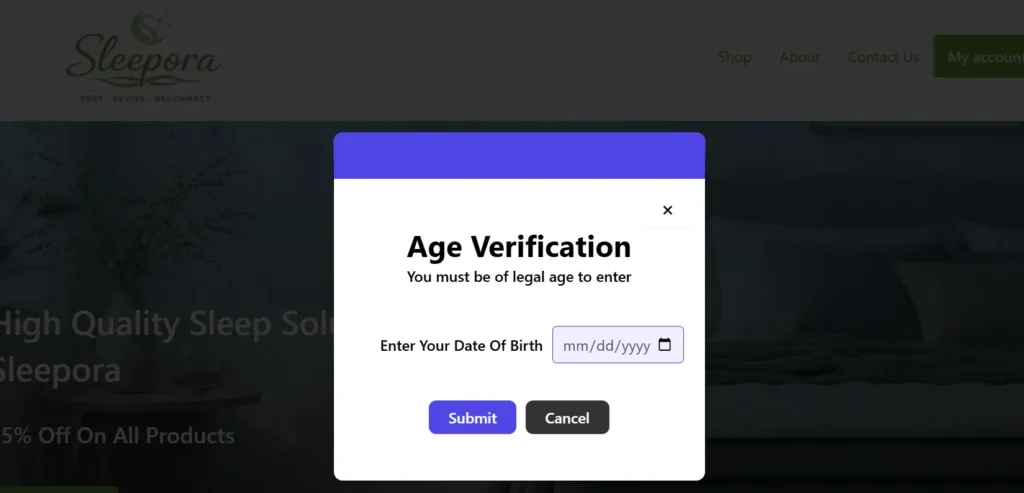
The Date of Birth verification popup ensures accurate age validation by asking visitors to enter their birth date before accessing restricted content. The plugin automatically calculates the visitor’s age based on the entered date. Only users meeting the minimum age requirement are allowed to proceed. Underage visitors can be blocked or redirected based on plugin settings. This method is ideal for strict age-restricted stores requiring reliable verification.
Yes / No Verification Popup :
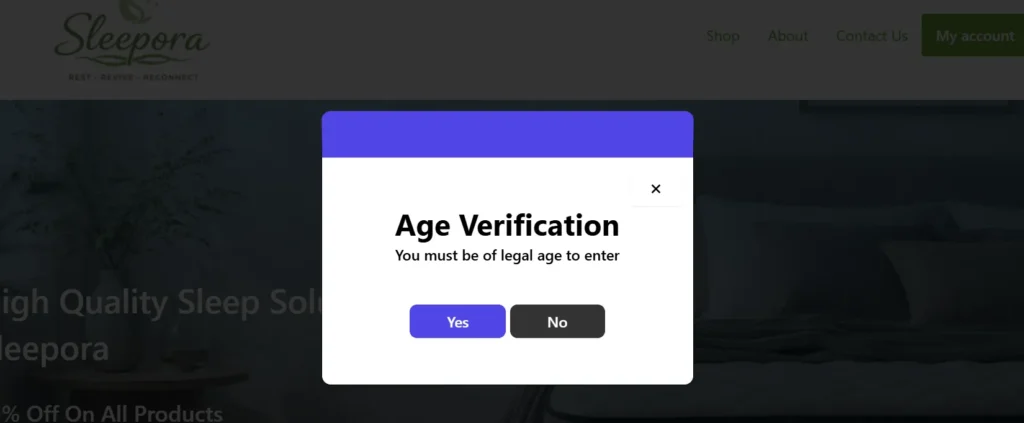
The Yes / No verification popup provides a quick and simple way for visitors to confirm their eligibility. Users can select Yes if they meet the required age or No if they do not. Based on the response, the plugin either grants access or restricts entry to protected content. This lightweight verification method minimizes user interaction while maintaining compliance. It is best suited for stores needing fast and straightforward age confirmation.
Checkbox Verification Popup :
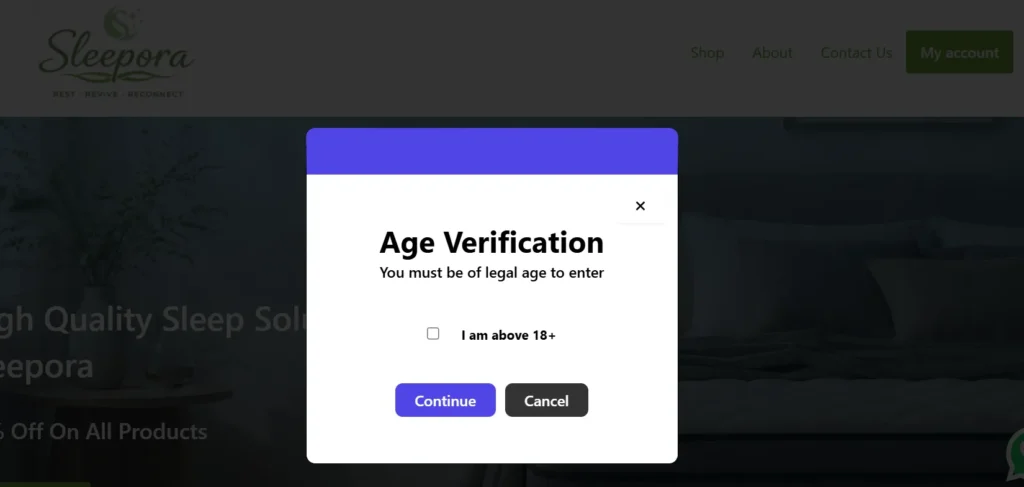
The Checkbox verification popup allows visitors to confirm they are above the required age by selecting a checkbox. After checking the confirmation box, users can click continue to access the website. This verification method offers a clean and minimal user experience with fewer steps. It helps store owners enforce age restrictions without interrupting browsing flow. The simple design makes it suitable for websites prioritizing ease of use.
Frequently Asked Questions
See the list below for our most frequently asked questions about our plugins.
If this doesn’t satisfy your requirement, please reach out to support team.
Q:What is Smart Age Gate for WooCommerce?
A: Smart Age Gate is a WooCommerce plugin that verifies visitor age before allowing access to your website or age-restricted products, helping businesses comply with legal requirements.
Q:Can I apply age verification to specific products only?
A: Yes. You can enable age verification for the entire website, selected product categories, or individual products.
Q: What age limits can I set?
A: You can set standard age restrictions such as 18+, 21+, or define any custom age requirement.
Q: Which verification methods are available?
A: The plugin supports simple confirmation buttons (Yes/No) and date-of-birth verification for more accurate age validation.
Q: Can I customize the popup design?
A: Yes. You can customize popup text, colors, background, logo, buttons, and overall styling to match your brand.
Q: What happens if a visitor is underage?
A: You can choose to block access, show a warning message, or redirect underage visitors to another page or website.
Q: Does the plugin remember verified users?
A: Yes. The plugin uses cookies to remember verified visitors, so they don’t need to verify their age on every visit.
Q: Is Smart Age Gate mobile friendly?
A: Yes. The age verification popup is fully responsive and works smoothly on desktop, tablet, and mobile devices.
Q: Do I need coding skills to use this plugin?
A: No. Smart Age Gate is beginner-friendly and can be configured entirely from the WordPress admin dashboard without coding.