
Recently Viewed Products for WooCommerce
Recently Viewed Products for WooCommerce helps customers easily revisit products they have previously viewed, improving product discovery and increasing conversion opportunities.
Overview
Recently Viewed Products for WooCommerce helps customers quickly find products they have previously browsed. The plugin automatically tracks viewed products and displays them on a dedicated page, product page section, widget area, or through shortcodes. This improves user experience, product discovery, and conversion rates.
Key Features
Track Recently Viewed Products
- Track products viewed by logged-in users.
- Track products viewed by guest users.
- Store viewing history automatically.
- Configure how long products remain visible.
Display Options
- Dedicated Recently Viewed Products page.
- Display on single product pages.
- Grid layout support.
- Carousel layout support.
- Responsive mobile-friendly design.
Shortcodes
- Display recently viewed products anywhere.
- Customize product count and layout.
- Support for pages, posts, and widgets.
Follow-Up Emails
- Send reminder emails about viewed products.
- Include coupon codes in emails.
- Encourage customers to complete purchases.
Reports & Analytics
- Product visit counts.
- Purchase counts from recently viewed products.
- Customer engagement tracking.
Custom Styling
- Custom CSS support.
- Button customization.
- Layout customization.
Installation
- Download the extension from your WooCommerce dashboard.
- Go to Plugins > Add New > Upload and select the ZIP file you just downloaded.
- Click Install Now, and then Activate.
How It Works ?
- The plugin automatically records every product a customer visits, creating a personalized browsing history without requiring any manual setup.
- Recently viewed products are stored and organized, allowing customers to easily return to items they showed interest in during previous visits.
- The saved products can be displayed anywhere on your store using shortcodes, widgets, dedicated pages, or product page sections.
- By helping customers quickly rediscover products they viewed earlier, the plugin improves user experience, increases engagement, and encourages more completed purchases.
Backend Settings
(Settings) :
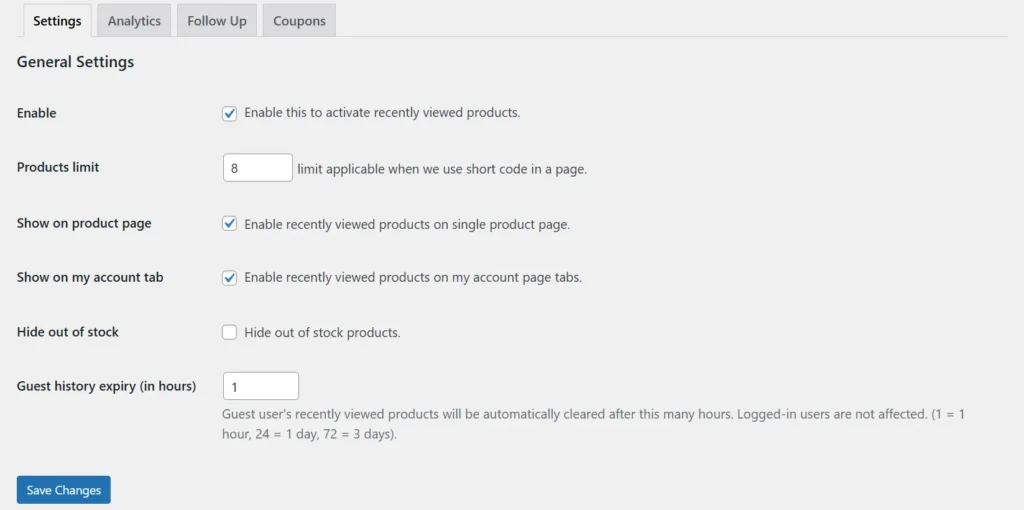
The plugin provides flexible settings that allow store owners to control how recently viewed products are tracked and displayed. Administrators can configure product limits, tracking methods, and display locations to match their store requirements. The settings panel offers easy customization options without requiring any coding knowledge. These options help create a seamless shopping experience while improving product visibility and customer engagement.
Analytics:
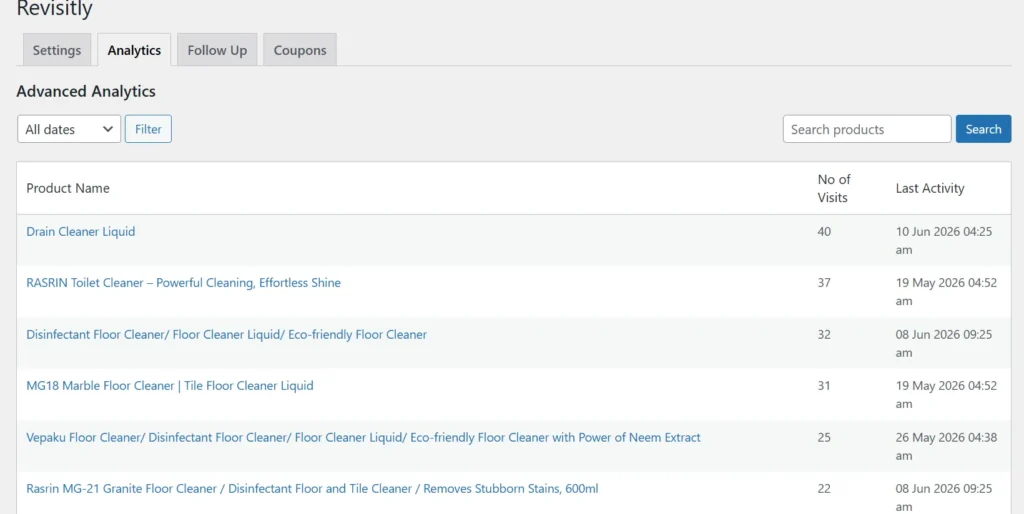
The Analytics section provides valuable insights into customer browsing behavior and product engagement. Store owners can monitor which products are viewed most frequently and identify popular items among visitors. Detailed reports help track customer interests, enabling better marketing and merchandising decisions. These analytics can be used to optimize product visibility, improve conversions, and enhance the overall shopping experience.
Followup:
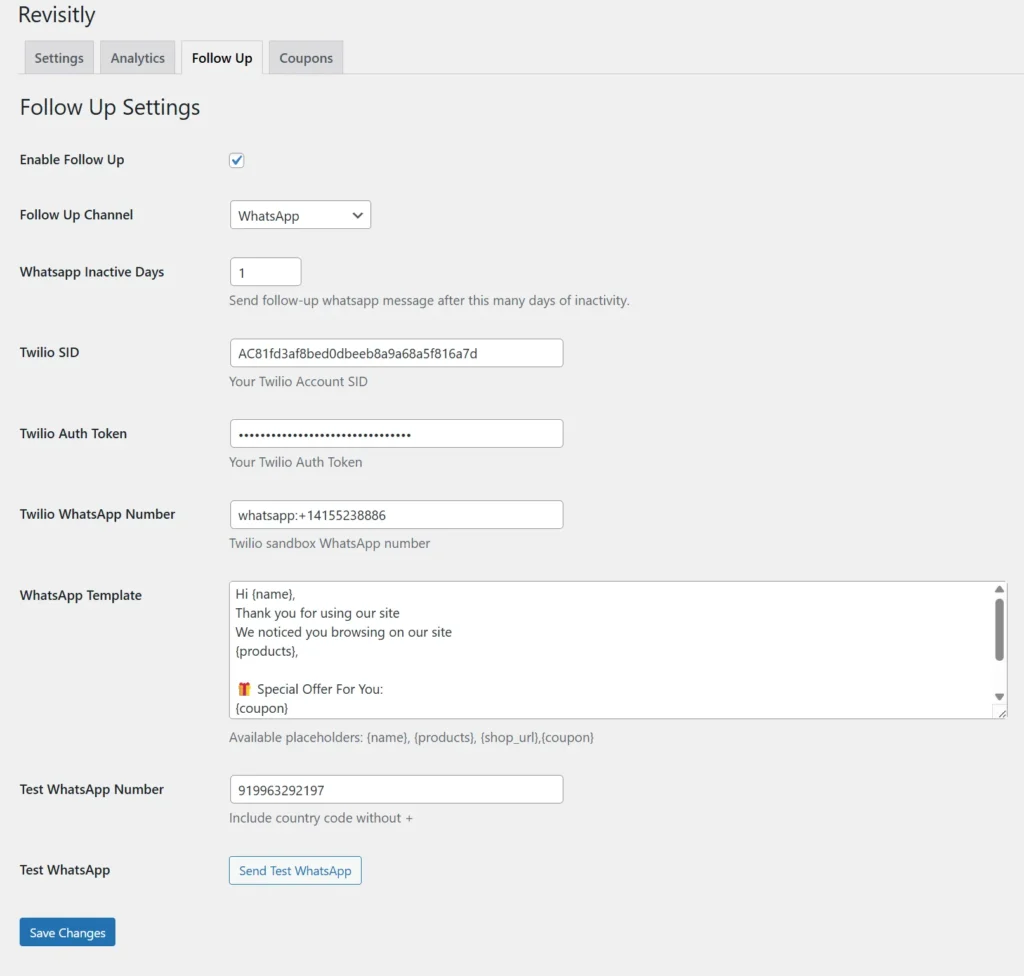
The Follow-Up feature helps re-engage customers by reminding them about products they recently viewed but did not purchase. Automated emails can be sent after a configurable period, encouraging customers to return to your store and complete their purchase. Store owners can personalize email content and include promotional offers or discount coupons. This feature helps recover potential lost sales and improves overall conversion rates.
Coupons:
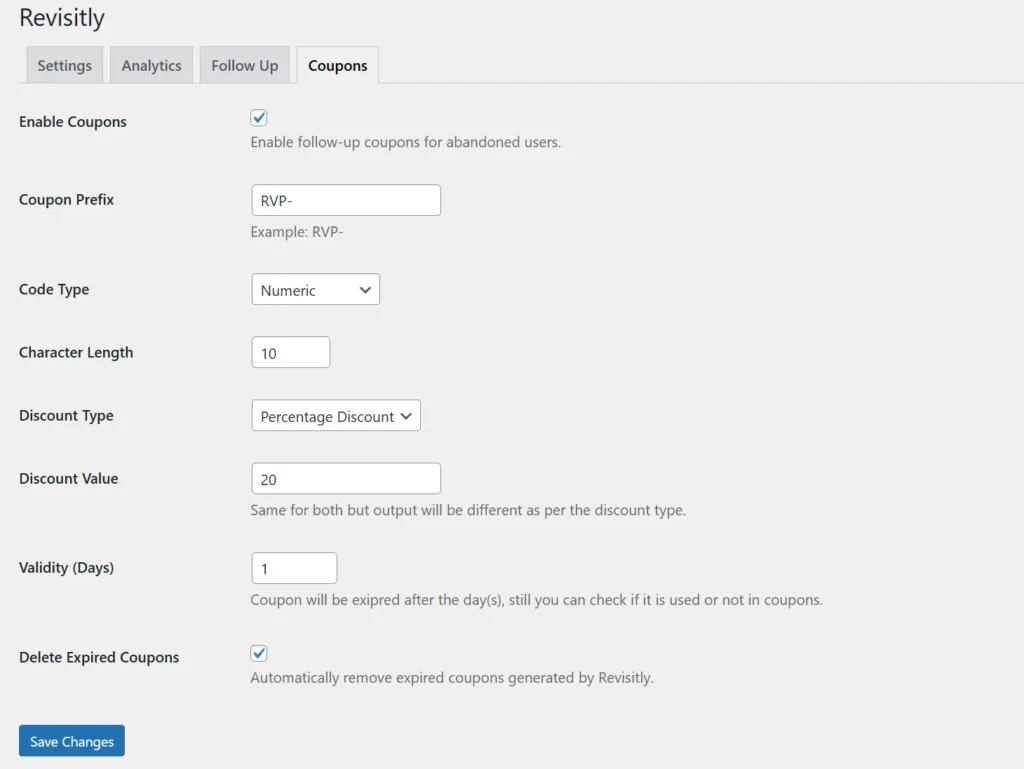
The Coupons feature allows store owners to create and distribute discount coupons to encourage customers to complete their purchases. Coupons can be automatically included in follow-up emails sent to customers who have viewed products but not yet placed an order. Flexible settings enable customization of discount types, values, and expiration dates. This feature helps increase customer retention, boost sales, and improve conversion rates through targeted promotions.
Frontend Workflow
Recently viewed products on single proudct page:
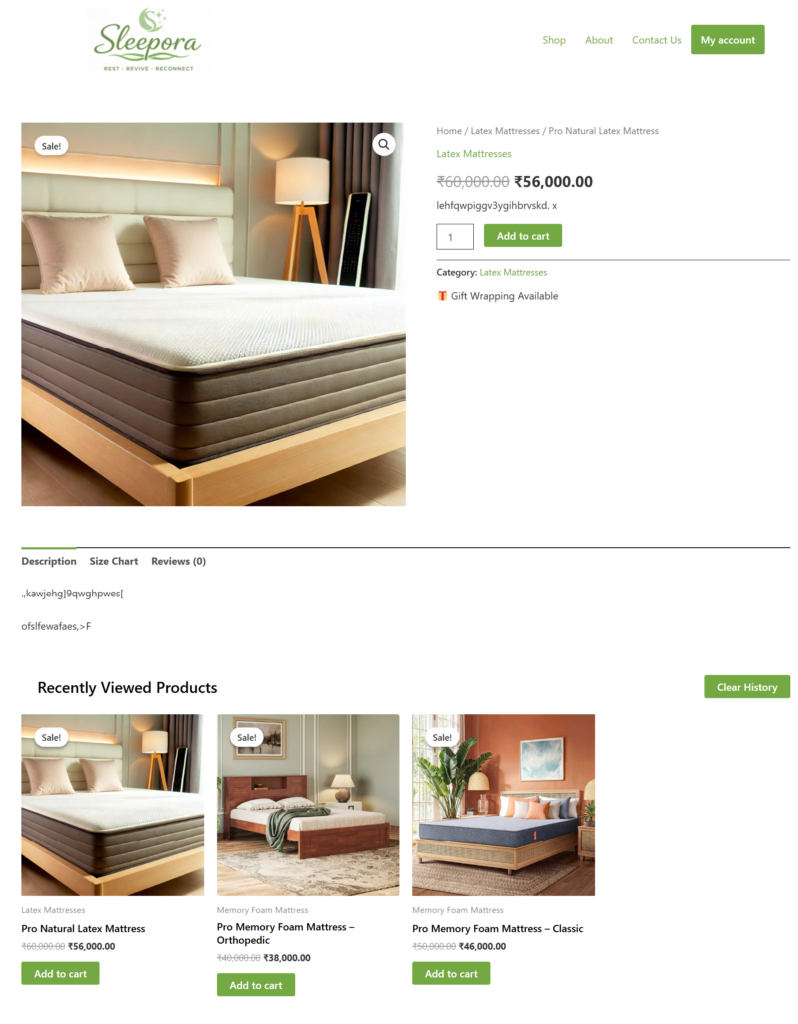
The plugin can display recently viewed products directly on the single product page, allowing customers to quickly revisit items they have browsed. Products can be shown in a customizable grid or carousel layout that matches your store design. This feature enhances product discovery by keeping previously viewed items easily accessible during shopping. By encouraging customers to explore products they were interested in, it helps increase engagement and potential sales.
Recently viewed products on Account page:
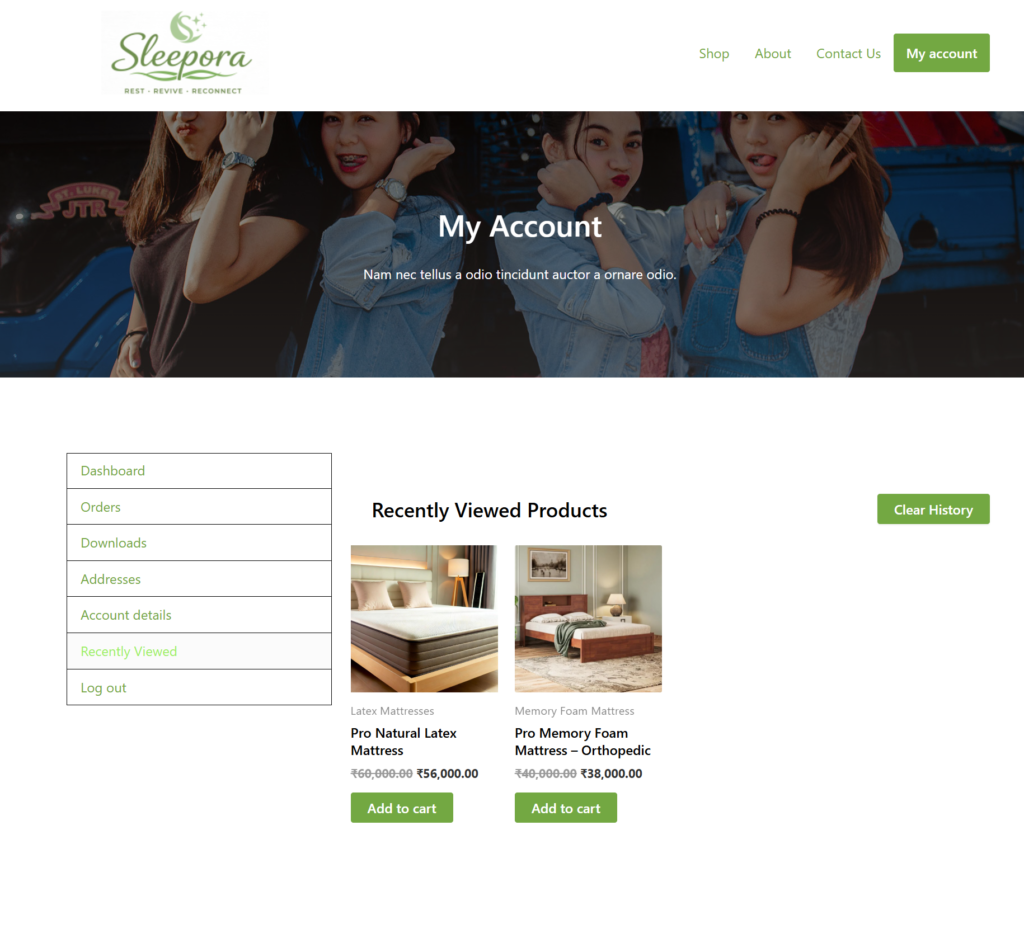
The Account Page integration allows customers to view their recently viewed products directly from their WooCommerce My Account area. This provides a convenient way for users to revisit products they have explored during previous browsing sessions. The feature enhances the shopping experience by keeping product history easily accessible in one place. Customers can quickly return to interested products, increasing engagement and the likelihood of completing a purchase.
Recently viewed products Short code:
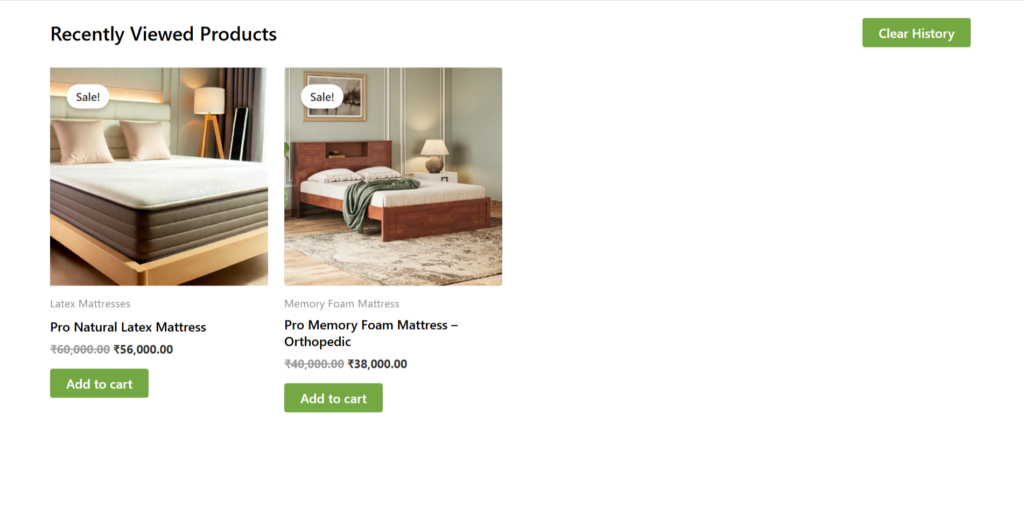
The plugin provides powerful shortcodes that allow you to display recently viewed products anywhere on your WooCommerce store, including pages, posts, sidebars, and custom layouts. Store owners can customize the number of products displayed and choose between grid or carousel layouts. Shortcodes offer a simple way to integrate recently viewed products without modifying theme files. This flexibility helps improve product visibility and makes it easier for customers to revisit items they have previously explored.
Email Remainder:
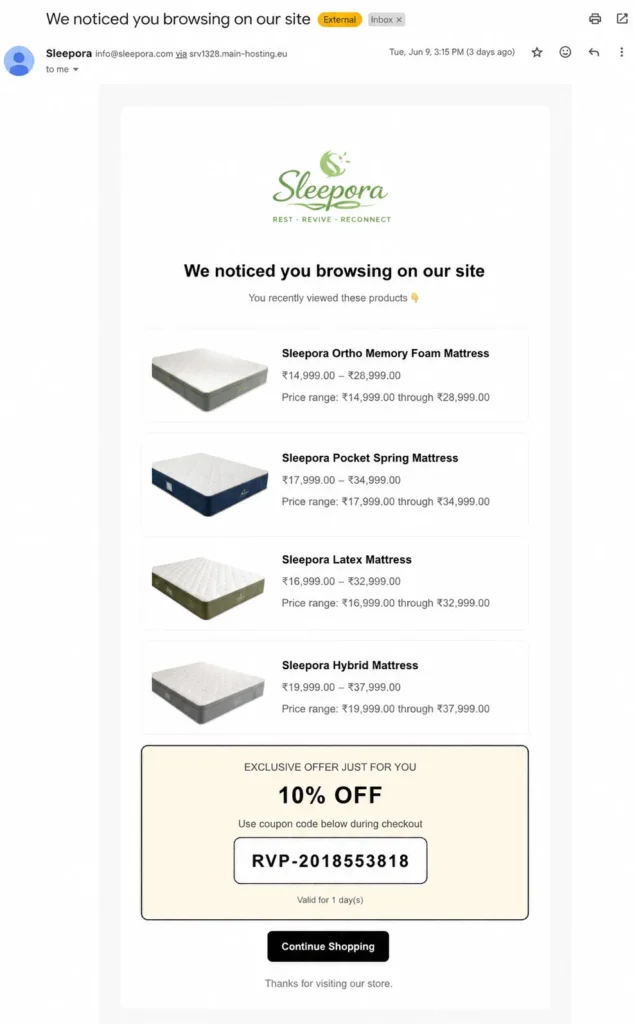
The Email Reminder feature automatically sends personalized emails to customers about products they have recently viewed but not purchased. Store owners can configure the timing, content, and frequency of reminder emails to suit their marketing strategy. These emails can include product details, special offers, or discount coupons to encourage customers to return and complete their purchase. By re-engaging interested shoppers, email reminders help improve customer retention and increase conversion rates.
Whatsapp Remainder:
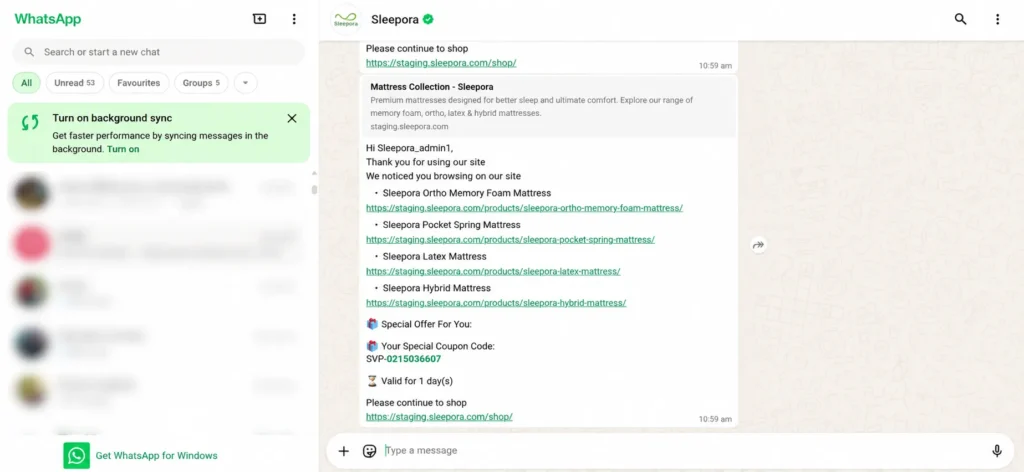
The WhatsApp Reminder feature helps reconnect with customers by sending automated WhatsApp messages about products they have recently viewed. Store owners can customize message content, timing, and promotional offers to encourage customers to return to the store. Personalized reminders can include product details, purchase links, and discount coupons for higher engagement. This feature improves customer communication, boosts conversions, and helps recover potential lost sales through a familiar messaging platform.
Frequently Asked Questions
See the list below for our most frequently asked questions about our plugins.
If this doesn’t satisfy your requirement, please reach out to support team.
Q: What is Revisitly for WooCommerce?
A: Revisitly is a WooCommerce plugin that tracks recently viewed products and helps recover lost sales through reminders, analytics, and coupon campaigns.
Q:Where can recently viewed products be displayed?
A: You can display them on product pages, My Account pages, or anywhere using shortcodes.
Q: Does Revisitly support guest users?
A: Yes. The plugin tracks both guest visitors and logged-in customers.
Q: Can I send WhatsApp reminders?
A: Yes. Revisitly integrates with Twilio WhatsApp to send personalized reminders.
Q: Can I send email reminders?
A: Yes. Automated email campaigns can be configured for inactive shoppers.
Q: Can Revisitly generate coupons automatically?
A: Yes. Personalized coupons can be generated and included in reminder messages.
Q: Does the plugin include analytics?
A: Yes. View counts, popular products, and customer activity are available in the analytics dashboard.
Q: Does Revisitly work with mobile and desktop visitors?
A: Absolutely. Revisitly tracks recently viewed products across both desktop and mobile devices, ensuring a seamless shopping experience for your customers.
Q: Can I exclude out-of-stock products from recently viewed lists?
A: Yes. Revisitly includes an option to automatically hide out-of-stock products from recently viewed sections, helping customers focus on products that are available for purchase.
Q: Do I need coding skills to use this plugin?
A: No, the plugin is beginner-friendly and can be configured directly from the WooCommerce dashboard without coding.