Running a WooCommerce store is easier than ever today. But getting visitors is only half the job. The real challenge is turning those visitors into paying customers.
Many store owners spend heavily on ads and SEO but still struggle with low conversion rates. In most cases, the problem is not the product, it’s the shopping experience.
Over the years, we’ve noticed that even small changes in a WooCommerce store can make a significant difference in conversions. Below are some proven strategies that actually help improve sales.
1. Improve Your Website Speed
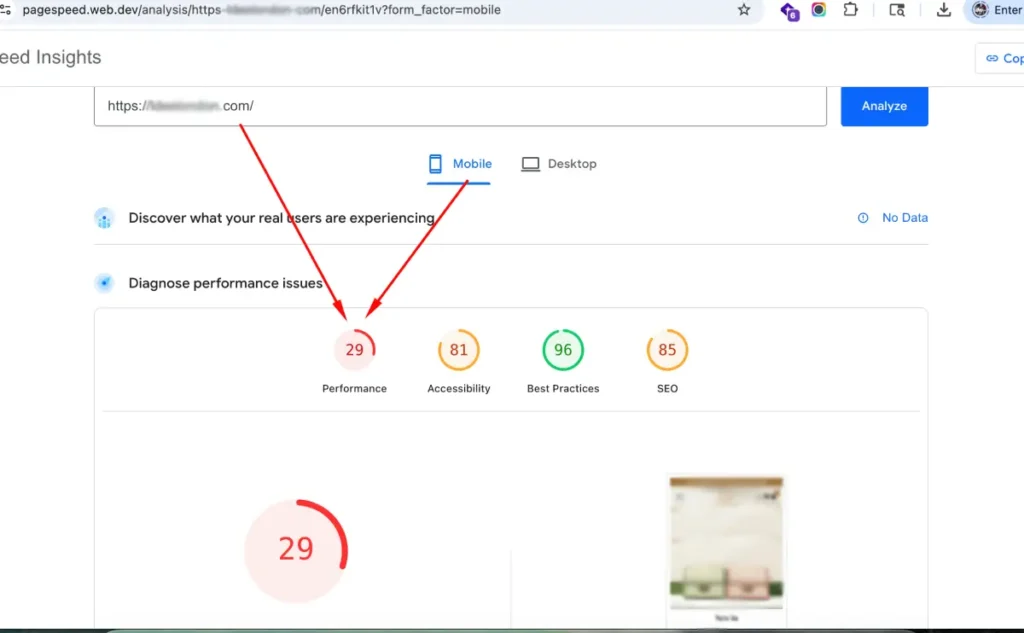
A slow WooCommerce store kills conversions.
Most users will leave if a page takes more than a few seconds to load, especially on mobile devices. This is something we frequently notice on stores using too many plugins or unoptimized themes.
Here are a few quick improvements:
- Use a lightweight WooCommerce theme
- Compress large images
- Enable caching
- Remove unused plugins
- Use a quality hosting provider
Even a one-second improvement in load time can positively impact conversions.
2. Simplify the Checkout Process
Long checkout forms are one of the biggest reasons for cart abandonment.
Customers want a fast and simple buying experience. If they are forced to create an account or fill unnecessary fields, many will simply leave.
A few things that usually help:
- Enable guest checkout
- Reduce unnecessary form fields
- Add one-page checkout
- Offer express payment methods
Some stores also use WhatsApp checkout options to simplify the process for mobile users.
3. Make Your Store Mobile Friendly
A large percentage of WooCommerce traffic now comes from mobile devices.
However, many stores still look great on desktop but feel difficult to use on phones. Small buttons, slow pages, and confusing layouts hurt conversions badly.
Before running ads or SEO campaigns, always test:
- Product pages on mobile
- Checkout flow
- Button visibility
- Page speed on mobile networks
A smoother mobile experience usually leads to better sales.
4. Use High-Quality Product Images
Customers cannot physically touch products online. Your images become the product experience.
Low-quality or blurry images reduce trust instantly.
Try adding:
- Multiple product angles
- Zoom functionality
- Lifestyle photos
- Product videos if possible (Make sure to host the videos on YouTube or similar third-party streaming platforms so they load faster and do not place unnecessary load on the server.)
Good visuals often increase confidence and reduce hesitation.
5. Add Social Proof
People trust other customers more than marketing copy.
Reviews, ratings, testimonials, and user-generated content can improve trust significantly.
6. Use Clear Call-To-Action Buttons
Sometimes stores lose sales simply because buttons are unclear.
Buttons like:
- Buy Now
- Add to Cart
- Order on WhatsApp
should stand out clearly and guide users naturally.
We’ve seen stores improve conversions just by improving button visibility and wording.
7. Recover Abandoned Carts
Not every customer buys immediately.
Many users leave and come back later. Recovering abandoned carts can help recover lost revenue.
Some effective methods:
- Email Reminders
- Discount Coupons
- WhatsApp Reminders
- Exit Intent Popups
Even recovering a small percentage of abandoned carts can increase monthly revenue substantially.