

Order Approval for WooCommerce
Stay in control and build trust with Order Approval for WooCommerce – approve orders before they’re processed, hassle-free.
Documentation
Overview
Order Approval for WooCommerce allows store owners to review and approve orders before payment is completed.
It helps prevent unwanted or risky orders by giving full control over the order process.
Customers can place orders normally, but payment is completed only after admin approval.
The plugin includes email notifications to keep both customers and admins informed.
It is ideal for managing high-value, wholesale, or custom orders efficiently.
Key Features
- Order Approval Workflow
Review and approve orders before allowing payment. - Skip Approval Rules
Automatically skip approval based on shipping methods, user roles, or order subtotal. - Custom Messages
Customize checkout, payment, and Thank You page messages. - Email Notifications
Send automated emails for order waiting, approved, rejected, and admin alerts. - Payment After Approval
Customers receive a payment link only after the order is approved. - Admin Control
Easily approve or reject orders from the WooCommerce Orders page. - Flexible Configuration
Fully customizable settings to match your store requirements.
Installation
- Download the extension from your WooCommerce dashboard.
- Go to Plugins > Add New > Upload and select the ZIP file you just downloaded.
- Click Install Now, and then Activate.
How It Works ?
- Customers place an order as usual on your WooCommerce store.
- The order is marked as “Waiting for Approval” instead of processing payment.
- The admin reviews the order and either approves or rejects it.
- If approved, the customer receives a payment link to complete the purchase.
Backend Settings
General :
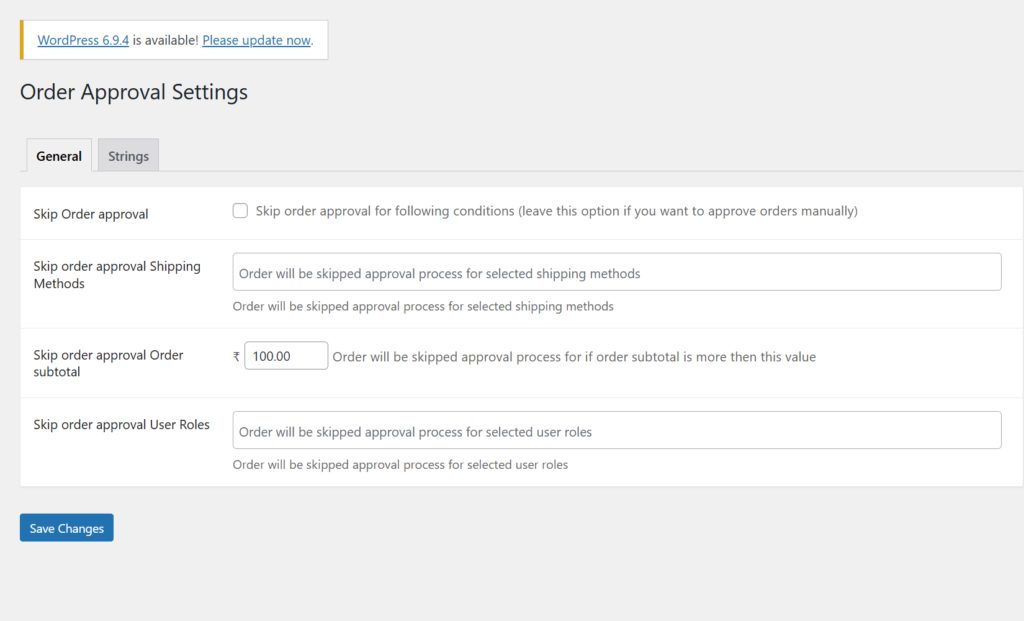
The General Settings give you full control over how the order approval process works in your store.
You can skip approval for specific shipping methods, allowing trusted deliveries to proceed automatically.
It also lets you exclude selected user roles, such as admins or repeat customers, from approval.
You can define a minimum order subtotal to automatically approve eligible orders.
These features help you automate approvals while maintaining complete control over your order workflow.
Strings:
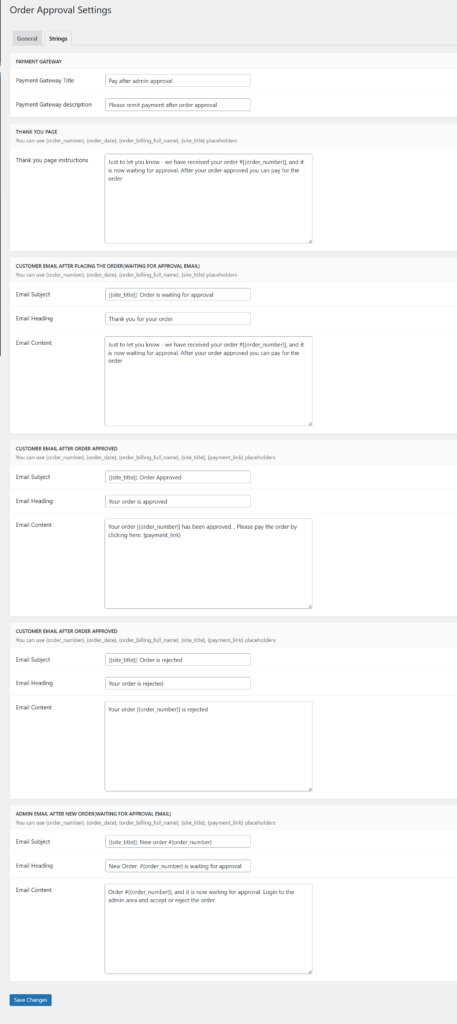
The Strings Settings allow you to customize all customer-facing text in the order approval process.
You can set a custom Payment Gateway Title, such as “Pay after admin approval.”
It also lets you add a clear Checkout Description to explain the process to customers.
You can personalize the Thank You Page Message to inform users that their order is under review.
These features help you improve communication and provide a clear, user-friendly experience.
Frontend Workflow
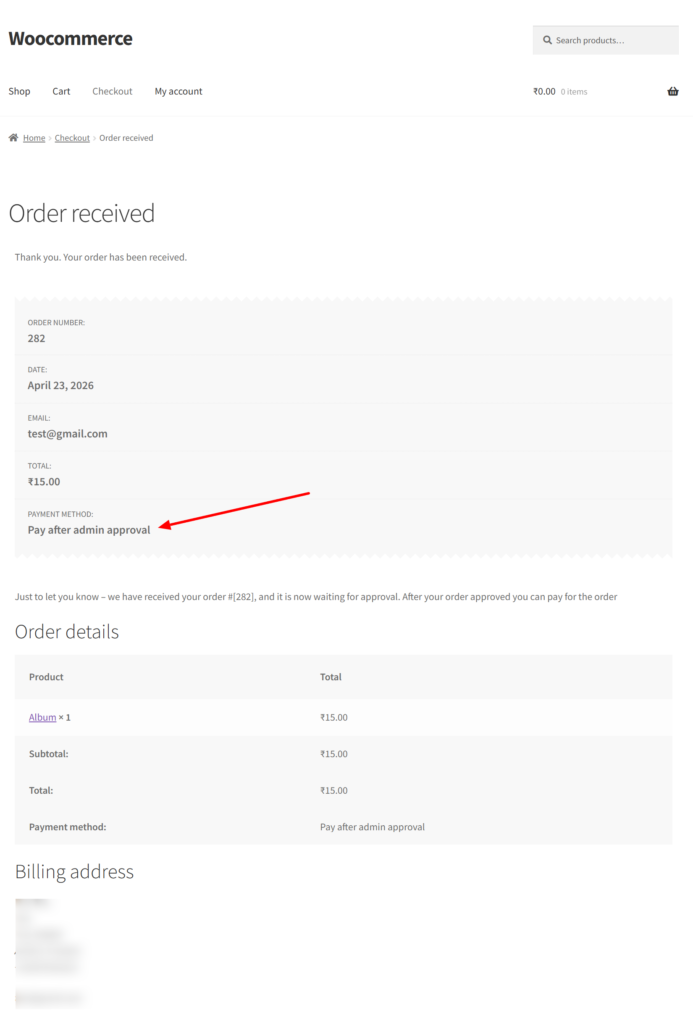
Customers can place orders normally on your WooCommerce store without any changes to the shopping experience.
After placing the order, they will see the Order Received page with a message indicating that the order is under review.
The selected payment method will display as “Pay after admin approval”, clearly informing the customer.
A confirmation message explains that the order is waiting for approval before payment can be completed.
Customers receive an email notification with the same information for transparency.
Once approved, they can easily complete the payment using the provided payment link.
Frequently Asked Questions
See the list below for our most frequently asked questions about our plugins.
If this doesn’t satisfy your requirement, please reach out to support team.
Q: What is Order Approval for WooCommerce?
A: Order Approval for WooCommerce allows store owners to review and approve or reject customer orders before processing or payment.
Q: How does the order approval process work?
A: Customers place an order first, and the admin reviews it. The order is then either approved or rejected before further processing.
Q: Can I approve or reject orders manually?
A: Yes, store owners can manually approve or reject orders from the admin panel for better control over order processing.
Q: Can customers complete payment after approval?
A: Yes, once an order is approved, customers receive a payment link or can proceed to complete the payment.
Q: Is payment processed before or after order approval?
A: Payment is processed only after the order is approved, ensuring full control over transactions.
Q: Does the plugin send notifications to customers?
A: Yes, customers receive notifications when their order is approved or rejected, keeping them informed about order status.
Q: Can I customize order statuses like Approved or Rejected?
A: Yes, the plugin supports custom order statuses such as Pending Approval, Approved, or Rejected for better workflow management.
Q: Is this plugin useful for Cash on Delivery (COD) orders?
Yes, it is especially useful for COD and high-value orders where manual verification is required before confirmation.
Q: Does this plugin improve order security?
Yes, it adds an extra layer of verification by allowing admins to review orders before processing.
Q: Can admins manage approvals easily from the dashboard?
Yes, admins can manage approvals directly from the WooCommerce order panel with simple actions.